By using this site, you agree to the Privacy Policy and Terms of Use.
Accept
World of SoftwareWorld of SoftwareWorld of Software
  • News
  • Software
  • Mobile
  • Computing
  • Gaming
  • Videos
  • More
    • Gadget
    • Web Stories
    • Trending
    • Press Release
Search
  • Privacy
  • Terms
  • Advertise
  • Contact
Copyright © All Rights Reserved. World of Software.
Reading: AI Wrote Your Tests. Variables Keep Them Alive. | HackerNoon
Share
Sign In
Notification Show More
Font ResizerAa
World of SoftwareWorld of Software
Font ResizerAa
  • Software
  • Mobile
  • Computing
  • Gadget
  • Gaming
  • Videos
Search
  • News
  • Software
  • Mobile
  • Computing
  • Gaming
  • Videos
  • More
    • Gadget
    • Web Stories
    • Trending
    • Press Release
Have an existing account? Sign In
Follow US
  • Privacy
  • Terms
  • Advertise
  • Contact
Copyright © All Rights Reserved. World of Software.
World of Software > Computing > AI Wrote Your Tests. Variables Keep Them Alive. | HackerNoon
Computing

AI Wrote Your Tests. Variables Keep Them Alive. | HackerNoon

News Room
Last updated: 2025/12/03 at 9:57 AM
News Room Published 3 December 2025
Share
AI Wrote Your Tests. Variables Keep Them Alive. | HackerNoon
SHARE

Previously I talked about how I was tired of “flaky” tests and how I’m using AI to generate test steps, saving hours of my time.

I showed how I can create a 20-step E2E test in 6 minutes, just by describing it.

But there’s a problem. Even an AI can create a “brittle” test.

Imagine you ask an AI: “Log in using ‘[email protected]’ and password ‘12345’, and check for the text ‘Welcome, John Doe'”.

The AI will do it. And then your test will fail.

It will fail when you run it on staging, where the login is [email protected]. It will fail when ‘John Doe’ changes his name to ‘Jane Doe’. It will fail because it is hardcoded.

This is the number one enemy of stable automation. And when I, as a solo developer, started building Debuggo, I knew I had to solve this problem first.

AI is the “Magic,” but Variables are the “Engineering”

The AI in Debuggo is great at “translating” English into steps. But real test stability isn’t just about the steps; it’s about the data those steps use.

From the very beginning, I designed Debuggo to work with two types of variables. This is the logic I wrote myself, on top of the AI core.

1. Environment VariablesThe Problem: You have different URLs, logins, or API_KEYs for your dev, staging, and production environments.

The Solution: In Debuggo, you don’t hardcode these values. You store them in your environment settings. Like this:

  • %BASE_URL% = https://my-staging-site.com
  • %ADMIN_LOGIN% = [email protected]
  • %ADMIN_PASSWORD% = superS3cret!

Now, here’s the best part. I don’t need to tell the AI: “Navigate to %BASEURL%, then fill ’email’ with %ADMINLOGIN%…”

I just write in plain English:

“login to the website”

And that’s it.

The AI is smart enough to understand that “login” requires the %BASE_URL%, %ADMIN_LOGIN%, and %ADMIN_PASSWORD% variables. It will find the right elements on the page (even if the layout changes), plug in the values from your environment, and perform the login.

The Result: The exact same test. Zero changes to the text. I can run it on any environment just by switching the env in Debuggo. That’s the foundation.

2. Temporary (“In-Test”) VariablesThis is my favorite part.

The Problem: How do you test a flow where data is generated during the test? The classic example: “Create a user” -> “Verify the user exists” -> “Delete that specific user.”

You don’t know the ID or email of this user before the test. You can’t hardcode it.

The Solution: I gave the AI the ability to “remember” data from the page and use it in later steps.

Imagine a test case like this:

  1. “Navigate to ‘/users’ and click ‘Create New User'”
  2. “Fill ’email’ with ‘[email protected]’ and click ‘Save'”
  3. “Find the new User ID from the table and save it as %new_user_id%“
  4. “Navigate to /users/delete/%newuserid%”
  5. “Click ‘Confirm Delete'”
  6. “Verify that the user with ID %new_user_id% is no longer in the table”

Step #3 and #6 are what make this a true E2E test. The AI isn’t just doing actions; it’s extracting dynamic data (%new_user_id%) and using it for test cleanup (Teardown).

What’s the takeaway?

For me, this is the difference between a “toy recorder” and a professional QA tool.

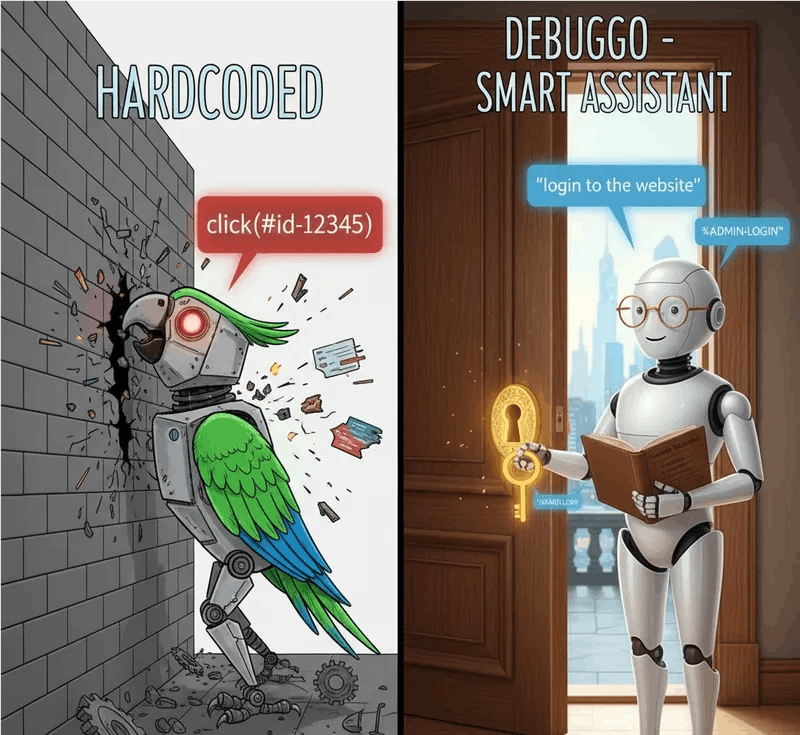
A simple recorder logs: click("#btn-123"). That’s brittle.

Debuggo (with AI) understands: click "Submit". That’s better.

Debuggo (with AI + Variables) understands: “login to the website”… then… “save the new ID as %user_id%"… and then… “delete %user_id%“.

That is a robust, maintainable automated test.

I’m building Debuggo not just to create tests quickly, but to create reliable tests that don’t break every time the wind blows.

This approach is my biggest bet. And I’m very curious to see if it solves your “flaky” test pain just like it solves mine.

Try my approach. I’m actively looking for beta testers who understand this “hardcoded data” problem.


Sign Up For Daily Newsletter

Be keep up! Get the latest breaking news delivered straight to your inbox.
By signing up, you agree to our Terms of Use and acknowledge the data practices in our Privacy Policy. You may unsubscribe at any time.
Share This Article
Facebook Twitter Email Print
Share
What do you think?
Love0
Sad0
Happy0
Sleepy0
Angry0
Dead0
Wink0
Previous Article When is Spotify Wrapped 2025 released? Previous dates and features When is Spotify Wrapped 2025 released? Previous dates and features
Next Article The Galaxy Z TriFold looks amazing, but I still have one big concern The Galaxy Z TriFold looks amazing, but I still have one big concern
Leave a comment

Leave a Reply Cancel reply

Your email address will not be published. Required fields are marked *

Stay Connected

248.1k Like
69.1k Follow
134k Pin
54.3k Follow

Latest News

Busy but Not Better: How Fake Tech Strategy Slows Real Progress | HackerNoon
Computing
Uber Launches Autonomous Rides in Dallas, But Not With Waymo This Time
News
This tiny box can turn your old speakers into Sonos rivals
Gadget
Let AI Write Your Pytest Suite: A Practical Guide for SDETs | HackerNoon
Computing

You Might also Like

Busy but Not Better: How Fake Tech Strategy Slows Real Progress | HackerNoon
Computing

Busy but Not Better: How Fake Tech Strategy Slows Real Progress | HackerNoon

8 Min Read
Let AI Write Your Pytest Suite: A Practical Guide for SDETs | HackerNoon
Computing

Let AI Write Your Pytest Suite: A Practical Guide for SDETs | HackerNoon

1 Min Read
Linux 6.18 Officially Promoted To Being An LTS Kernel
Computing

Linux 6.18 Officially Promoted To Being An LTS Kernel

1 Min Read
Study Finds OTFS Can Dramatically Cut Channel Training Costs in High-Mobility Networks | HackerNoon
Computing

Study Finds OTFS Can Dramatically Cut Channel Training Costs in High-Mobility Networks | HackerNoon

10 Min Read
//

World of Software is your one-stop website for the latest tech news and updates, follow us now to get the news that matters to you.

Quick Link

  • Privacy Policy
  • Terms of use
  • Advertise
  • Contact

Topics

  • Computing
  • Software
  • Press Release
  • Trending

Sign Up for Our Newsletter

Subscribe to our newsletter to get our newest articles instantly!

World of SoftwareWorld of Software
Follow US
Copyright © All Rights Reserved. World of Software.
Welcome Back!

Sign in to your account

Lost your password?