By using this site, you agree to the Privacy Policy and Terms of Use.
Accept
World of SoftwareWorld of SoftwareWorld of Software
  • News
  • Software
  • Mobile
  • Computing
  • Gaming
  • Videos
  • More
    • Gadget
    • Web Stories
    • Trending
    • Press Release
Search
  • Privacy
  • Terms
  • Advertise
  • Contact
Copyright © All Rights Reserved. World of Software.
Reading: Chrome’s latest update gives it three features it has long needed
Share
Sign In
Notification Show More
Font ResizerAa
World of SoftwareWorld of Software
Font ResizerAa
  • Software
  • Mobile
  • Computing
  • Gadget
  • Gaming
  • Videos
Search
  • News
  • Software
  • Mobile
  • Computing
  • Gaming
  • Videos
  • More
    • Gadget
    • Web Stories
    • Trending
    • Press Release
Have an existing account? Sign In
Follow US
  • Privacy
  • Terms
  • Advertise
  • Contact
Copyright © All Rights Reserved. World of Software.
World of Software > News > Chrome’s latest update gives it three features it has long needed
News

Chrome’s latest update gives it three features it has long needed

News Room
Last updated: 2026/02/22 at 12:46 AM
News Room Published 22 February 2026
Share
Chrome’s latest update gives it three features it has long needed
SHARE

TL;DR

  • Chrome now has a split-view tool that allows you to view two tabs at the same time.
  • An annotations tool has been added to the PDF viewer.
  • Users can now download PDFs directly to Google Drive.

Chrome already has quite a few productivity tools built into it, like tab groups, translation, autofill, and more. Google is now adding even more to that list with a new update. In total, the browser is getting three new handy features.

Don’t want to miss the best from Android Authority?

google preferred source badge light@2xgoogle preferred source badge dark@2x

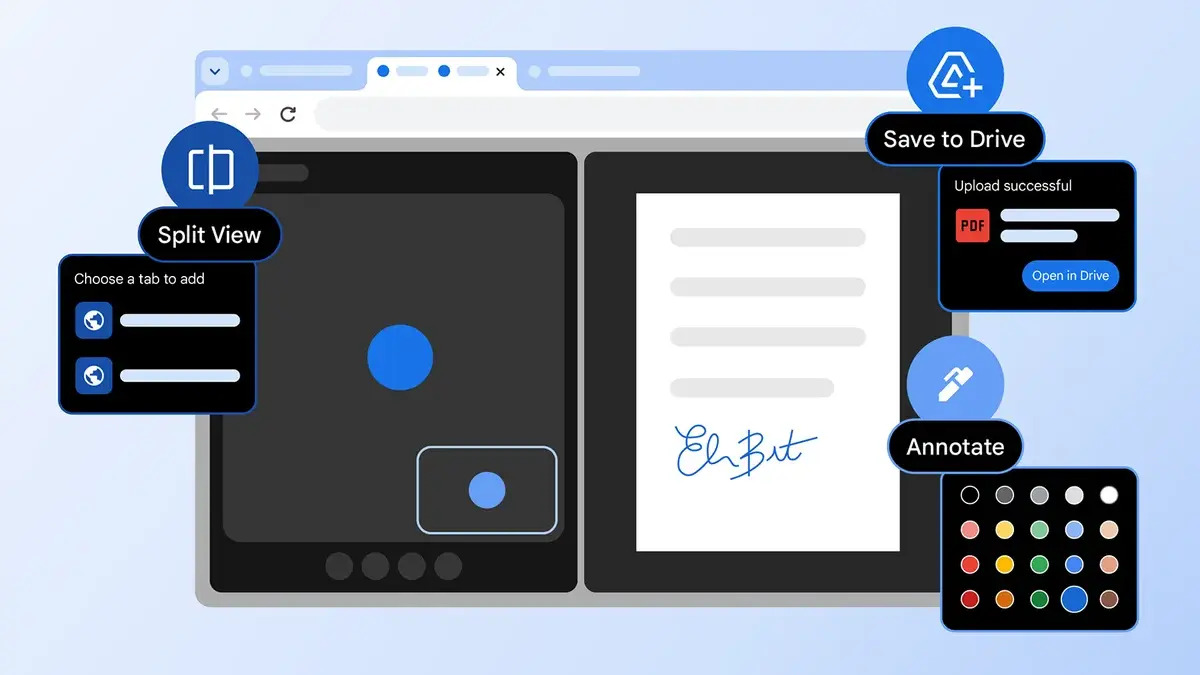
Google has announced that it is rolling out three new Chrome features. The first new feature is split view, which will let you view two tabs at the same time. If you frequently go back and forth between tabs, this feature should help streamline things a bit. While other browsers have already implemented this feature, it’s nice to see it finally arrive in Chrome.

Chrome Productivity Split View

The second new feature is for your PDF documents. Chrome’s PDF viewer finally has an annotations tool. Previously, you had to download a PDF and open a separate app to make changes. Now you can mark up documents, jot down notes, and add your signature all in the browser.

The final feature being added to the browser in this update is called “Save to Google Drive.” In the past, if you wanted to save a file to Google Drive, you would have to download it first and then upload it to Drive. With “Save to Google Drive,” you can now save the file directly to Drive, cutting out the middleman. To access “Save to Google Drive” you just need to click on the Google Drive icon in the PDF viewer.

This update comes just as Google is rolling out pinned tabs for Chrome on Android.

Thank you for being part of our community. Read our Comment Policy before posting.

Sign Up For Daily Newsletter

Be keep up! Get the latest breaking news delivered straight to your inbox.
By signing up, you agree to our Terms of Use and acknowledge the data practices in our Privacy Policy. You may unsubscribe at any time.
Share This Article
Facebook Twitter Email Print
Share
What do you think?
Love0
Sad0
Happy0
Sleepy0
Angry0
Dead0
Wink0
Previous Article How to Manage Multiple Business Instagram Accounts as a Team How to Manage Multiple Business Instagram Accounts as a Team
Next Article How to Use Instagram Saved Replies (Previously Known as Quick Replies) How to Use Instagram Saved Replies (Previously Known as Quick Replies)
Leave a comment

Leave a Reply Cancel reply

Your email address will not be published. Required fields are marked *

Stay Connected

248.1k Like
69.1k Follow
134k Pin
54.3k Follow

Latest News

Spat between BYD and Great Wall Motor intensifies as Geely, GAC join the battle · TechNode
Computing
1TB of Storage? Not Quite. Beware This Sketchy PC Listing Tactic
News
Virtual Desktop Solutions for Education: Transforming Digital Classrooms
Gadget
AI tool uses enrolment information to pinpoint disengagement
Software

You Might also Like

1TB of Storage? Not Quite. Beware This Sketchy PC Listing Tactic
News

1TB of Storage? Not Quite. Beware This Sketchy PC Listing Tactic

6 Min Read
German publishers push regulators to fine Apple over ATT – 9to5Mac
News

German publishers push regulators to fine Apple over ATT – 9to5Mac

4 Min Read
Take cleaning floors off your to-do list thanks to this robot vacuum, now 5 off
News

Take cleaning floors off your to-do list thanks to this robot vacuum, now $165 off

4 Min Read
You can get three months of Disney Plus and Hulu for  
News

You can get three months of Disney Plus and Hulu for $15 

2 Min Read
//

World of Software is your one-stop website for the latest tech news and updates, follow us now to get the news that matters to you.

Quick Link

  • Privacy Policy
  • Terms of use
  • Advertise
  • Contact

Topics

  • Computing
  • Software
  • Press Release
  • Trending

Sign Up for Our Newsletter

Subscribe to our newsletter to get our newest articles instantly!

World of SoftwareWorld of Software
Follow US
Copyright © All Rights Reserved. World of Software.
Welcome Back!

Sign in to your account

Lost your password?