Now Playing is one of those little features that makes Pixel phones great
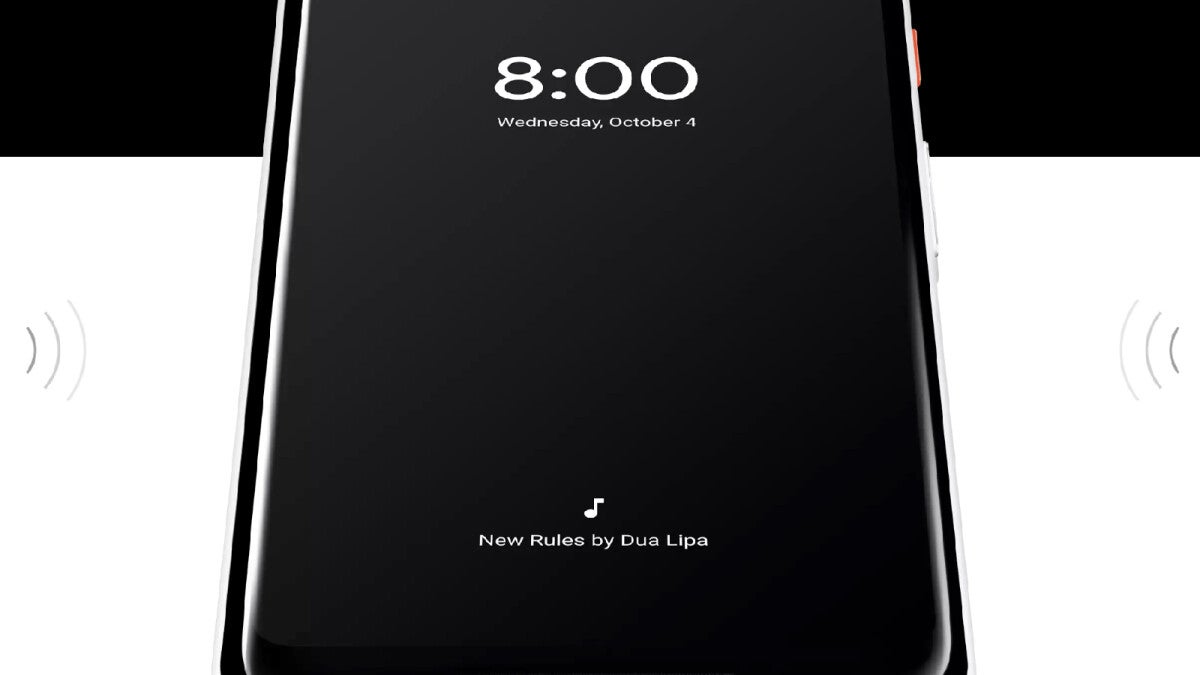
Found on the bottom of the Pixel’s lock screen display, “Now Playing” is a music recognition feature that listens to tunes playing in the background wherever you are, and lists the name of the tune and the artist. To access the feature, go to Settings > Sound & vibration > Now Playing. You can make sure that the feature is enabled by looking at the first toggle on the page which should be toggled on. You can also toggle on Enhance Now Playing, which uses Google Search to identify songs that your device cannot recognize and also provides album artwork.
Furthermore, you can also see a list of your Now Playing history. If you tap on any of the songs on the list, you will be prompted to play the song using your default music streamer. A setting on the Now Playing page allows you to choose between:
- YouTube Music
- YouTube
- Apple Music
- Spotify
- None
YouTube Music is my default Music Player.
Google is working on a dedicated app for Now Playing
One string of code read “now_playing_upgrade_notification_action”>Go to play store. There is also a notification that says, “Download the new Now Playing app. Now Playing has a new home. Your settings, song history, and other features can be found in the dedicated app.”
When Google unveiled the Pixel 10 line last year, it made it clear that it would differentiate its phones by making the assistant feature proactive. Let’s say you have to call the airline about making a change to your reservation. Instead of going through your apps to get the information you’ll need when making the call, the Magic Cue will send you the pertinent information such as the flight number, ticket number and the seat number.
Why I return to the Pixel over and over again
Perhaps Now Playing isn’t as useful or helpful as the Magic Cue, but it really is a good example of the little things that Pixel fans love. Even the quarterly Pixel Drops are a feature that you don’t see on other handsets. Sure, other phones do issue updates from time to time, but Google has a whole schedule for the Pixel Drops and promotes it as a way to make your Pixel feel like a brand-new phone.
So, yeah. I have my reasons for choosing my Pixel 6 Pro over my iPhone 15 Pro Max. Sometimes it is the little things that matter. For example, there is no comparison between the A17 Pro application processor (AP) that powers my iPhone (it was the industry’s first 3nm AP) and the OG Tensor that powers the Pixel 6 Pro; it’s the small little things like At a Glance, Now Playing, the Pixel Drop, the Recorder app, and using Gemini as a powerful assistant that have me returning to the Pixel time and again.