By using this site, you agree to the Privacy Policy and Terms of Use.
Accept
World of SoftwareWorld of SoftwareWorld of Software
  • News
  • Software
  • Mobile
  • Computing
  • Gaming
  • Videos
  • More
    • Gadget
    • Web Stories
    • Trending
    • Press Release
Search
  • Privacy
  • Terms
  • Advertise
  • Contact
Copyright © All Rights Reserved. World of Software.
Reading: Google just improved the best free feature on your Pixel — here’s how to use it
Share
Sign In
Notification Show More
Font ResizerAa
World of SoftwareWorld of Software
Font ResizerAa
  • Software
  • Mobile
  • Computing
  • Gadget
  • Gaming
  • Videos
Search
  • News
  • Software
  • Mobile
  • Computing
  • Gaming
  • Videos
  • More
    • Gadget
    • Web Stories
    • Trending
    • Press Release
Have an existing account? Sign In
Follow US
  • Privacy
  • Terms
  • Advertise
  • Contact
Copyright © All Rights Reserved. World of Software.
World of Software > Gadget > Google just improved the best free feature on your Pixel — here’s how to use it
Gadget

Google just improved the best free feature on your Pixel — here’s how to use it

News Room
Last updated: 2026/02/13 at 9:51 PM
News Room Published 13 February 2026
Share
Google just improved the best free feature on your Pixel — here’s how to use it
SHARE

It’s no secret that one of the best reasons to use a Pixel is the suite of Pixel-exclusive software features Google’s phones come with. Whether it’s a longstanding feature like Now Playing or a newer addition such as Pixel Screenshots, they’re why Pixels are as good as they are.

However, with so many available, it’s easy to let some of these Pixel goodies slip through the cracks — as I’ve done for years with Google’s free Pixel VPN. Pixel VPN works just like any paid VPN service, except it’s 100% free. And as of February 2026, Google has made Pixel VPN even better.

If you have a modern Pixel, you may not know you have access to a fully functional VPN at no extra cost. If you’re not already using it, you should, and I’ll show you how.

Do you use Pixel VPN?

1035 votes

What Pixel devices can use Pixel VPN?

Joe Maring /

You’ll also want to confirm that Pixel VPN works in your country. The US, UK, Canada, Japan, and many other locations are supported; see the full list on Google’s support page.

How to turn on and use your Pixel’s VPN

Joe Maring /

As with most Pixel features, enabling Pixel VPN is pretty straightforward. However, unless you know exactly where to look, finding it initially can be a chore. Here’s exactly what to do:

  1. Open the Settings app on your Pixel.
  2. Tap Network & internet.
  3. Tap VPN.
  4. Tap VPN by Google.
  5. Scroll down the page or tap More.
  6. Tap Use VPN at the bottom of the screen.

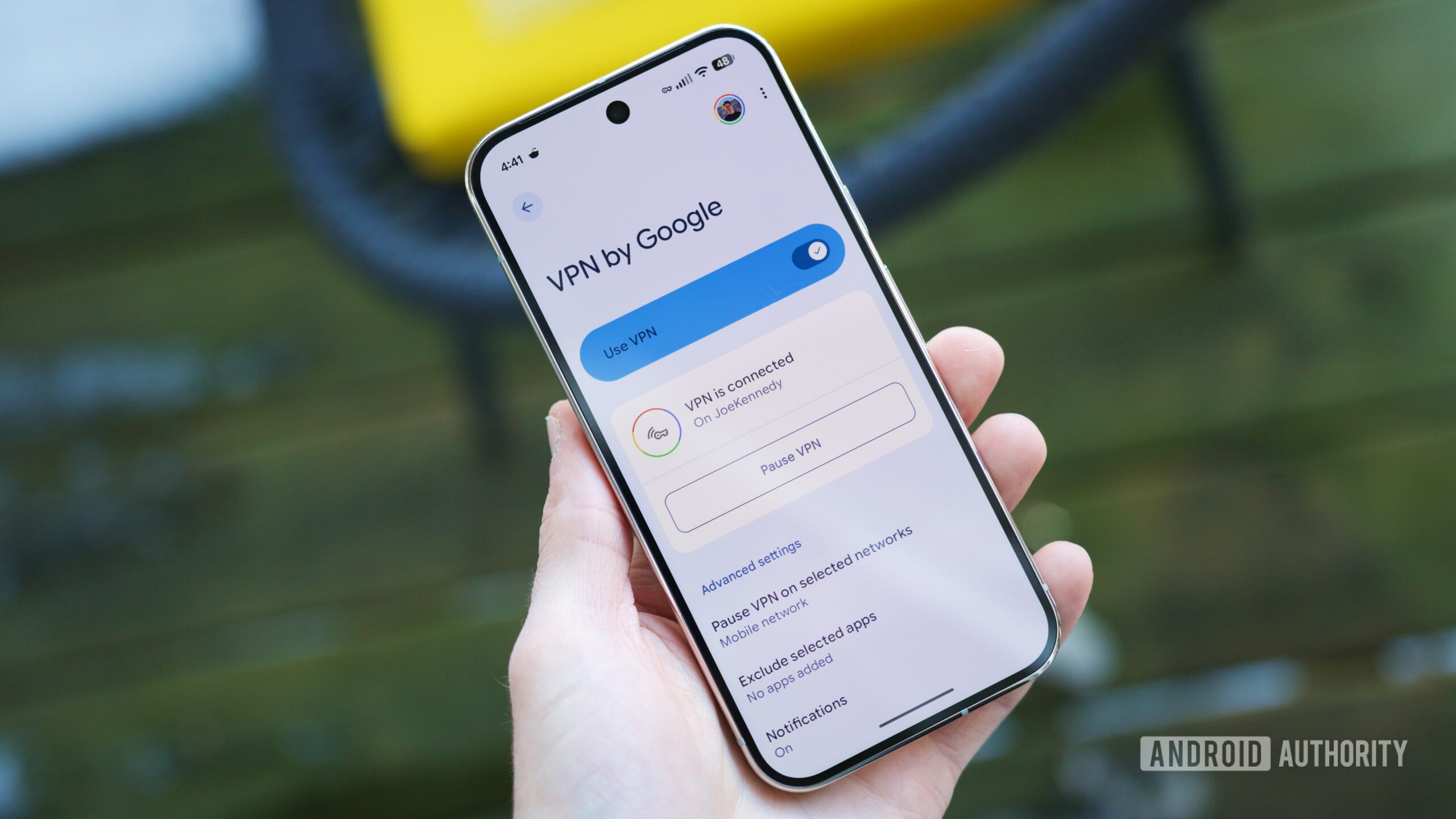
You’ll need to wait a couple of seconds for the VPN to connect, but it’ll be up and running shortly. Once the screen changes from “VPN is connecting” to “VPN is connected,” you’ll know you’re in the clear.

From this page, you have a few customization tools at your disposal.

By default, Pixel VPN won’t turn on if you’re connected to a mobile network. If you still want Pixel VPN to operate on mobile networks, tap Pause VPN on selected networks and then tap the trash can icon next to Mobile network.

Similarly, you can configure the VPN to pause/disconnect for specific Wi-Fi networks. From this same page, tap Get started, tap While using the app on the location permission pop-up, tap Go to settings, tap Allow all the time, and then go back. Now, you’ll see a full list of saved Wi-Fi networks and can tap whichever ones you don’t want to use Pixel VPN with.

Back on the main Pixel VPN page, tap Exclude selected apps to select any apps you want the VPN to ignore when it’s connected. You can also tap Notifications to choose whether to receive VPN notifications (you will by default).

Finally, ensure you have the Pixel VPN tile in your Quick Settings. Google recently updated the tile to include connection information you can view directly from the Quick Settings page, making the tile significantly more useful than before. Instead of the tile simply saying “VPN by Google,” it’ll now show one of four statuses based on your connection: Connected, Paused, Connecting, or Can’t connect.

Don’t want to miss the best from ?

google preferred source badge light@2xgoogle preferred source badge dark@2x

Thank you for being part of our community. Read our Comment Policy before posting.
Sign Up For Daily Newsletter

Be keep up! Get the latest breaking news delivered straight to your inbox.
By signing up, you agree to our Terms of Use and acknowledge the data practices in our Privacy Policy. You may unsubscribe at any time.
Share This Article
Facebook Twitter Email Print
Share
What do you think?
Love0
Sad0
Happy0
Sleepy0
Angry0
Dead0
Wink0
Previous Article Enabling Operational Stability Across Urban and Digital Markets Enabling Operational Stability Across Urban and Digital Markets
Next Article 4 Road Trip Car Gadgets That Are Worth The Trunk Space – BGR 4 Road Trip Car Gadgets That Are Worth The Trunk Space – BGR
Leave a comment

Leave a Reply Cancel reply

Your email address will not be published. Required fields are marked *

Stay Connected

248.1k Like
69.1k Follow
134k Pin
54.3k Follow

Latest News

which cars can circulate and which rest on February 14
Mobile
Rewards, skins, and how to claim
Mobile
Galaxy S26’s Now Nudge could help with flights, rentals, reservations, and more
News
The AI Image Batching Method That Cut My Content Time in Half
Computing

You Might also Like

Enabling Operational Stability Across Urban and Digital Markets
Gadget

Enabling Operational Stability Across Urban and Digital Markets

4 Min Read
Kalinihta Digital Ltd Builds Payment Infrastructure Designed for Long-Term Operational Confidence
Gadget

Kalinihta Digital Ltd Builds Payment Infrastructure Designed for Long-Term Operational Confidence

5 Min Read
The Best Presidents’ Day Deals on Gear We’ve Actually Tested
Gadget

The Best Presidents’ Day Deals on Gear We’ve Actually Tested

1 Min Read
Why SEO Is a Cost-Effective Alternative to Paid Advertising for Accountants
Gadget

Why SEO Is a Cost-Effective Alternative to Paid Advertising for Accountants

15 Min Read
//

World of Software is your one-stop website for the latest tech news and updates, follow us now to get the news that matters to you.

Quick Link

  • Privacy Policy
  • Terms of use
  • Advertise
  • Contact

Topics

  • Computing
  • Software
  • Press Release
  • Trending

Sign Up for Our Newsletter

Subscribe to our newsletter to get our newest articles instantly!

World of SoftwareWorld of Software
Follow US
Copyright © All Rights Reserved. World of Software.
Welcome Back!

Sign in to your account

Lost your password?