


By using this site, you agree to the Privacy Policy and Terms of Use.
Accept
World of SoftwareWorld of SoftwareWorld of Software
  • News
  • Software
  • Mobile
  • Computing
  • Gaming
  • Videos
  • More
    • Gadget
    • Web Stories
    • Trending
    • Press Release
Search
  • Privacy
  • Terms
  • Advertise
  • Contact
Copyright © All Rights Reserved. World of Software.
Reading: Google Lets You Recover Access To Your Account With The Help Of A Friend: How To Use Recovery Contacts – BGR
Share
Sign In
Notification Show More
Font ResizerAa
World of SoftwareWorld of Software
Font ResizerAa
  • Software
  • Mobile
  • Computing
  • Gadget
  • Gaming
  • Videos
Search
  • News
  • Software
  • Mobile
  • Computing
  • Gaming
  • Videos
  • More
    • Gadget
    • Web Stories
    • Trending
    • Press Release
Have an existing account? Sign In
Follow US
  • Privacy
  • Terms
  • Advertise
  • Contact
Copyright © All Rights Reserved. World of Software.
World of Software > News > Google Lets You Recover Access To Your Account With The Help Of A Friend: How To Use Recovery Contacts – BGR
News

Google Lets You Recover Access To Your Account With The Help Of A Friend: How To Use Recovery Contacts – BGR

News Room
Last updated: 2025/10/16 at 7:19 AM
News Room Published 16 October 2025
Share
Google Lets You Recover Access To Your Account With The Help Of A Friend: How To Use Recovery Contacts – BGR
SHARE


Below the Sky/Shutterstock

If you have ever lost access to your Gmail account – which essentially means you can’t log in to your Google Account for other services you might use — you know how distressing the situation is. Whether you forgot your password or lost physical access to the device, the recovery process can be annoying, as you have to pass verification tests that Google performs to prevent unauthorized access to your account. Starting Wednesday, Google has a new recovery tool for personal Google Accounts, which should make it easier to recover access: You can enroll a trusted family member or friend via the new Recovery Contacts feature.

Google has set up a new Recovery Contacts page in your Google Account where you can invite people to act as your account recovery method. When you need their help, you’ll share a code with them, and they’ll get an email or notification where they can enter that code to verify it’s you. This process should help you regain access to your Google Account and everything it includes when you can’t use a password, SMS one-time code, or a different recovery option.

The feature sounds similar to Proton’s new security feature for Proton Mail that lets friends and family access your account in emergencies. Apple also has a comparable recovery contact feature for Apple ID accounts. However, unlike Proton’s tool, Google’s Recovery Contacts feature does not give third-party access to your Gmail address and your Google Account. The new feature’s only purpose is to help you regain access to a lost account.

How to set up Recovery Contacts for your Google Account
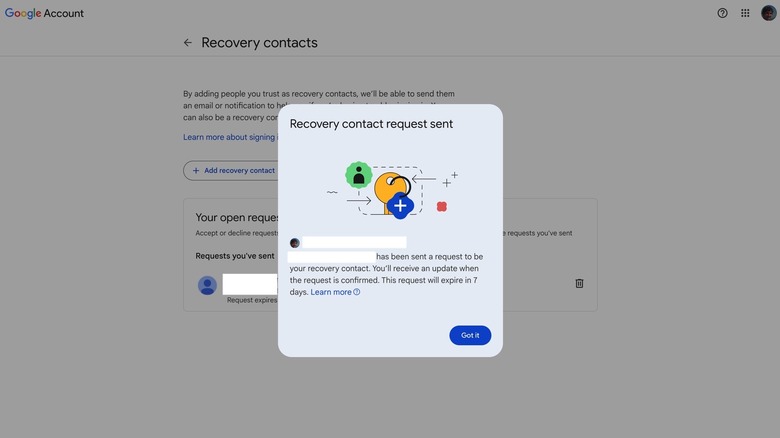

Recovery Contacts: Sending a recovery contact request to a trusted person.
Chris Smith/BGR

The process of setting up Recovery Contacts for your Google Account is relatively simple. You can do it in a web browser on your computer, on your Android device, and on iPhone and iPad. Here are the steps you need to follow to add Recovery Contacts via the web interface:

  • Go to your Google Account
  • Click Security
  • Look for Recovery Contacts in the “How you sign in to Google” section
  • Sign in to your account if prompted
  • Click “Add recovery contact”
  • Enter the email address of a trusted friend or family member
  • Click Send request and wait for the other person to respond (image above)

The system will inform you that a prompt has been sent to the other person, and they can see your name, email address, and profile photo. The other person has seven days to respond to the Recovery Contacts request. After that, you’ll need to resubmit the request. A person can refuse to be your recovery contact (image below). 
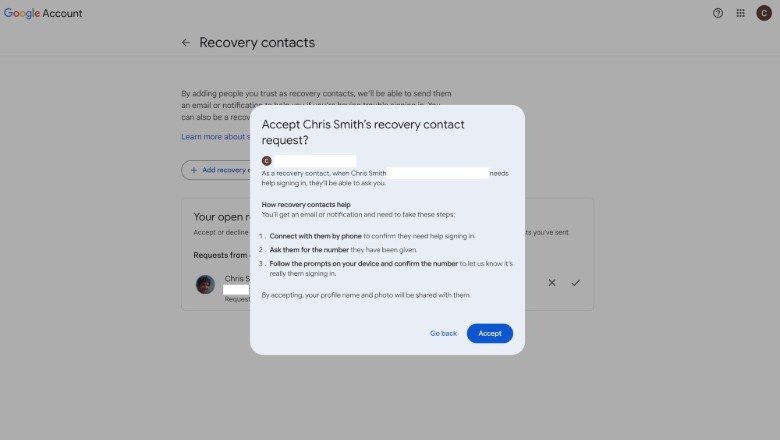
Recovery Contacts: A prompt asking a Google user whether they want to be someone's recovery contact.Chris Smith

You can add as many Recovery Contacts as you want and change them as you see fit. You can remove a contact if you need to. The process above is identical on Android and iOS.



Sign Up For Daily Newsletter

Be keep up! Get the latest breaking news delivered straight to your inbox.
By signing up, you agree to our Terms of Use and acknowledge the data practices in our Privacy Policy. You may unsubscribe at any time.
Share This Article
Facebook Twitter Email Print
Share
What do you think?
Love0
Sad0
Happy0
Sleepy0
Angry0
Dead0
Wink0
Previous Article Spit On, Sworn At, and Undeterred: What It’s Like to Own a Cybertruck Spit On, Sworn At, and Undeterred: What It’s Like to Own a Cybertruck
Next Article An Earthling’s Guide to Planet Hunting An Earthling’s Guide to Planet Hunting
Leave a comment

Leave a Reply Cancel reply

Your email address will not be published. Required fields are marked *

Stay Connected

248.1k Like
69.1k Follow
134k Pin
54.3k Follow

Latest News

Apple Seeds Second tvOS 26.2 Release Candidate
News
Wham's 'Last Christmas' Is Stressing Your Pets Out. What Other Holiday Songs Made the Cut?
News
These are the apps Apple says you should be downloading
Gadget
Azoma becomes latest AI search startup to secure funding – UKTN
News

You Might also Like

Apple Seeds Second tvOS 26.2 Release Candidate
News

Apple Seeds Second tvOS 26.2 Release Candidate

7 Min Read
Wham's 'Last Christmas' Is Stressing Your Pets Out. What Other Holiday Songs Made the Cut?
News

Wham's 'Last Christmas' Is Stressing Your Pets Out. What Other Holiday Songs Made the Cut?

5 Min Read
Azoma becomes latest AI search startup to secure funding – UKTN
News

Azoma becomes latest AI search startup to secure funding – UKTN

3 Min Read
Apple’s Tiny Powerhouse, the Mac Mini M4, Is 0 Off During Cyber Week Sales
News

Apple’s Tiny Powerhouse, the Mac Mini M4, Is $100 Off During Cyber Week Sales

4 Min Read
//

World of Software is your one-stop website for the latest tech news and updates, follow us now to get the news that matters to you.

Quick Link

  • Privacy Policy
  • Terms of use
  • Advertise
  • Contact

Topics

  • Computing
  • Software
  • Press Release
  • Trending

Sign Up for Our Newsletter

Subscribe to our newsletter to get our newest articles instantly!

World of SoftwareWorld of Software
Follow US
Copyright © All Rights Reserved. World of Software.
Welcome Back!

Sign in to your account

Lost your password?