
By using this site, you agree to the Privacy Policy and Terms of Use.
Accept
World of SoftwareWorld of SoftwareWorld of Software
  • News
  • Software
  • Mobile
  • Computing
  • Gaming
  • Videos
  • More
    • Gadget
    • Web Stories
    • Trending
    • Press Release
Search
  • Privacy
  • Terms
  • Advertise
  • Contact
Copyright © All Rights Reserved. World of Software.
Reading: Google Messages Finally Added Real-Time Location Sharing – Here’s How To Use It – BGR
Share
Sign In
Notification Show More
Font ResizerAa
World of SoftwareWorld of Software
Font ResizerAa
  • Software
  • Mobile
  • Computing
  • Gadget
  • Gaming
  • Videos
Search
  • News
  • Software
  • Mobile
  • Computing
  • Gaming
  • Videos
  • More
    • Gadget
    • Web Stories
    • Trending
    • Press Release
Have an existing account? Sign In
Follow US
  • Privacy
  • Terms
  • Advertise
  • Contact
Copyright © All Rights Reserved. World of Software.
World of Software > News > Google Messages Finally Added Real-Time Location Sharing – Here’s How To Use It – BGR
News

Google Messages Finally Added Real-Time Location Sharing – Here’s How To Use It – BGR

News Room
Last updated: 2026/03/20 at 12:51 PM
News Room Published 20 March 2026
Share
Google Messages Finally Added Real-Time Location Sharing – Here’s How To Use It – BGR
SHARE


Koshiro K/Shutterstock

Being able to easily share your location with others is one reason that Android’s Find Hub — which received a massive update with Android 16 — and the iPhone’s Find My network have become so popular. It makes keeping up with family and close friends extremely simple, while also giving you the ability to remove the tracking option at any time. But what if you’re meeting up with a friend that you don’t want to give access to your location all the time? Well, if you have an Android phone with Google Messages, then that is now more easily possible thanks to Google’s latest addition of real-time sharing directly in the Messages app.

Now, we’ve known this feature was coming for at least a month or so, as a previous APK teardown helped reveal that real-time location sharing had been spotted in a beta for Google Messages; however, it appears that the feature has now officially begun rolling out, with us confirming its availability on a Galaxy S25 Ultra earlier this morning. So how exactly does this new feature work? Well, it’s thankfully quite simple. Instead of having to go into Google Maps or register someone through the Find Hub on Android, you can now share your location directly in the Messages app by tapping on a few quick options.

How to share real-time location in Google Messages
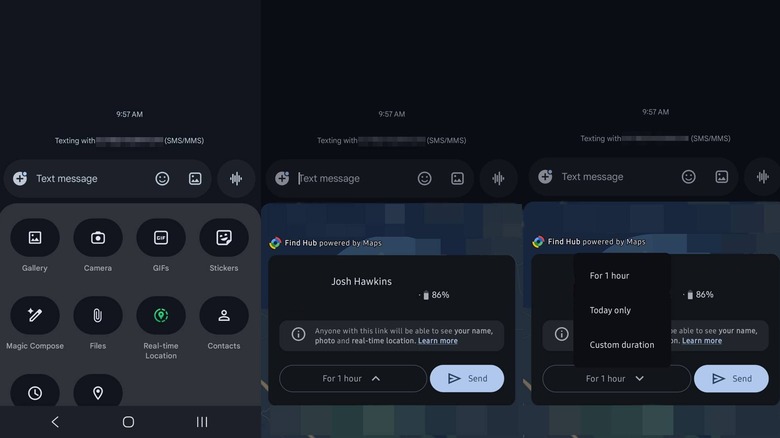

Breakdown of how to use Real-time location sharing directly in Google Messages.
Josh Hawkins / BGR

To start easily sharing your location, open the conversation that you want to share your location with. Next, tap the plus icon in the chat — it is located next to the text entry area — and then select Real-time location from the list. If you haven’t given Messages access to your location, then you’ll be prompted to do so. Once confirmed, you’ll get a quick view of the area around you, as well as an option for how long you want to share and a Send button.

To customize the duration of time you share your location, simply tap on the dropdown and then select one of the options that pop up. You can share for one hour, just that day, or even until you turn the feature off. If you only need to share for 15 to 30 minutes, then you can select the Custom duration setting and enter the time you want to share. It is worth noting that the fake phone number we put in for our screenshots does not list the Until I turn it off option; however, we did confirm its existence with a real phone number that has RCS chats enabled (RCS being the feature that helps Google Messages catch more scams).

After you confirm the location-sharing options, your location will be visible directly in Google Messages, allowing you to easily see where your friends and family are and letting them track you. And, once the timer for the duration you set runs out, it should revert to not sharing anymore, without requiring you to go in and remove the person with any additional steps.




Sign Up For Daily Newsletter

Be keep up! Get the latest breaking news delivered straight to your inbox.
By signing up, you agree to our Terms of Use and acknowledge the data practices in our Privacy Policy. You may unsubscribe at any time.
Share This Article
Facebook Twitter Email Print
Share
What do you think?
Love0
Sad0
Happy0
Sleepy0
Angry0
Dead0
Wink0
Previous Article 2 software stocks with impressive fundamentals and 1 we’re abandoning 2 software stocks with impressive fundamentals and 1 we’re abandoning
Next Article 3 best new to Prime Video shows to binge-watch this weekend (March 20-22) 3 best new to Prime Video shows to binge-watch this weekend (March 20-22)
Leave a comment

Leave a Reply Cancel reply

Your email address will not be published. Required fields are marked *

Stay Connected

248.1k Like
69.1k Follow
134k Pin
54.3k Follow

Latest News

YouTube Monetization: How to Make Money on YouTube in 2025
Computing
OpenClaw is the AI ​​agent that is blowing the AI ​​industry’s mind. We have tested it: Crossover 1×42
Mobile
Researchers resurrect the CD with mind-blowing storage capacity
Mobile
4 Cheap Home Security Cameras That Punch Above Their Price Bracket – BGR
News

You Might also Like

4 Cheap Home Security Cameras That Punch Above Their Price Bracket – BGR
News

4 Cheap Home Security Cameras That Punch Above Their Price Bracket – BGR

11 Min Read
The Week’s 10 Biggest Funding Rounds: Investment Slows, But Security And AI Remain Top Picks
News

The Week’s 10 Biggest Funding Rounds: Investment Slows, But Security And AI Remain Top Picks

5 Min Read
Mac gaming is better than ever, and it still sucks
News

Mac gaming is better than ever, and it still sucks

1 Min Read
Influencers are pushing out media for aspiring Democratic politicians
News

Influencers are pushing out media for aspiring Democratic politicians

0 Min Read
//

World of Software is your one-stop website for the latest tech news and updates, follow us now to get the news that matters to you.

Quick Link

  • Privacy Policy
  • Terms of use
  • Advertise
  • Contact

Topics

  • Computing
  • Software
  • Press Release
  • Trending

Sign Up for Our Newsletter

Subscribe to our newsletter to get our newest articles instantly!

World of SoftwareWorld of Software
Follow US
Copyright © All Rights Reserved. World of Software.
Welcome Back!

Sign in to your account

Lost your password?