
Last year, Google introduced a new feature to give everyone more control over the results they see when searching online. You now have the ability to choose your own preferred sources, which means that when you search for certain newsworthy topics on Google, your favorite websites will appear more often in the Top Stories section above the search results. Taking advantage of this feature helps ensure that you never miss a relevant story from an outlet you trust.
Speaking of trusted outlets, BGR will be celebrating its 20th anniversary this year. We’ve been reporting on technology, science, and entertainment since 2006, and we’re hoping to continue to do so for at least another 20 years. If you enjoy reading our news, previews, reviews, and live coverage, one way you can help us achieve that goal is by adding BGR as a preferred source. It’s a great way to stay up to date on current events in the world of technology, and as you’ll see below, it couldn’t be much easier.
Adding BGR as a preferred source
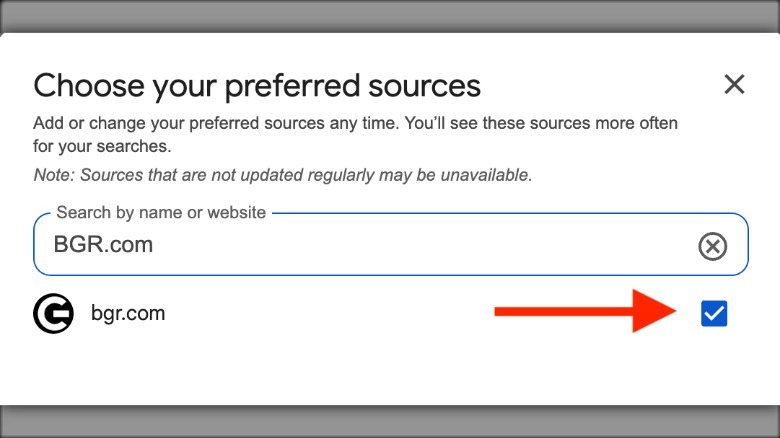
If you’re interested in adding BGR as a preferred source on Google, the first step is to search for a topic related to technology or entertainment on Google, such as “iPhone 18.” You should see a “Top stories” section near the top of the page. Click or tap on the Cards Star icon next to “Top stories” (which looks like a square with a star on it), and a pop-up should appear that asks you to choose your preferred sources. Type “BGR.com” into the search bar, check the box next to the site’s address, and hit the “Reload results” button.
 Static Media
If you’re looking for an even simpler method, you can also just click this link. You’ll be taken straight to Google’s “Source preferences” page, and BGR should already be filled out in the search bar. All you need to do is check the box, and you can then click the “Take me to Google Search” button at the bottom of the page to start searching.
Going forward, you should see BGR articles in your search results more often. Google also has a separate “From your sources” section on the search results page that focuses entirely on the websites you visit most often. Even after you make your selections, you will continue to see other websites in “Top stories” and search results, so this won’t lock you into only seeing content from your preferred sources. That said, it’s a powerful tool that you can use to customize what Google serves you on a regular basis.