
By using this site, you agree to the Privacy Policy and Terms of Use.
Accept
World of SoftwareWorld of SoftwareWorld of Software
  • News
  • Software
  • Mobile
  • Computing
  • Gaming
  • Videos
  • More
    • Gadget
    • Web Stories
    • Trending
    • Press Release
Search
  • Privacy
  • Terms
  • Advertise
  • Contact
Copyright © All Rights Reserved. World of Software.
Reading: How to Install OpenClaw with Ollama (Step-by-Step Tutorial) | HackerNoon
Share
Sign In
Notification Show More
Font ResizerAa
World of SoftwareWorld of Software
Font ResizerAa
  • Software
  • Mobile
  • Computing
  • Gadget
  • Gaming
  • Videos
Search
  • News
  • Software
  • Mobile
  • Computing
  • Gaming
  • Videos
  • More
    • Gadget
    • Web Stories
    • Trending
    • Press Release
Have an existing account? Sign In
Follow US
  • Privacy
  • Terms
  • Advertise
  • Contact
Copyright © All Rights Reserved. World of Software.
World of Software > Computing > How to Install OpenClaw with Ollama (Step-by-Step Tutorial) | HackerNoon
Computing

How to Install OpenClaw with Ollama (Step-by-Step Tutorial) | HackerNoon

News Room
Last updated: 2026/03/12 at 10:02 PM
News Room Published 12 March 2026
Share
How to Install OpenClaw with Ollama (Step-by-Step Tutorial) | HackerNoon
SHARE

Imagine having a personal AI agent running on your computer. It can read files, run commands, automate tasks, and remember your workflows.

In this guide, you will learn how to run OpenClaw with Ollama locally and choose the best local LLM models.

This setup allows you to:

• run AI agents locally n • keep your data private n • avoid cloud API costs n • build powerful automation workflows

By the end of this tutorial, you will have OpenClaw running with a local model using Ollama.

What is OpenClaw?

OpenClaw is an open-source AI agent framework. Unlike a normal chatbot, OpenClaw can perform real actions on your computer.

For example, it can:

• run terminal commands n • read and edit files n • automate workflows n • control browsers n • remember tasks using local memory

OpenClaw acts as a bridge between LLM reasoning models and your operating system.

Why Run OpenClaw with Ollama?

Running OpenClaw with Ollama gives you a fully local AI agent.

1. Full Privacy. All data stays on your computer.

2. No API Costs. You don’t need OpenAI or cloud providers.

3. Faster Performance. Local models remove network latency.

4. Persistent Memory. OpenClaw stores conversations in local Markdown files, allowing long-term memory.

5. Messaging Interface. You can control OpenClaw through:

• Telegram n • Slack n • WhatsApp

This allows you to trigger workflows from your phone.

Best Local Models for OpenClaw

Choosing the right local model is important for reliable agent behavior.
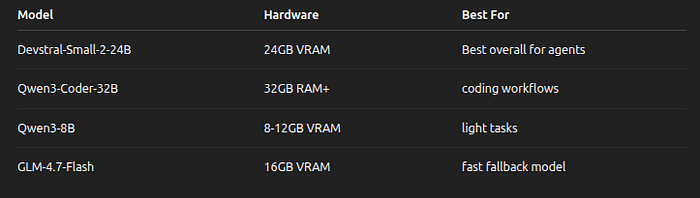
Best Local Models for OpenClaw

For reliable tool usage, use models 14B or larger. Small models often fail when executing multi-step commands.

How to Install OpenClaw with Ollama

Step 1 — Install Ollama

Install Ollama:

curl -fsSL https://ollama.com/install.sh | sh

Verify installation:

curl http://localhost:11434/api/tags

Then download one of these models from ollama.com website:

  • qwen3-coder — Optimized for coding tasks
  • glm-4.7 — Strong general-purpose model
  • gpt-oss:20b — Balanced performance and speed
  • gpt-oss:120b — Improved capability

Example of command:

ollama run qwen3-coder

Step 2 — Install OpenClaw

Install OpenClaw:

curl -fsSL https://openclaw.ai/install.sh | bash

Run OpenClaw with Ollama by using this command:

ollama launch openclaw
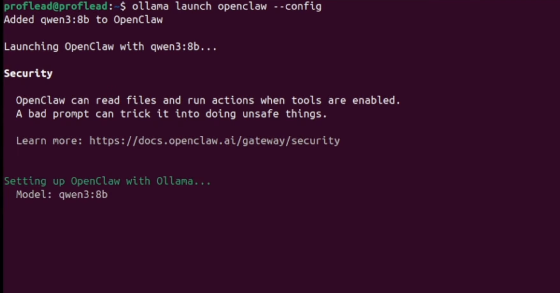
Run OpenClaw with Ollama

Video Walkthrough

Watch on YouTube: How to Set Up OpenClaw with Ollama

Security: The “Kernel Module” Warning

As of the March 2026 security updates, OpenClaw’s broad permissions are a double-edged sword. Because it operates at the kernel/OS level:

  • Disable Web Search: For a fully local workflow, toggle search to false In your config, ensure no data snippets are sent to search engines.
  • Audit Your Logs: OpenClaw saves every action in a local log. Periodically check these to ensure your agent isn’t performing “ghost actions.”
  • Human in the Loop: Always keep tool permissions set to “ask” for sensitive commands like rm -rf or sending external emails.

Conclusion

If you follow the steps in this guide, you should now have a working OpenClaw setup running with a local model.

Try it out, experiment with different models, and see what kinds of workflows you can automate.

And if you discover something interesting, feel free to share it. I’m always curious to see how people are using these tools.

Cheers, proflead! 😉

Sign Up For Daily Newsletter

Be keep up! Get the latest breaking news delivered straight to your inbox.
By signing up, you agree to our Terms of Use and acknowledge the data practices in our Privacy Policy. You may unsubscribe at any time.
Share This Article
Facebook Twitter Email Print
Share
What do you think?
Love0
Sad0
Happy0
Sleepy0
Angry0
Dead0
Wink0
Previous Article Best Hisense deal: Save 2.03 on the Hisense 100-inch Class QD7 Mini-LED 4K TV at Amazon Best Hisense deal: Save $502.03 on the Hisense 100-inch Class QD7 Mini-LED 4K TV at Amazon
Next Article IDrive Review: Excellent Backup Software With Unmatched Value IDrive Review: Excellent Backup Software With Unmatched Value
Leave a comment

Leave a Reply Cancel reply

Your email address will not be published. Required fields are marked *

Stay Connected

248.1k Like
69.1k Follow
134k Pin
54.3k Follow

Latest News

The Front Door Problem: Breaking Into Big Tech Without a “Top-Tier” Degree | HackerNoon
Computing
Gemini’s got a new shortcut to get to tools faster
News
Meituan’s next decade · TechNode
Computing
Galidix Expands Global Market Intelligence Program to Deliver Deeper Investment Research for Modern Traders
Gadget

You Might also Like

The Front Door Problem: Breaking Into Big Tech Without a “Top-Tier” Degree | HackerNoon
Computing

The Front Door Problem: Breaking Into Big Tech Without a “Top-Tier” Degree | HackerNoon

8 Min Read
Meituan’s next decade · TechNode
Computing

Meituan’s next decade · TechNode

4 Min Read
How to Write GRC Documentation That Non-
Technical Stakeholders Actually Understand | HackerNoon
Computing

How to Write GRC Documentation That Non- Technical Stakeholders Actually Understand | HackerNoon

14 Min Read
Elden Ring producer Hidetaka Miyazaki visits Tencent in Shenzhen · TechNode
Computing

Elden Ring producer Hidetaka Miyazaki visits Tencent in Shenzhen · TechNode

3 Min Read
//

World of Software is your one-stop website for the latest tech news and updates, follow us now to get the news that matters to you.

Quick Link

  • Privacy Policy
  • Terms of use
  • Advertise
  • Contact

Topics

  • Computing
  • Software
  • Press Release
  • Trending

Sign Up for Our Newsletter

Subscribe to our newsletter to get our newest articles instantly!

World of SoftwareWorld of Software
Follow US
Copyright © All Rights Reserved. World of Software.
Welcome Back!

Sign in to your account

Lost your password?