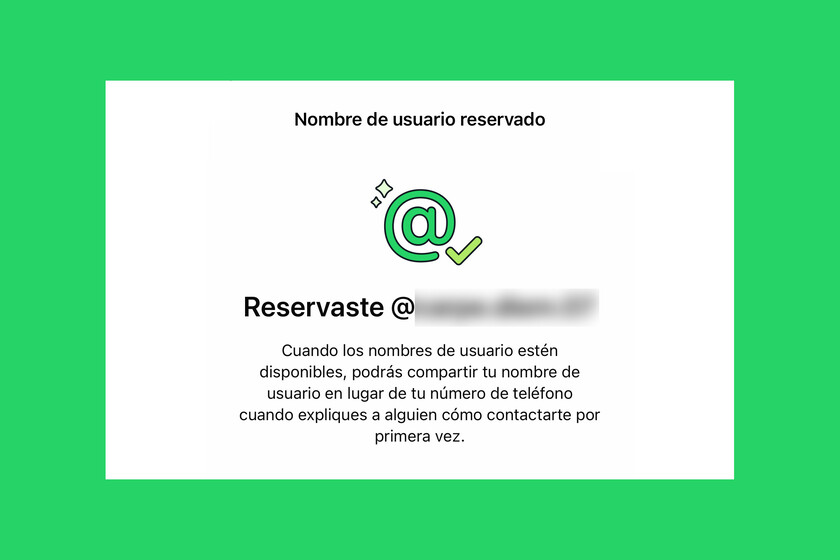
We may have been talking about usernames on WhatsApp for months, but it is one thing to read about a feature that is coming and quite another to see it appear in our own account. This Monday, WhatsApp, from Meta, opened the reserve of identifiers before they can be used generally, and the first thing I did was try to get mine out of the way. At first I couldn’t do it, but a few hours later the option was already there. And then the interesting thing began: booking it was easy, choosing it not so much.
In the article published earlier we already explained the scope of the function: usernames do not replace the phone number to create the account, but they do add a more private way to initiate certain contacts. This time the approach is more practical: what I found inside the application, what steps I followed to reserve my identifier and what detail forced me to change plans when I tried the most obvious option.
How I reserved my username on WhatsApp
In my case, the journey started from the main WhatsApp screen, in the bottom bar of the application. To the right of Chats the tab appears Youwhich is where WhatsApp groups access to the profile and various account settings. From there I entered Account and then in User namean option that already appeared in the menu. As seen in the screenshots, the path is not hidden, but it does require knowing where to look if we have not yet received a clear warning within the app.
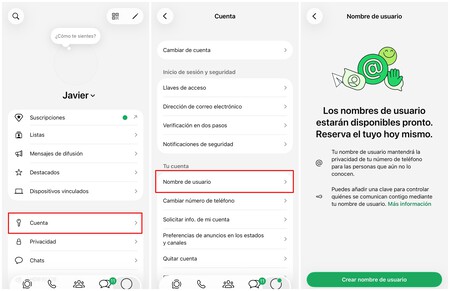
The next screen leaves little room for doubt about the status of the feature. WhatsApp does not say that usernames can simply be used, but rather that “they will be available soon” and that, in the meantime, we can reserve ours. It also summarizes the promise of privacy with a simple explanation: the username will serve to keep the number hidden from people who do not yet know it. This nuance is relevant so as not to confuse reservation with complete availability. What we have in front of us, for now, is a way to set aside an identifier before general deployment.
By clicking on Create usernamethe first thing I did was try my own name. It is a quite natural reaction when a platform opens the pool of identifiers: before getting complicated with numbers, hyphens or combinations, we try to stay with the cleanest form possible. In my case, I wrote Javier and waited for WhatsApp validation. The response was not exactly what I expected.
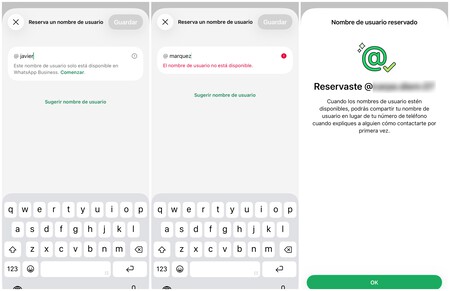
The message was quite specific: “This username is only available on WhatsApp Business.” That is, it did not seem like a normal case of a busy identifier, but rather an availability conditional on the type of account. In practice, this introduces an interesting nuance for those who try to reserve very simple names, especially proper names, because some, apparently, can be left out of a personal account even if they appear associated with another channel. In my case it didn’t make sense to jump to WhatsApp Business.
Then I tried another logical option: my last name. It was a reasonable alternative, because it was still easy to remember and fit well with the idea of sharing a personal identifier without resorting to a very long combination. This time WhatsApp did show a much more conventional notice: “Username is not available“There the problem was no longer the type of account, but pure and simple availability, something to be expected in a function that comes to a service with a huge user base.
At that point it was time to decide whether to continue trying combinations or choose a reasonable option and continue with the process. I opted for the second. The name I ended up saving was not the cleanest nor the one I would have chosen in an ideal world, but it did what I needed: to clearly identify myself and serve as contact information without exposing my phone number. After accepting the identifier, WhatsApp displayed the message you expected to see: “Username reserved.”
The reservation does not end entirely on that screen, because WhatsApp also allows you to adjust who will be able to contact us through the username. In the section Contact me by username I found two options, and the one that was marked by default was All. That is, if I left the configuration as is, anyone who knew my identifier could use it to initiate that first contact. For a function that is presented precisely as a privacy layer, I think that setting deserves review before closing the process.
The other option available was People who know my password. When selected, WhatsApp generates a key that works as a second filter for that first contact by username. The idea is simple: it is not enough for someone to know our identifier, they would also have to know that key to be able to start the conversation that way.
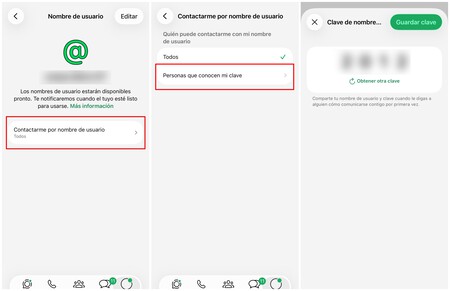
Here is an important detail that should not be overlooked. In my experience, it is not enough to enter People who know my password and see the password generated by WhatsApp. If we then go back or simply close the application, the setting is not applied and the configuration remains at All. For that additional filter to really work you have to click on Save key. Only then is the key registered and can be consulted later from the same section.
That said, we must keep in mind that we are talking about a gradual deployment. If you enter WhatsApp, follow the same route and it still does not appear User nameit doesn’t mean that you are doing something wrong or that your account has any problem. In my case, the option was not available when I heard the news and appeared a few hours later. It is best to keep the application updated on iOS or Android and check again later, because WhatsApp will gradually activate the reservation.

It is also worth remembering that not all names enter this reserve under the same conditions. Meta has explained that small businesses and organizations They will be able to claim existing names on Instagram or Facebooksomething that makes sense within its own ecosystem, because both networks are part of the same company as WhatsApp. The company has also reserved names of public figures to avoid opportunistic appropriations.
My experience, in summary, was quite simple, but not as automatic as I expected. Reserving the username only takes a few minutes when the option appears in the account, although it is good to assume that the first choice may not be available or cannot be reserved from a personal account. The second point is privacy: if we want to limit who can contact us in this way, we must activate the password and save it correctly.
Images |
In | The funniest AI chatbot of the moment is not an AI chatbot: you ask it for something and a human being behind it solves it for you