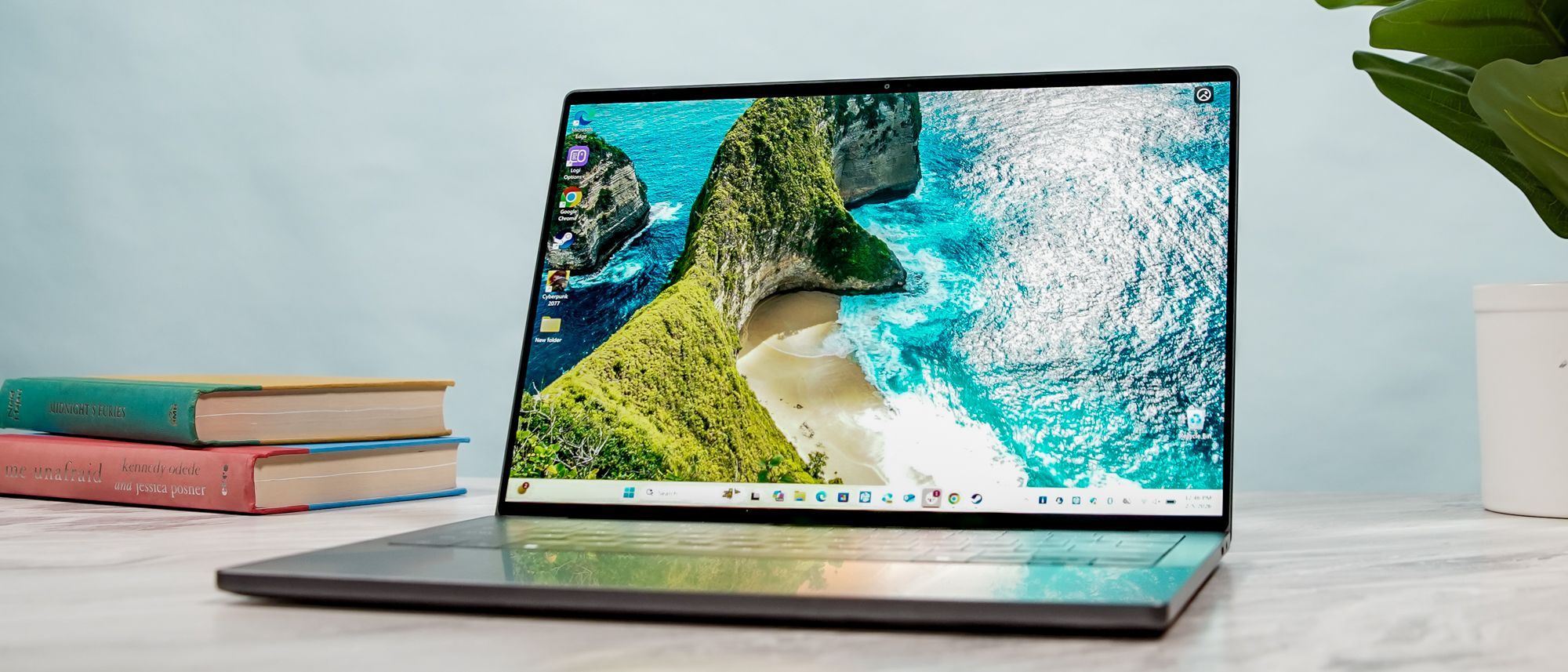
The Dell XPS 14 (2026) is a true return to form. Like many others, I wasn’t exactly enthused when the company decided to rebrand its iconic laptop line as “Dell Premium.” Thankfully, it didn’t take long for the company to rethink its strategy. XPS is back, and arguably better than ever.
I don’t think it’s a coincidence that the new XPS looks a heck of a lot like a MacBook. The CNC-machined aluminum chassis features softer, rounded corners and weighs just 3.0 pounds — nearly a full pound lighter than the previous model. Best of all, Dell fixed its biggest blunders: the capacitive touch row is gone in favor of physical function keys, and the haptic trackpad now has subtle tactile etching so you can actually feel its boundaries.
Besides the redesign, the other headline feature is the (2880 x 1800) InfinityEdge tandem OLED touch display. Thanks to this technology, the panel delivers incredible contrast, vivid colors, and vibrant HDR performance that makes standard panels look dull. It’s a marvel to behold.
Performance is equally impressive thanks to Intel’s Panther Lake architecture. Built on the 18A node, this chip delivers strong performance for everyday work and even gaming. The latter is especially noteworthy for a laptop featuring an integrated graphics card. You get the best of both worlds here.
Dell XPS 14 (2026) review: Cheat sheet
- What is it? The Dell XPS 14 (2026) ditches the controversial design of previous models to deliver a functional Windows laptop.
- Who is it for? For Windows users seeking a laptop with an Intel Panther Lake CPU, long battery life, and a vibrant OLED panel.
- What does it cost? The Dell XPS 14 starts at $1,599 on Dell’s website. As configured, our review unit is valued at $2,199.
- What do we like? We like the new design, drool-worthy tandem OLED panel, fast Panther Lake performance, and strong (for Windows) battery life.
- What don’t we like? We don’t like the missing microSD card slot and smaller display size (though neither is a deal-breaker)
Dell XPS 14 (2026) review: Specs
| Row 0 – Cell 0 |
Dell XPS 14 (starting) |
Dell XPS 14 (tested) |
|
Price |
$1,599 |
$2,199 |
|
CPU |
Intel Core Ultra 5 325 |
Intel Core Ultra X7 358H |
|
GPU |
Intel Graphics |
Integrated Arc Graphics |
|
Display |
14-inch (1920 x 1200), Non-Touch, 2K, 1-120Hz |
14-inch 2.8K (2880 x 1800) OLED| InfinityEdge touch display |
|
Memory |
16GB |
32GB |
|
Storage |
512GB |
1TB |
|
Ports |
3x Thunderbolt 4 / USB-C, 1x 3.5mm headphone jack |
3x Thunderbolt 4 / USB-C, 1x 3.5mm headphone jack |
|
Connectivity |
Intel Wi-Fi 7, Bluetooth 6 |
Intel Wi-Fi 7, Bluetooth 6 |
|
Size |
12.1 x 8.2 x 0.5 inches |
12.1 x 8.2 x 0.5 inches |
|
Weight |
3 pounds |
3 pounds |
Dell XPS 14 (2026) review: The ups
The Dell XPS 14 (2026) impresses thanks to its new design, fast performance, gorgeous OLED panel, and long-lasting battery life.
Lovely, practical design
The new XPS 14 design is the best kind of apology Dell could have given us. The team clearly took some inspiration from the 14-inch MacBook Pro M5, featuring more rounded corners and a refined CNC-machined aluminum chassis that feels dense and premium. It looks amazing and feels fantastic to hold.

At 3 pounds, this machine is significantly lighter than last year’s Dell 14 Premium (3.7 lbs), making it much easier to travel with. You still get three USB-C ports (all Thunderbolt 4), but the overall package feels much more grounded and practical. It successfully combines the best aspects of previous XPS models with the functional basics you expect from a premium notebook.

The most welcome change to the XPS 14’s design is the return of physical function keys. Dell has officially ditched the polarizing capacitive touch row, which proved more frustrating than functional for touch typists like me.

Restoring tactile keys — including a dedicated Escape key — brings much-needed sanity to the keyboard deck. The “Zero-Lattice” keycap design remains, offering a stable, clicky typing experience with 1.3mm of travel that feels great despite the laptop’s slim profile.

The haptic touchpad also receives a major upgrade. While it remains a seamless sheet of glass integrated into the palm rest, Dell added subtle tactile etching to define its boundaries. This simple fix solves the invisible trackpad problem of previous models, allowing you to feel the edges without looking down. It’s a subtle change that makes a big difference.
Magnificent OLED panel

Besides the new design and Panther Lake power, the other big feature on the XPS 14 2026 is the Tandem OLED display, the same tech Apple uses on the latest iPad Pro M5. By stacking two OLED layers, you get inky blacks, vibrant whites, and contrast levels that are quite pleasing to the eye. It’s easily one of the finest screens I’ve seen on a laptop.
I love the way colors pop on this panel, especially when you have something rich in front of an all-black background. If you plan to watch movies or YouTube videos on the XPS 14, you’re going to have a great time.
| Row 0 – Cell 0 |
Dell XPS 14 (2026) |
Dell 14 Premium |
MacBook Pro 14-inch M5 |
|
Nits (brightness) |
355 (SDR) | 381 (HDR) |
354.6 (SDR) | 593 (HDR) |
558 (SDR) | 1109 (HDR) |
|
sRGB |
126.6% |
163.2% |
115.4% |
|
DCI-P3 |
89.7 |
115.6% |
81.7% |
|
Delta-E |
0.20 |
0.28 |
0.20 |
You’ll notice that this Tandem OLED doesn’t get as bright as the previous year’s model or the MacBook Pro in our testing. This is likely because Dell tuned this specific panel for power efficiency and longevity rather than raw peak brightness. By using two layers to share the workload, the screen should resist burn-in much longer, even if it doesn’t “pop” quite as much in direct sunlight.
Strong Panther Lake performance

The Dell XPS 14 is an excellent showcase for Intel’s new Panther Lake architecture. Our review unit came equipped with an Intel Core Ultra X7 358H CPU, 32GB of RAM, and a 1TB SSD. Thanks to those specs, you get a machine that’s more than capable for everyday work.
The XPS 14 handled my typical (and sometimes chaotic) workday without breaking a sweat. My daily workflow usually involves dozens of Chrome tabs, Slack, and occasional photo editing. I used the XPS 14 for an entire eight-hour shift, and it never stuttered or lagged. Even with a heavy browser load and a few Google Meet calls thrown in, the system remained snappy and responsive.
| Row 0 – Cell 0 |
Geekbench (single/multi-core) |
Handbrake (Video editing) |
|
Dell XPS 14 (2026) |
2,867 / 16,927 |
4:32 (mins:secs) |
|
Dell 14 Premium |
2,701 / 15,794 |
5:06 |
|
MacBook Pro 14-inch M5 |
4,288 / 17,926 |
3:31 |
How did the Dell XPS 14 fare in our testing lab? On Geekbench 6, which measures overall CPU performance, the XPS 14 pulled in a solid multi-core score of 16,927. That’s a respectable jump over last year’s Dell 14 Premium (15,794). However, the MacBook Pro M5 has the edge in both single- and multi-core performance.
In our Handbrake test, which tasks the laptop with transcoding a 4K video to 1080p, the XPS 14 finished in just 4 minutes and 32 seconds. That’s over 30 seconds faster than the previous model, showing that Panther Lake can hold its own during sustained heavy lifting.
| Row 0 – Cell 0 |
Photoshop (Score/Time) |
Premiere Pro |
|
Dell XPS 14 (2026) |
8,789 / 14.42 mins |
35,005 / 15.87 mins |
|
Dell 14 Premium |
7,583 / 14.2 mins |
56,542 / 4.5 mins |
|
MacBook Pro 14-inch M5 |
13,755 / 8.02 mins |
69,887 / 3.05 mins |
The results here were a bit of a mixed bag for our suite of Adobe tests. In Photoshop, the XPS 14 scored an 8,789, showing a clear improvement in raw processing power over its predecessor (7,583). However, Premiere Pro, which is notoriously demanding, saw the XPS 14 lag behind the old Premium model in terms of time.
It’s worth noting that while the M5 MacBook Pro remains the king of video editing with a staggering 3:03 render time, the XPS 14 still offers a competent experience for those who aren’t editing feature films on the go.
| Row 0 – Cell 0 |
SSD BlackMagic Disk Speed (Write/Read in MBps) |
|
Dell XPS 14 (2026) |
3,779 / 4,809 |
|
Dell 14 Premium |
3,695 / 4,235 |
|
MacBook Pro 14-inch M5 |
6,517 / 6,619 |
Lastly, on the BlackMagic Disk Speed test, the XPS 14’s SSD is plenty fast for most tasks, clocking in at 3,779 MBps write and 4,809 MBps read. It’s a modest upgrade over the 2025 model, ensuring that file transfers and app launches feel near-instant.
Again, Apple’s M5 pulls ahead with nearly double the speed. But unless you’re moving massive 8K video files every day, you likely won’t notice the difference in typical use.
Overall, the Dell XPS 14’s performance is exactly what you want from a high-end Windows ultrabook. While the M5 MacBook Pro is objectively more powerful in raw benchmarks, the XPS 14 provides more than enough “oomph” for everything from complex spreadsheets to light creative work. You won’t be disappointed with how this machine handles your workflow.
Solid gaming performance

Since this laptop relies on integrated Intel Arc graphics rather than a dedicated GPU, I went into my testing with tempered expectations. After all, the XPS 14 is a thin-and-light productivity machine first and a gaming rig second. However, the new Panther Lake chip is a serious overachiever, delivering gaming prowess that would have been unthinkable for an ultraportable just a couple of years ago.
While our benchmarks show a slight dip in raw frame rates compared to the previous model, there is a very good reason for that: last year’s Dell 14 Premium often relied on a discrete Nvidia RTX chip. By contrast, the 2026 XPS 14 is doing all of this heavy lifting on a single piece of silicon.
| Row 0 – Cell 0 |
Borderlands 3 |
Cyberpunk 2077 |
Shadow of the Tomb Raider |
|
Dell XPS 14 (2026) |
36 fps |
14.9 fps |
39 fps |
|
Dell 14 Premium |
41 fps |
12.2 fps |
50 fps |
|
MacBook Pro 14-inch M5 |
32 fps |
43 fps (for this Mac setting) |
57 fps |
At native resolutions, a game like Cyberpunk 2077 is still a bridge too far for integrated graphics at 14.9 fps. But when I dropped the resolution to 1080p and enabled Intel XeSS (Intel’s AI-powered upscaling tech), I got the game to run at close to 60 frames per second.
In Shadow of the Tomb Raider, the XPS 14 maintained a solid 39 fps. While that’s lower than the previous model’s 50 fps, it’s worth noting that the Panther Lake chip is doing this while drawing less power and generating less heat than a dedicated GPU setup.
The key takeaway is that this Panther Lake chip allows the XPS 14 to run modern titles roughly as well as a budget gaming laptop would. For a machine that fits easily into a messenger bag and lasts all day, being able to clock out of work and jump into a decent gaming session without needing a bulky power brick is a huge win for integrated graphics.
Long battery life

While Intel’s claim of 31-hour battery life for Panther Lake might have been aimed at the lower-resolution models, the Dell XPS 14 still holds its own in the endurance department. In our battery test, which involves continuous web surfing over Wi-Fi at 150 nits of brightness, the new OLED-equipped XPS 14 lasted for an average of 12 hours and 23 minutes.
| Row 0 – Cell 0 |
Time (hours:mins) |
|
Dell XPS 14 (2026) |
12:23 |
|
Dell 14 Premium |
8:16 |
|
MacBook Pro 14-inch M5 |
18:00 |
While the OLED model doesn’t endure as long as the other Panther Lake laptops we’ve tested, such as the Samsung Galaxy Book 6 Pro (15:17) and the Asus Zenbook Duo (14:23), it’s still a monumental step forward for Windows laptops.
To put that in perspective, this new model lasted exactly 4 hours and 7 minutes longer than its predecessor, the Dell 14 Premium. While the MacBook Pro M5 still reigns supreme with its epic 18-hour runtime, the gap between Windows and macOS efficiency has never been smaller.
The culprit for the lower (but still respectable) runtime here is almost certainly that stunning Tandem OLED panel. As Dell noted, this dual-layer technology is designed for incredible peak brightness and long-term durability to prevent burn-in. However, powering two layers of pixels simultaneously demands more juice than a standard LED or even a traditional single-stack OLED panel.
To prove that point, we also ran the same tests on a Dell XPS 14 configured with a 1200p LED panel. That model lasted for a staggering 20 hours and 41 minutes, making it one of the longest-running laptops we have ever put through our lab.
It’s important to remember that the LED version utilizes a less power-hungry processor and a lower-resolution screen, but if you prioritize staying power over screen pop, that 20+ hour mark can’t be overlooked.
Dell XPS 14 (2026) review: The downs
While the XPS 14 doesn’t have significant flaws, some of its shortcomings might be frustrating to certain users.
No microSD card slot

One baffling design choice is the removal of the microSD card slot. While Dell has included three Thunderbolt 4 ports, the loss of dedicated expandable storage is strange, especially for a machine aimed at the creative crowd.
For photographers and videographers who need to quickly offload footage from a camera, this omission means another dongle to carry in your bag, which can be viewed as a frustrating step backward.
I don’t use microSD cards in my daily workflow, so the missing slot isn’t a dealbreaker for me. However, I’m not a fan of seeing features stripped away, particularly on a premium laptop like this. While it likely won’t be a complete dealbreaker for everyone (it isn’t for me), it’s a detail to keep in mind if you rely on card-based storage for your work or hobbies.
Smaller display

One other notable change is the screen size. While last year’s Dell 14 Premium featured a slightly roomier 14.5-inch display, the 2026 XPS 14 has moved back to a standard 14.0-inch panel. It’s a subtle shift, but if you’re coming from the older model, you’ll likely notice the loss of that extra half-inch of vertical real estate.
That said, this downsize isn’t a total wash. The smaller display has allowed Dell to shave weight and bulk off the chassis, resulting in a machine that’s more portable than its predecessor, as I noted above.
While it’s a bummer to see the screen shrink, it isn’t a dealbreaker for most people, especially given how much easier this laptop is to slide into a bag. That mesmerizing tandem OLED also makes up for the smaller footprint.
Dell XPS 14 (2026) review: Verdict
The Dell XPS 14 (2026) might be a modern-day “New Coke” situation, but I’m glad the company listened to user feedback and returned to what has always worked for this iconic laptop line. Not only is this a brilliant redemption story, it’s also a fantastic Windows laptop that offers stunning performance and strong battery life in an elegant, refined design.
If you aren’t tied to the Windows ecosystem and want a notebook that offers even stronger raw performance and longer battery life, the MacBook Pro 14-inch (M5) remains an excellent alternative. This is especially true considering the entry-level MacBook Pro costs $600 less than the XPS 14 configuration I reviewed here. Plus, the MacBook Pro still includes an SDXC card slot for you creatives out there.
However, for those who value the Windows experience, you won’t go wrong with the Dell XPS 14. It comes with my highest recommendation and marks a true return to form for Dell’s flagship. Welcome back, XPS! Please, never go away again.

Follow Tom’s Guide on Google News and add us as a preferred source to get our up-to-date news, analysis, and reviews in your feeds.