2. Blaze AI
Who is Blaze AI best for?
Blaze AI is best for people who want help creating marketing content. It’s a good fit for solo founders, small business owners, and marketers who don’t have a full content team but still need blogs, social media posts, email campaigns, and landing copy on a regular basis.
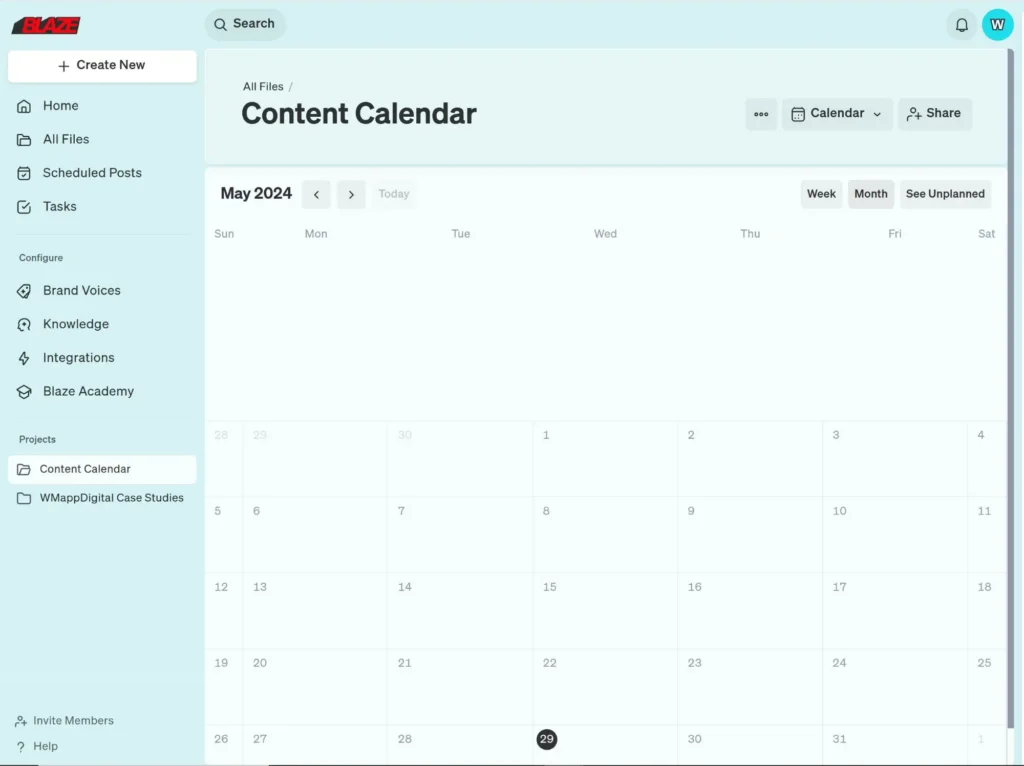
Blaze AI feature overview
Blaze feels like a tool built for when marketing isn’t your full-time job, but it still needs to get done. Instead of dropping you into a dashboard full of options, it nudges you through a looser flow: figure out what you’re trying to say, use NLP-driven suggestions to generate post ideas, clean them up, and then auto publish posts across the main social media platforms.
That structure is helpful if you’re the kind of person who gets stuck between “I should post more” and actually publishing anything, especially when you’re trying to keep track of all your upcoming posts in one place.
I found most of the value in the creation phase. Blaze works well as one of those lightweight content curation tools, helping turn rough ideas into usable drafts for blogs, emails, and social media posts. It’s not perfect, and it definitely needs human editing, but it removes the friction of starting from zero.
I consider it most useful when working across channels at once, where one idea can quickly become multiple posts without rewriting everything manually or juggling RSS feeds from different sources.
Scheduling and analytics are there, but they’re clearly not the main focus. You get basic visibility into upcoming posts, some social media analytics, and surface-level social media metrics, but not the kind of detailed analytics you’d expect from a more powerful social media scheduler.
Blaze isn’t trying to optimize every data point or replace enterprise tools with unlimited users and complex reporting. It’s more about keeping content moving consistently than squeezing every last percentage point out of performance.
Key features of Blaze:
- Guided onboarding to define goals, audience, and brand voice, helping teams save time from day one and organize posts before anything goes live.
- Built-in AI tools that support content creation by helping you generate post ideas for blogs, emails, and social media posts without starting from scratch.
- Long-form and short-form content creation in one workspace, making it easier to move from planning to publishing without jumping between tools.
- Campaign-based content organization that acts like a lightweight post planner, helping you manage campaigns and keep all related content grouped together.
- A built-in editor for refining tone, structure, and messaging, useful when you want to optimize posts before publishing across major social platforms.
- Multi-format content reuse from a single idea, allowing you to adapt content efficiently for different channels while saving time.
- Basic scheduling and publishing across channels using a simple posting tool, without the complexity you’d find in platforms like Sprout Social or Meta Business Suite.
- Simple performance tracking that focuses on surface-level insights, such as audience engagement and the ability to track follower growth, rather than deep social listening dashboards.
- Collaboration features for small teams, including shared workspaces to brainstorm, review drafts, and organize posts together without needing unlimited users.
- A shared media library to store visuals and reuse assets across campaigns, keeping content creation consistent and easier to manage.
- Entry-level support for reputation management and light social listening, enough to stay aware of conversations without the heavy tooling of enterprise platforms like Sprout Social.
What I like about Blaze AI
What stood out to me with Blaze AI is how much ground it tries to cover in one place. When it works, it really works. A lot of the positives come down to speed, convenience, and the feeling that the tool is genuinely trying to help you move faster, especially if you’re creating content across channels and don’t want to start from scratch every time.
Here’s what others say about Blaze AI’s pros:
- “Blaze AI is best at taking one piece of content and turning it into 100 more. Whether it is a social media post turned into a blog post or a video transcript turned into website HTML, Blaze can make it happen.” – Dylan S., Source
- “It is useful that it allows them the ability to monitor for potential leads based on their activity online. It enables me get to my prospects with a lot more accuracy and get to those that are already showing the intent to buy.” – Tolga E., Source
- “I found to tool to be really intuitive and easy to set up. Blaze has the best customer support team and I use the platform daily. The breadth of features is very impressive as Blaze helps with everything from lead generation to multi-step outreach campaigns to convert them.” – Gayatri, Source
- “It makes it simplier to use and ensure you are hitting your numbers with good content and the scheduler is such a great tool implemented.” – Stephanie, Source
- “We are big fans of the outcomes Blaze delivers – they have opened up very valuable pipeline for us which we monitor every single day. The product is easy to set up and is an easy to execute on growth channel for us. They were very warm and prompt in onboarding us to the platform and was very mindful of connecting the channel with existing growth systems.” – Verified User, Source
What could be improved about Blaze AI
That said, Blaze isn’t without its trade-offs. Some of the same things that make it powerful can also make it feel overwhelming, especially when everything is happening in one interface. A few limitations show up once you start using it more heavily or expect more polish and control from the content it generates.
Here’s what others say about Blaze AI’s cons:
- “Blaze, I have found, is overworked tying to do too much and therefore making the experience on the platform overwhelming and confusing at times.”- Dylan S., Source
- “In terms of content generation Blaze AI seems a little narrow. It is often somewhat bland, it often does not have that flair that is necessary for it to be more eye-catching.” – Tolga E., Source
- “The overwhelming background makes it a bit diffficult to focus and differentiate from the work that has been done.” – Stephanie, Source
- “While Blaze is fantastic, one thing I’d suggest is adding Lightning UI. They’re already working on this, and once implemented, it will make the product even more powerful for targeting and engagement” – Gaurav, Source
Blaze AI pricing
- Offers a free trial
- Plans start at $22 per month
3. SmarterQueue
Who is SmarterQueue best for?
SmarterQueue is a good option if you like structure and repetition in the way you handle social media. It works well for social media marketers or small teams who plan content in advance, reuse posts, and think in categories rather than one-off posts.
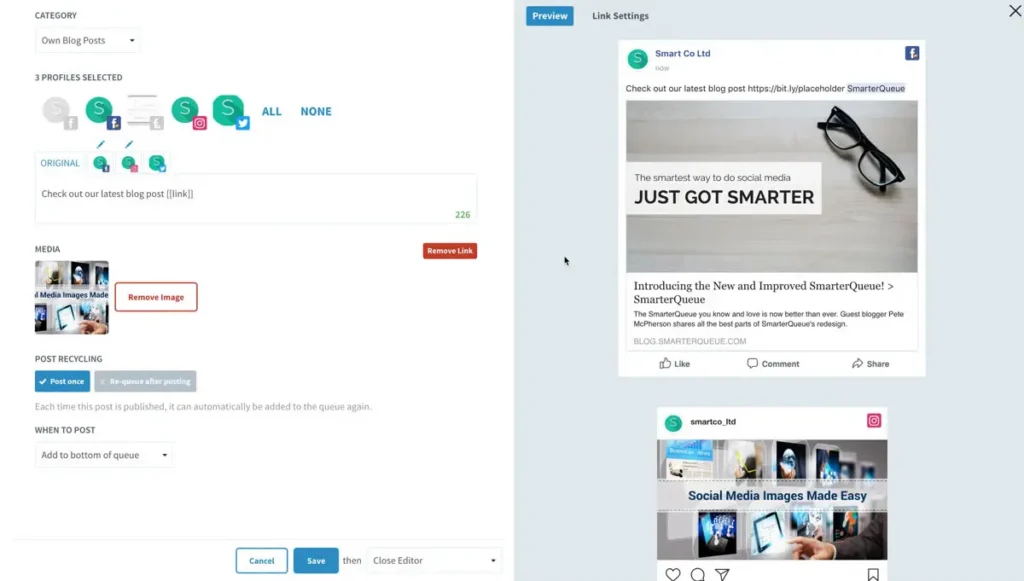
SmarterQueue feature overview
SmarterQueue is built around structure, repetition, and systems. It’s clearly designed for marketing teams and in-house teams who want their content engine to run in the background while they focus on higher-level strategy.
Instead of treating every post as a one-off, the platform encourages you to organize content into categories, campaigns, and long-term buckets, with content recycling features that help evergreen posts stay in rotation. You can create multiple variations of the same idea, refine post captions with the AI assistant, and reuse high-performing formats without constantly starting from scratch.
Where it really stands out is automation and scheduling depth. SmarterQueue goes far beyond just scheduling, offering publishing tools that support seamless scheduling across channels. You can schedule posts individually, auto-publish content, and manage key features scheduling from one central dashboard.
While it doesn’t rely on a unified social inbox, it does include light monitoring tools to keep an eye on performance and user generated content trends. The interface itself is a mix of a great user interface and a very user friendly interface once you get past the initial setup curve.
Analytics and optimization are core to how SmarterQueue positions itself. It’s not only about publishing, but about helping marketing teams understand what works, optimize future posts, and make smarter decisions over time.
Built-in insights help teams approve posts, spot patterns, and adjust strategy based on real performance, making it a solid fit for teams that want more than just scheduling, but don’t necessarily need an all-in-one engagement inbox.
Key features of SmarterQueue:
- Create, manage, and schedule social media posts across multiple social media channels
- Plan and organise posts using campaigns and content categories
- Visual content calendar to see all scheduled content at a glance
- Content library to store and reuse images, videos, and captions
- Unified inbox for messages and replies from multiple social channels
- Social analytics to track the performance of posts and campaigns
- Campaign optimisation tools to identify trends and best posting times
- Hashtag monitoring and analytics across social media platforms
- In-platform content creation and editing tools
- Automation features for recurring content and multi-step workflows
- AI-assisted planning to improve content performance over time
What I like about SmarterQueue
What people tend to like most about SmarterQueue is the time it gives back. Once the queues and schedules are set up, the tool does a lot of the repetitive work in the background. That’s especially helpful if you’re balancing social media with other responsibilities or running a business alongside a full-time job.
A lot of the positive feedback points to automation, content recycling, and having multiple social media channels in one place. SmarterQueue clearly works best when you plan ahead and let the system do its thing.
Here’s what others say about SmarterQueue’s pros:
- “I have been with SmarterQueue since January 2017! SmarterQueue allowed me to build my business Facebook page and keep my audience engaged while still having to work a full time job. The scheduler allowed me to set up (and recycle) posts so I could focus on finding pockets of time to build my online business.” – Amber D., (Source)
- “It’s great being able to set up all of your social media feeds to automatically post on a schedule you choose.” – Verified User, (Source)
- “We use SmarterQueue to schedule multiple social media channels. It’s easy to use, the content recycling option is a nice feature and I like the visual previews for posts.” – Adam B., (Source)
- “SmarterQueue has made its best improvements with Instagram functionality. Overall, I save precious time by scheduling out posts weeks in advance. I can easily add/remove posts. Having all of my social media platforms in one place is gold. No more clicking from site to site.” – Elysia V. (Source)
- “I love that I create the content once and it is rescheduled automatically so that my content gets shared automatically many times and that I can create multiple posts from the same content to give it variety.” – Angela M., (Source)
What could be improved about SmarterQueue
Most of the downsides come down to usability. SmarterQueue can feel less intuitive than expected, especially when you’re trying to make quick changes or find specific settings. Things like pausing queues, adjusting schedules, or setting things up for the first time aren’t always obvious.
There are also some rough edges around previews and content curation. While the automation is a big strength, it sometimes comes at the cost of clarity and control, especially if you want to tweak things on the fly.
Here’s what others say about SmarterQueue’s cons:
- “Although I would still 10/10 recommend SmarterQueue, I do have a hard time navigating the site and finding different spots. (Where to “pause” the queue or where to set up new posts, etc.)” – Amber D., (Source)
- “If I would improve on anything it would probably be a cleaner way to see the queue and the scheduling but I am not sure how to make that happen.” – Angela M., (Source)
- “Sometimes pictures do not appear on posts exactly as they do in the preview feature. We’ve had to edit or redo a few posts due to unexpected photo cropping.”– Adam B., (Source)
- “Setting up the feeds and the posting plan could be a little more intuitive. I was able to figure out all of the steps and functionality, but the process wasn’t easy.” – Verified User, (Source)
- “It would be nice if SmarterQueue could pull suggested content variations for my blog posts. I am not sure if this is their fault but finding other blog feeds has become a recent issue. Some of the Curate from social media options won’t load.” – Elysia V. (Source)
SmarterQueue pricing
4. Plann by Linktree
Who is Plann best for?
Plann is best for creators, small business owners, and social media managers who want an easy, visual way to plan and schedule social posts without a steep learning curve.
If you’re mainly focused on Instagram and Facebook but also need to post on Twitter/X, LinkedIn, or Pinterest, and you care about how your feed looks as much as when it posts, Plann fits that workflow.
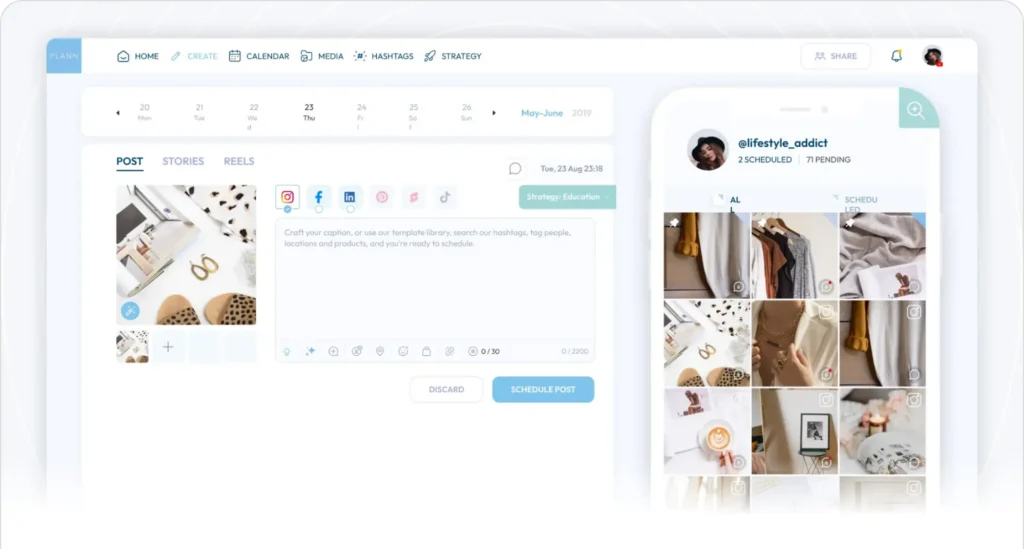
Plann feature overview
Plann is one of those tools that feels designed for the everyday work of planning social media rather than for heavy strategy or enterprise workflows. When I opened it, what struck me first was how easy it was to lay out a full content plan visually, almost like arranging cards on a board.
Instead of jumping straight into analytics or complicated settings, I was dropped into a calendar view where I could see weeks of planned social posts and move them around with a simple drag-and-drop.
I found that Plann works best when your priorities are clarity and consistency. It doesn’t try to replace every part of your marketing stack, it focuses on helping you take ideas, organise them, and get them scheduled out across the platforms you use most.
The editor is straightforward, and visual previews make it easier to plan feed-based platforms like Instagram without guessing how a post will look live. For small teams or solo social media managers, that low friction makes it a reliable daily tool.
There are trade-offs. Plann doesn’t dig as deep into analytics as some all-in-one social media management platforms, and it isn’t built to handle complicated approval workflows or extremely large volumes of accounts.
But if your main aim is to organise posts, maintain a predictable pace, and see your whole plan at a glance, it gets that job done without headaches.
Key features of Plann:
- Visual content calendar with drag-and-drop planning
- Scheduling for Instagram, Facebook, X, LinkedIn, and Pinterest
- Instagram grid preview for feed planning
- Bulk scheduling
- Caption templates
- Hashtag library
- Post idea prompts
- Basic post performance insights
- Best-time posting suggestions
- Team collaboration with shared calendars
- Linktree integration
- Mobile and desktop apps
What I like about Plann
What I like about Plann is how approachable it feels compared to many other social media tools. It’s clearly built to support planning first, not just posting. The social media calendar, visual feed planning, and built-in prompts make it easier to shape a social media strategy instead of posting on impulse.
A lot of users point out how helpful Plann is for staying consistent across social channels, especially on Instagram. Features like post ideas, basic analytics to track performance, and the ability to schedule posts ahead of time make it a solid option for running smaller social media campaigns without needing all the features of a heavy social media marketing platform.
What others say about Plann’s pros:
- “My favorite feature of Plann is the strategy feature. It’s the first Instagram marketing tool that I have used that gives me a road map of what I should post.” – Loren Jackson, (Source)
- “Plann is a super helpful tool that makes running your social media way easier. You can plan out posts ahead of time, use the auto-posting feature, and see how well your posts are doing. Plann even lets you make shareable links to manage all your content in one spot.” – Fahim AI, (Source)
- “Recently started using this app for Instagram. So far, it is a pretty good app. Works as described and posts photos, reels, and even stories to IG, and you can also add a few other platforms. Helps with posting regularly when unable to be online.” – Teresa Hardig (Source)
What could be improved about Plann
Most of the downsides come down to limitations and edge cases. While Plann works well for day-to-day planning and bulk scheduling, some features feel incomplete or inconsistent, especially around integrations and visibility into past content.
Several users mention missing data, unsupported platform features, or changes after the Linktree merge that weren’t clearly communicated.
It’s not a deal-breaker if you’re focused on planning and publishing, but if you expect full coverage across most social media platforms or deep historical insights, those gaps can become frustrating over time.
What others say about Plann’s cons:
- “Starting off with Plann and one thing I noticed is the feed visual tool doesn’t show posts on instagram where we were invited to collaborate.” – Anonymous User, (Source)
- “I contacted Plann’s customer service to be told that upon merging with Linktree, this Easylink beta was abandoned. It was technically “still available to current users”, yet somehow also “no longer supported” which is what was causing some to receive those errors. They indicated that upon merging, customers needed to switch to Linktree, but this was never, at any point, communicated, and in the site, there’s every indication that Easylink is still entirely functional. Of course, this means another subscription to Linktree.” – Anonymous User (Source)
- “Features were okay but lacked Bluesky integration, so we eventually switched to a different platform – which was when the issues started. Doesn’t matter if you cancelled the services before the renewal period. They WILL ABSOLUTELY try to charge you for it and then lock you out of you account until you pay the ransom.” – RB, (Source)
- “I can not see previous posts. It not a deal-breaker for me, but I also would like to see how much I posted the month or even the week before.” – Loren Jackson, (Source)
Plann pricing
- Offers a free trial
- Paid plans start at $15/month
5. Sprinklr
Who is Sprinklr best for?
Sprinklr is not a tool I’d recommend to someone just starting with social media scheduling or looking for a lightweight way to plan posts. It’s best suited for larger teams, enterprise brands, and organizations managing complex social media operations across many channels and audiences.
Sprinklr feature overview
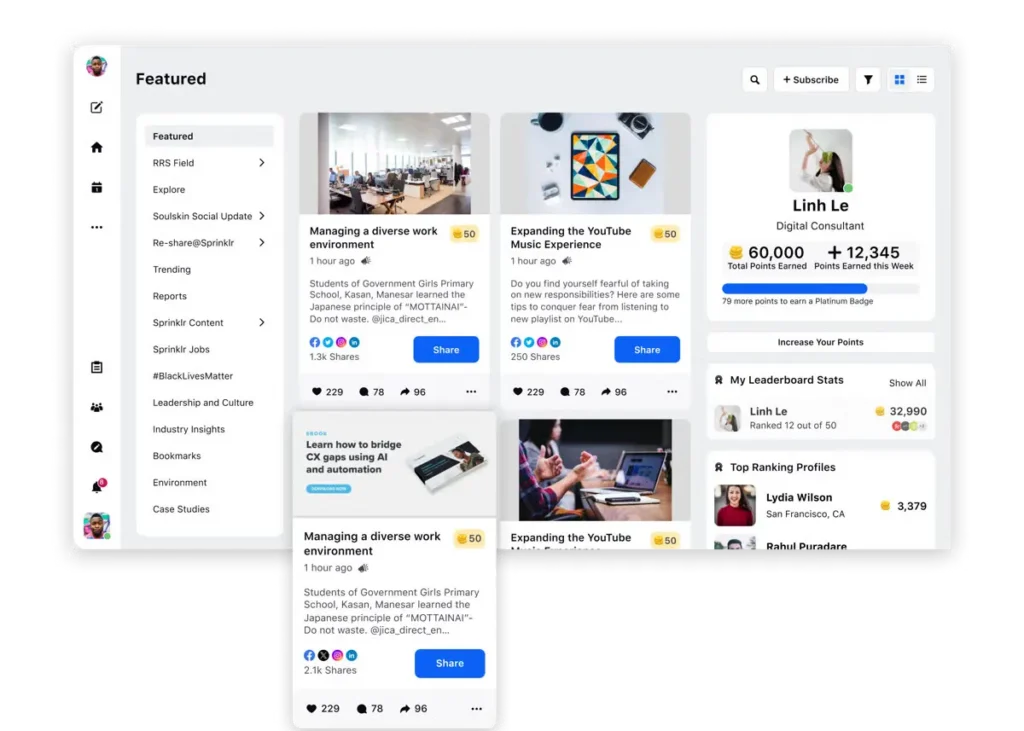
Sprinklr goes far beyond what most social media scheduling platforms offer. It combines scheduling, publishing, engagement, social listening, and analytics into one large system. I could schedule content across major platforms, manage multiple accounts, and keep everything organised inside a structured content calendar.
What stood out most to me was the level of control. Approval workflows are baked into the platform, which is useful for large social media teams but can slow things down if you just want to publish content quickly. Social listening tools let you track brand mentions and conversations across social media channels, but they require setup and time to really be useful.
Analytics are detailed and built for reporting. You can track post performance, audience demographics, and campaign results across social platforms. That depth is great for stakeholders, but it also means there is a learning curve. I often felt like I was using only part of the platform while a lot of advanced features stayed untouched.
Key features of Sprinklr:
- Social media scheduling for Facebook, Instagram, LinkedIn, X (Twitter), TikTok, YouTube, Pinterest
- Publishing and management for Google Business Profile and Google Business
- Media scheduling and bulk scheduling for high content volumes
- Central content calendar for managing multiple social media accounts
- Approval workflows with role-based permissions
- Unified inbox for comments, messages, and mentions across social media channels
- Social listening tools to track brand mentions and keywords
- Advanced analytics for post performance and campaign tracking
- Audience insights including demographics and engagement trends
- Collaboration tools for large social media teams
- Integrations with CRM, customer support, and marketing systems
- Support for managing multiple brands within one social media management platform
What I like about Sprinklr
What I appreciate about Sprinklr is how much control it gives you once everything is set up. It’s one of the few social media management platforms where you can genuinely run most of your social media work from one place.
Publishing, moderation, reporting, social listening, and governance all live in the same environment, which makes a big difference when you’re managing multiple social media accounts at scale.
A lot of the positives come down to consolidation. For large teams and complex setups, Sprinklr reduces the need to jump between tools and makes it easier to keep oversight, consistency, and structure across social media platforms.
Here’s what others say about Sprinklr’s pros:
- “Having most of the native social media features functional on the Sprinklr interface is a real advantage. It secures governance and account access, and allows for managing all activities in one place (writing with or without AI, publishing, content sponsorship, moderation, reporting).” – Cedric M., (Source)
- “The tool offers various possibilities for working with data obtained from social networks, whether through own pages or Social Listening. The insights that can be extracted using the filters are enormous. I really like the way it is possible to perform this data processing.” – Verified User (Source)
- “I like the capability of Sprinklr Social to post to multiple locations at once, which saves us a lot of time since it would otherwise take hours to post to all the social media pages individually. I also find the social listening feature valuable.” – Sara Chaudary P., (Source)
- “What I like best about Sprinklr Social is its ability to centralize and streamline social media management across multiple platforms. The unified dashboard, powerful scheduling tools, real-time engagement tracking, and AI-powered insights make it easy to stay on top of audience interactions while maintaining brand consistency. It’s a great tool for scaling content, monitoring sentiment, and driving smarter social strategy.” – Mohamed A. (Source)
- “I appreciate the reliability and the diverse features of Sprinklr Social, as it allows us to consolidate all our needs into one tool. We particularly use the Editorial Calendar for an overview of our posts, the tagging of topics to structure our content meaningfully, and the ability to prepare reports easily for the management board using the Presentations Tool.” – Verified User (Source)
What could be improved about Sprinklr
That same depth is also where Sprinklr starts to feel heavy. Many of the downsides show up once you go beyond basic scheduling and start configuring the platform properly. Setup takes time, some features require support or external help, and the interface can feel unintuitive, especially for new users.
Several limitations are also tied to integrations and APIs. Not every native platform feature makes it into Sprinklr, and some analytics or AI summaries feel uneven across different areas of the tool. It’s powerful, but it demands patience, training, and the right expectations.
Here’s what others say about Sprinklr’s cons:
- “Sometimes certain uses are complex to implement (configuration) and require the help of support (or a specialized agency – subcontractor).”– Cedric M., (Source)
- “It’s not user friendly, our accounts keep deactivating, it sometimes gives weird errors, and building reports is clunkier than I would like it to be. The UX just isn’t very good, some of the things are not labeled the way you’d expect. It was pretty difficult to set up initially.” – Sara Chaudary P., (Source)
- “Partially, it would be desirable to integrate even more platform features into Sprinklr. This often fails due to the connection via the API.” – Verified User (Source)
- “I don’t like the fact that some AI data summary reading features are only available for Listening and not for the Care area. This makes data analysis difficult because, for example, when there are spikes in cases on certain days of the month, we can’t get an AI summary of the comments to better understand what happened. This also prevents us from assessing whether the classifications used by the team make sense in light of the comments received.” – Verified User (Source)
- “While Sprinklr Social is a powerful platform, one area for improvement is its user interface, which can feel a bit complex and overwhelming for new users. Additionally, certain tasks—like pulling custom reports or navigating deep analytics—can require extra training or support. Streamlining some of these features could greatly enhance the overall user experience” – Mohamed A. (Source)
Sprinklr pricing
Frequently asked questions
What is the best social media scheduling tool?
Hands down, the best social media scheduling tool I’ve used is SocialBee. It’s easy to navigate, doesn’t overcomplicate basic tasks like scheduling social media posts, and handles multiple social media accounts without slowing down. Whether you’re a solo social media manager or juggling content for several brands, SocialBee strikes a great balance between simplicity and powerful features.
Other tools can be strong in specific areas (like advanced analytics or team workflows), but for everyday social media scheduling that just works, SocialBee is my go-to.
Does scheduling social media posts affect their performance?
Scheduling posts doesn’t hurt performance. The platforms don’t penalize you for using a scheduler.
What does affect performance is how and when you post.
Scheduling helps you stay consistent, post at better times, and avoid rushed captions or last-minute uploads at low-traffic hours. When you plan ahead, you’re more likely to publish with intention instead of reacting on the fly.
What are the best times to schedule posts on social media?
The best times to post on social media usually fall within workday routines and short breaks. Across most platforms, mornings tend to perform well, especially between 9 and 10 AM, with another strong window around lunch and early afternoon. Evenings can also work, depending on the platform and audience.
That said, timing does vary. Instagram and TikTok often perform better early in the morning or early evening, while LinkedIn and Twitter/X are more reliable during business hours. Google Business Profile posts tend to do well before work, during lunch breaks, and right after the workday ends. These are solid benchmarks, but your own audience data should always be the final judge.
Choose the social media scheduling tools that work best for YOU
After reviewing and actually using these social media scheduling tools, one thing became clear: there’s no single tool that works perfectly for everyone. Each platform has its strengths, but also very real trade-offs depending on how you plan, schedule, and manage social media day to day.
SocialBee works for me because it doesn’t overcomplicate things. It gives me structure where I need it and gets out of the way everywhere else. It’s the tool I keep coming back to, not because it’s perfect, but because it fits how social media work actually happens.
If you want a social media scheduler that stays practical as your workload grows, start your 14-day free SocialBee trial and see how it fits into your own way of working.