Most WooCommerce store owners hit a wall trying to turn visitors into paying customers. Sales trickle in slowly, customers abandon their carts, and you wonder what you’re missing.
This is because running a successful WooCommerce store goes far beyond just listing products online. Every element of your store, from your product pages to your checkout process, needs to work together to guide visitors toward making a purchase.
After working with many different online store owners, I’ve seen how small tweaks can turn struggling shops into thriving businesses.
This guide is designed to help you achieve just that. I’ll share a collection of my proven tips and strategies that deliver real results and make the biggest difference for your bottom line.

TL;DR: How to Succeed with WooCommerce
- Focus on the Customer Experience: Success comes from creating a smooth and trustworthy shopping journey, not just adding features. Every part of your store should work together to guide visitors from browsing to buying.
- Build a Strong Foundation First: Before focusing on marketing, make sure your store is fast, reliable, and mobile-friendly. A solid technical foundation prevents lost sales due to frustrated customers.
- Optimize for Conversions and Retention: Use social proof, a simple checkout process, and smart automation to turn visitors into buyers. Then, use excellent support and loyalty programs to keep them coming back.
- Put the Customer at the Center: Every decision, from design to support, should be made with your customer’s needs in mind. A customer-focused approach is the key to long-term growth.
Common Challenges for WooCommerce Store Owners
Many new store owners face unexpected hurdles. It is not just about putting products online; it is about overcoming specific friction points that stop visitors from buying.
Here are a few common issues and how they directly impact your bottom line:
| Common Challenge | How It Hurts Sales |
|---|---|
| Slow Website Performance | Visitors leave instantly if pages don’t load and may shop with your competitors. |
| High Cart Abandonment | Shoppers add items but give up at checkout due to friction. |
| Poor Mobile Experience | You lose sales from the majority of users browsing on phones. |
| Lack of Trust Signals | New visitors hesitate to buy because they don’t see social proof. |
The good news is that these problems are solvable. Once you understand the fundamentals, you can build a store that not only works well but actually drives sales.
If you’re just getting started, then begin with our WooCommerce Made Simple guide.
Otherwise, you can use these quick links to navigate through my top tips for success:
🧱 Build a Strong Foundation
Before you spend money on marketing, you need a rock-solid technical foundation. Why? Because in eCommerce, speed equals revenue.
Online shoppers are impatient. If your product pages take too long to load, visitors will hit the ‘back’ button and buy from your competitor instead. In fact, studies show that a loading delay of just one second can significantly drop your conversion rates.
A fast, reliable, and mobile-friendly store ensures that when you do bring visitors to your site, they stick around long enough to buy. These first steps are non-negotiable for success.
1. Upgrade to Fast & Reliable WooCommerce Hosting
Standard shared hosting plans often struggle with the constant database activity of a WooCommerce store, leading to slow page loads and crashes during traffic spikes.
Your hosting is the engine of your store. If it’s not powerful enough, then everything else suffers. That’s why upgrading to a specialized WooCommerce hosting provider is one of the most important investments you can make for stability and speed.
Look for hosts that offer features specifically designed to keep your store running smoothly. For example, server-level caching speeds up your pages automatically, while a Content Delivery Network (CDN) ensures fast loading times for customers all over the world.
You will also want access to one-click staging sites. This allows you to test new plugins or updates in a safe environment without risking breaking your live store and losing sales.
Most importantly, hosting companies with good support teams understand WooCommerce and can help you solve store-specific issues, which is invaluable. This foundation ensures your site is fast and reliable, especially during critical sales events like Black Friday.
SiteGround WooCommerce is my top recommendation. In fact, we use SiteGround to host the WPBeginner website itself because of its reliability and speed.
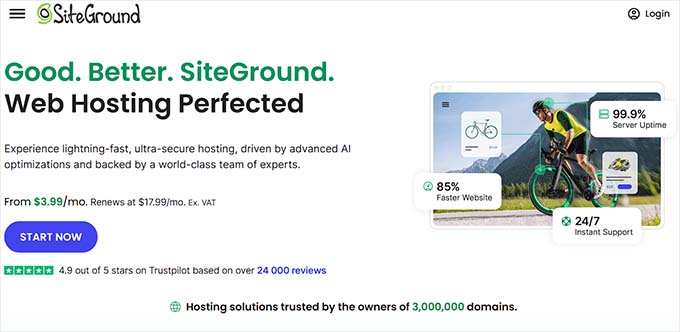
Their platform includes powerful security features to protect your store, and their customer support team is fantastic at resolving WordPress-specific issues quickly.
For a complete comparison of your options, see our guide to the best WooCommerce hosting providers.
2. Clean & Maintain Your WooCommerce Database
Over time, your store’s database accumulates a lot of unnecessary data, such as old product revisions, expired temporary data (e.g., items left in abandoned shopping carts), and information from uninstalled plugins.
This bloat forces your server to work harder for every request, which can significantly slow down your site’s admin area and storefront.
Regularly cleaning your database is an essential maintenance task. You can use a free plugin like WP-Optimize to safely clean up this junk data with just a few clicks.
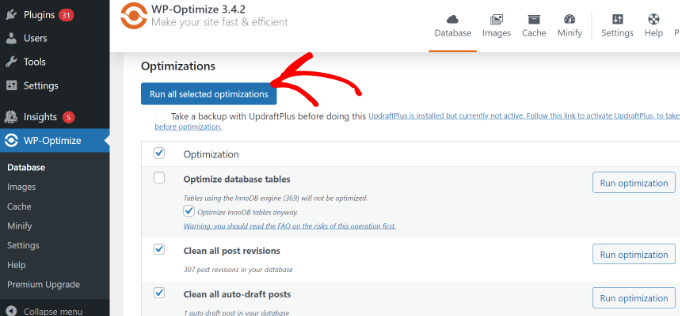
Learn the safe way to do this in my guide on how to optimize your WordPress database.
Important: Before you make any changes to your database, it is absolutely critical to create a full backup of your website. A plugin like Duplicator makes this easy and ensures you can restore your store if anything goes wrong.
3. Optimize Product Images for Better Performance
High-quality product photos are essential for sales, but they are often the biggest cause of a slow website. Every unoptimized image adds to your page’s loading time and increases the chances that visitors will leave.
The goal is to reduce the file size of your images as much as possible without sacrificing quality.
Before uploading, you should compress your images using an image tool or plugin to dramatically shrink their file size. This helps your pages load significantly faster for your visitors and is supported by all modern web browsers.
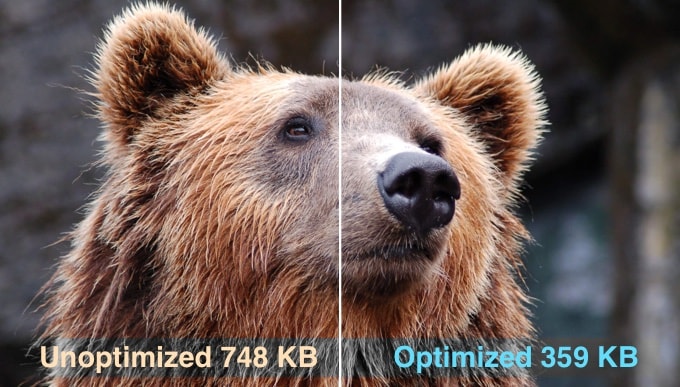
I recommend using the EWWW Image Optimizer plugin. It automatically compresses your images as you upload them, so you don’t have to remember to do it manually.
To help you get the most out of your product images, you can follow these detailed guides:
4. Optimize Your Store for Mobile Users
With over half of all online traffic coming from mobile devices, a poor mobile experience is no longer an option.
If your store is difficult to navigate, has tiny buttons, or requires pinching and zooming, you are actively losing sales from a majority of your potential customers.
Start by using a high-quality, responsive WordPress theme that automatically adapts to different screen sizes. However, don’t stop there.
You need to test the entire shopping journey on a real smartphone. Don’t just rely on your desktop browser’s preview mode; pick up your phone and act like a customer.
Here is a quick checklist of specific things to look for:
- Readability: Is the text large enough to read without pinching and zooming?
- Clickability: Are buttons and links spaced far enough apart so that you don’t accidentally tap the wrong one?
- Navigation: Is the menu easy to open and use on a small screen?
- Popups: Do email signup forms cover the entire screen, making it impossible to close them?
By identifying and fixing these specific issues, you create a smoother experience, which directly leads to more mobile sales.
For more details on this process, see our guide on how to optimize the customer journey for your WooCommerce store.
🎨 Design a Store That Inspires Trust
Your website’s design is like a physical shop window. If it looks messy or outdated, then people will keep walking.
But a professional, modern-looking store invites them in. It immediately builds credibility and makes visitors feel safe enough to hand over their credit card details.
Trust is about creating an experience that feels secure and reliable, which encourages visitors to become customers.
5. Choose a Professional Theme and Page Builder
Your store’s design is your first chance to build trust. Customers are far more likely to buy when your site is easy to navigate and feels professional from the first click.
Good store design also shapes how customers make buying decisions. A clear product hierarchy, consistent layouts, and obvious next steps help shoppers understand what matters most and reduce hesitation as they browse.
When your store guides people smoothly from product to product, it naturally leads to more add-to-carts and completed checkouts.
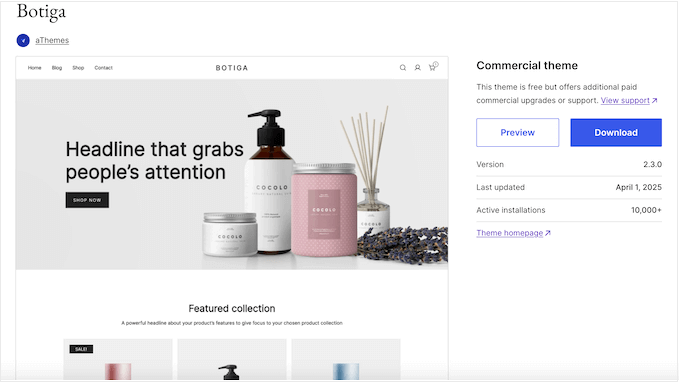
This is where choosing the right WooCommerce theme is so important.
Botiga is a great example. It is built specifically for WooCommerce, ensuring your product pages and checkout look professional and load quickly.
For more picks, see our roundup of the fastest WooCommerce themes.
While your theme handles the overall structure of your store, you’ll often want more flexibility for things like landing pages, seasonal promotions, or a custom homepage. This is where a page builder like SeedProd becomes especially useful.
SeedProd works alongside your theme. It allows you to build high-converting landing pages and product pages using a simple drag-and-drop editor, giving you complete creative freedom.
You can highlight best-selling products, build campaign-specific layouts, and control exactly how customers move toward checkout, all without touching code.
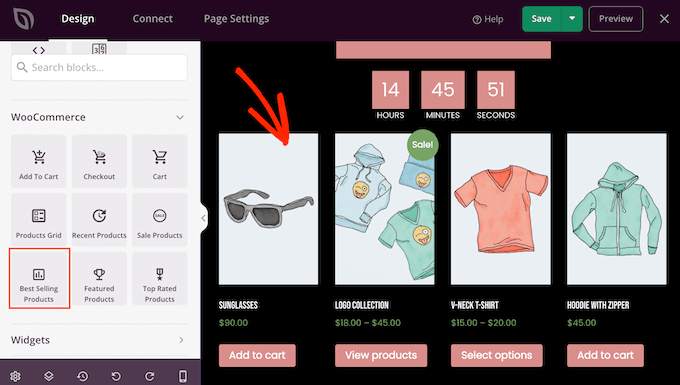
For details, see our guide on how to design WooCommerce product pages.
6. Expand Your Market With Multiple Languages & Currencies
If you only sell in one language and currency, then you’re missing out on a massive global market.
Research shows that shoppers overwhelmingly prefer to buy from sites that provide information in their native language and display prices in their local currency. It removes uncertainty and builds a huge amount of trust.
Instead of patching together multiple plugins, it’s best to use a single, powerful solution. A plugin like WPML (WordPress Multilingual Plugin) is designed to handle both tasks seamlessly.
It allows you to translate everything, from product descriptions to checkout fields, and its WooCommerce add-on can automatically detect a visitor’s location to show the correct currency. This creates a professional, trustworthy experience for international customers.
Learn how in our guide on how to create a multilingual WordPress site with WPML.
🛒 Streamline the Shopping Experience
Every extra click or confusing step in your checkout process gives a customer a reason to leave.
By simply removing friction from the buying process, you can make it as easy as possible for people to give you their money.
7. Set Up Frictionless Checkout to Minimize Cart Abandonment
The default WooCommerce checkout page is functional, but it’s not optimized for conversions. A long or complicated checkout process is one of the top reasons customers abandon their carts. Each unnecessary field or extra step gives them a chance to second-guess their purchase.
I recommend replacing the standard checkout with a high-converting, streamlined process using a tool like FunnelKit. It creates beautiful, mobile-friendly checkout pages that are designed to be as frictionless as possible.
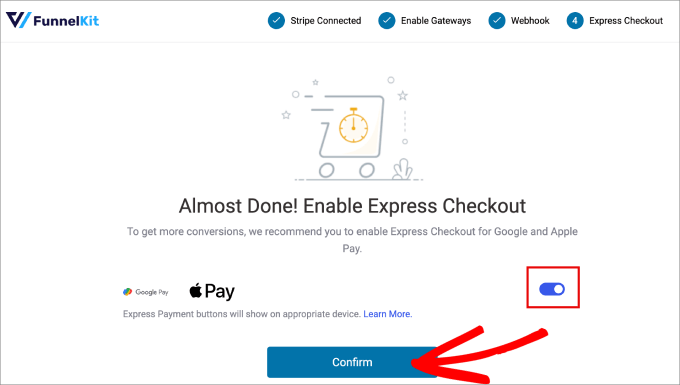
You can follow these guides to simplify the process:
8. Set Up an Abandoned Cart Recovery Strategy
On average, around 70% of shopping carts are abandoned. This means that for every 10 customers who add products to their cart, 7 of them leave without paying.
You need a systematic way to bring these visitors back. This is known as abandoned cart recovery.
While sending reminder emails is the most common method, a comprehensive strategy often involves multiple touchpoints to ensure customers return to complete their purchases.
You can use a tool like FunnelKit Automations to set up these workflows automatically. It allows you to send timely reminders, offer personalized coupons, and track exactly how much revenue you recover.
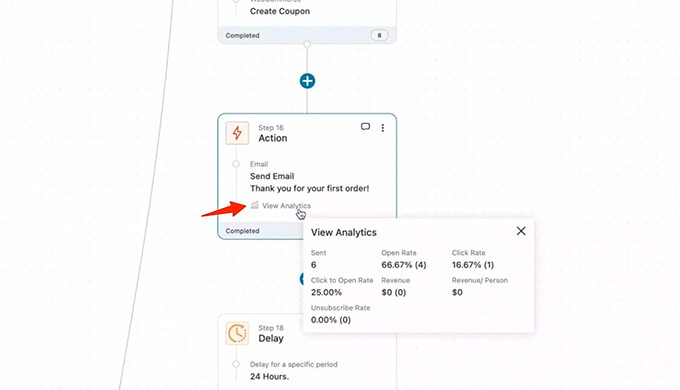
For a complete breakdown of the best strategies, see our guide on how to set up WooCommerce cart recovery the right way.
Tip: To make sure your recovery emails actually land in the inbox and not the spam folder, I strongly recommend using WP Mail SMTP to improve your WooCommerce store’s email deliverability.
9. Automate Invoicing & Payments
Administrative tasks like creating invoices take you away from focusing on growing your business. On the other hand, automating this process can save you hours.
It also makes sure your customers receive professional, consistent documentation. This helps build trust and streamline your bookkeeping.
The easiest way to do this is with a free plugin like WooCommerce PDF Invoices & Packing Slips. Once installed, it will automatically generate a professional PDF invoice for every completed order and attach it to the customer’s order confirmation email.
This provides a better customer experience with zero ongoing effort on your part.
For more ideas, see our guide on the best WooCommerce automations to increase sales.
📈 Attract and Convert More Customers
Getting traffic is only half the battle. The real challenge is converting visitors into customers. With average eCommerce conversion rates ranging from 2% to 3%, you need powerful strategies to persuade shoppers to buy.
Fortunately, you don’t need to be a marketing genius to fix this. Let’s look at a few proven ways to boost your sales using SEO, social proof, and smart offers.
10. Use WooCommerce SEO to Attract More Shoppers
Search Engine Optimization (SEO) is the process of improving your online store’s rankings in Google search results. This is important for attracting shoppers who are actively looking for the products you sell.
Unlike paid ads, traffic from SEO is free and continues to bring in customers long after you’ve done the work.
To get started, you can use a plugin like All in One SEO (AIOSEO), which makes it easy to optimize your product titles, descriptions, and category pages.
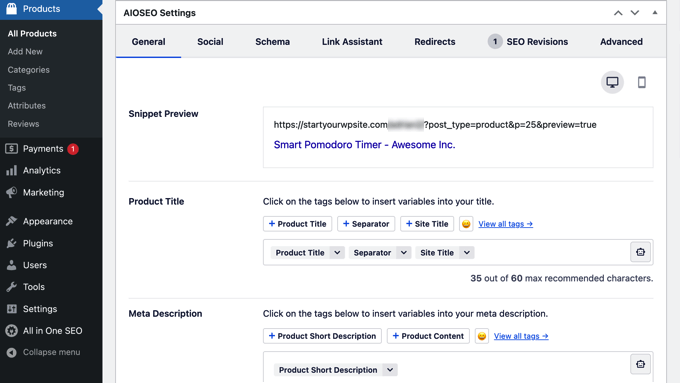
Beyond optimizing your store pages, consider creating helpful blog content related to your products. To find the best topics, simply look at the questions your customers ask in support emails.
For example, if a customer asks, “How do I grind beans for a French Press?”, you can bet hundreds of others are searching for that exact phrase in Google. Writing a blog post to answer it will bring those potential customers right to your store.
Follow my WooCommerce SEO guide for a complete strategy.
Also, if your store has a physical location, local SEO can drive significant foot traffic and online sales from nearby customers. Local search optimization helps you appear when people search for products ‘near me’ or in your city.
11. Boost Conversions With Social Proof
Social proof is the idea that people are more likely to buy if they see others doing it. It reduces hesitation and builds immediate trust.
First, I recommend using a plugin like TrustPulse to display real-time notifications of recent sales. This creates a sense of urgency and shows new visitors that your store is popular.
You can learn how to set this up in our guide on how to use FOMO on your site to increase conversions.
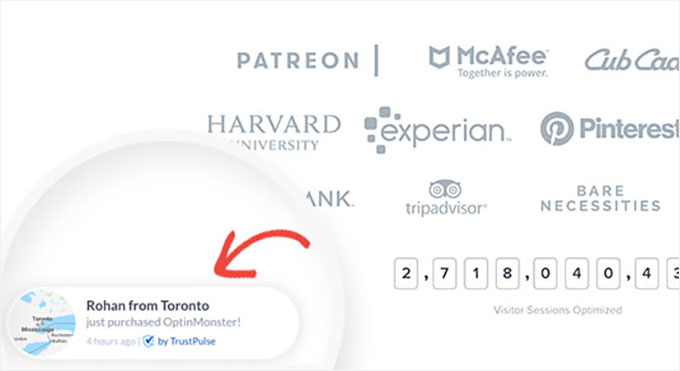
Second, it’s a good idea prominently display customer reviews. You can use a tool like Smash Balloon Reviews Feed Pro to easily collect and showcase authentic reviews on your product pages, which is one of the strongest trust signals you can have.
For details on how to do this, see our guide on how to show Google, Facebook, and Yelp reviews in WordPress.
12. Increase Sales With Smart WooCommerce Coupons
While basic percentage-off coupons (like 50% off) can drive sales, they can also train customers to always wait for a discount. This can hurt your profits.
A better approach is to use smart coupons that encourage specific behaviors, like increasing order size or buying for the first time.
A plugin like Advanced Coupons unlocks these powerful strategies. You can create Buy One, Get One (BOGO) deals that clear inventory, offer free shipping for orders over $50 to increase average order value, or give a special discount only to first-time customers.
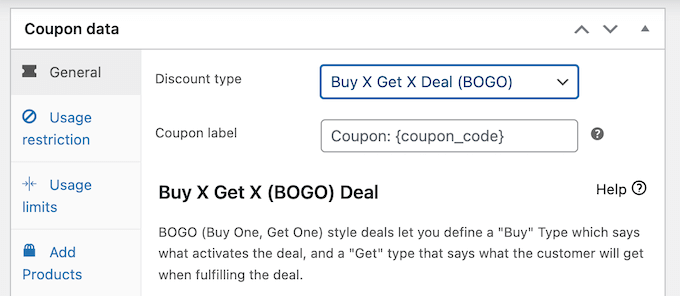
This strategic use of coupons can significantly boost sales without devaluing your brand.
You can learn how by following our guide on how to create smart coupons in WooCommerce.
13. Increase Sales With Upsells and Order Bumps
One of the easiest ways to increase your revenue is to sell more to the customers you already have. Two of the best ways to achieve this are order bumps and upsells.
An order bump is a small, relevant add-on that customers can add to their order with a single click right on the checkout page (such as “Add gift wrapping for $5”).
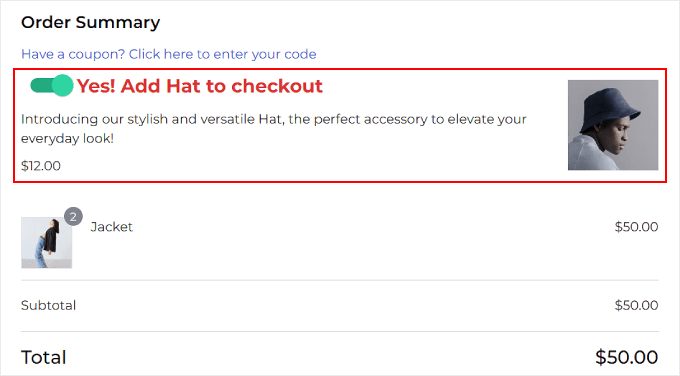
On the other hand, an upsell is a larger offer presented immediately after a customer completes their purchase but before they see the thank you page (for example, “Get a matching accessory for 20% off”).
A tool like FunnelKit makes it easy to add both to your store. Implemented correctly, these can significantly increase your average order value.
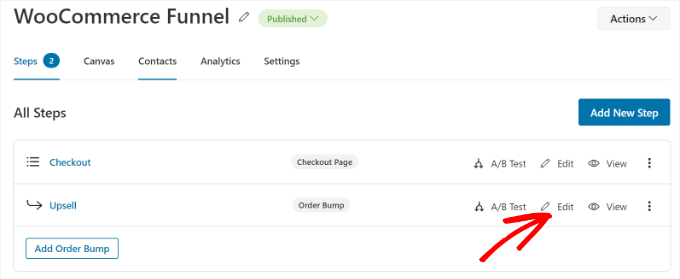
Learn more in our guide on how to upsell products in WooCommerce.
Most people who visit your store will leave without making a purchase. If you don’t get their email address, you have no way to bring them back.
Building an email list allows you to send new product announcements, flash sales, and exclusive coupons directly to interested shoppers. This is the most effective way to turn window shoppers into paying customers.
You can use a tool like OptinMonster to create targeted campaigns, such as an ‘exit-intent’ popup that offers a 10% discount to visitors who are about to leave your site.
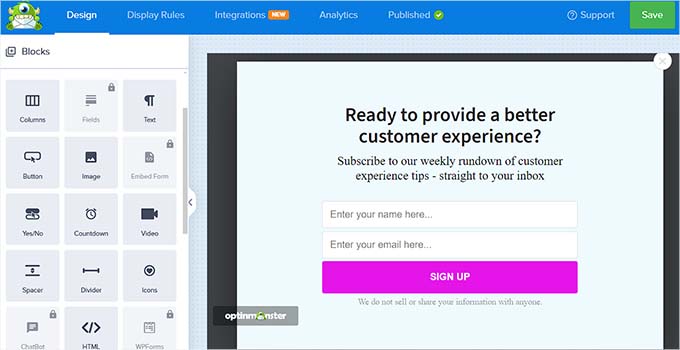
You can also use WPForms to add simple newsletter signup forms in your footer or sidebar.
Once you have their email address, the next step is to use an email marketing service to send promotions and build customer relationships.
Check out my full guide on how to build an email list in WordPress for all the details.
🤖 Use Data and AI to Work Smarter
Running a store involves a lot of guesswork. Unless you use data.
By combining analytics with AI tools, you can stop guessing what your customers want and start automating the busy work.
This frees up your time so you can focus on growing your business instead of just running it.
15. Use Analytics to Understand Your Customers
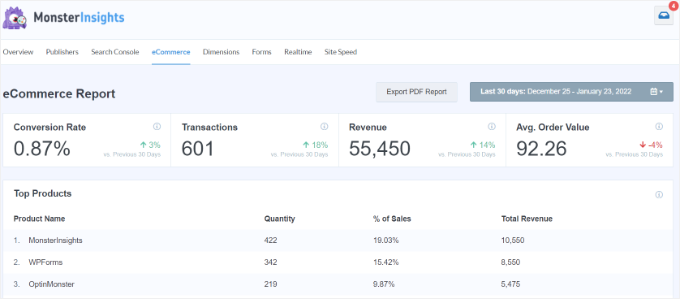
Without analytics, you’re running your store blind. Data shows you exactly how customers find your store, which products they view, and where they drop off in the buying process. This allows you to stop guessing and start making informed decisions to improve your sales.
The best way to track this data is with MonsterInsights, which makes Google Analytics easy for beginners. It shows you all your key eCommerce metrics right in your WordPress dashboard.
See our guide on how to enable customer tracking in WooCommerce with Google Analytics.
To understand the ‘why’ behind the numbers, I also recommend using a tool like UserFeedback to run simple post-purchase surveys to ask customers directly for their opinions on your products and shopping experience.
16. Use AI Tools to Automate Product Descriptions
Artificial Intelligence is no longer a futuristic concept. Instead, it’s a practical tool that can save you time and help you make more sales. You can use AI to automate repetitive tasks, freeing you up to focus on strategy.
For instance, I recommend using StoreAgent to automatically generate compelling product descriptions that drive sales. This powerful WooCommerce plugin uses AI to write hundreds of engaging, unique product descriptions that convert visitors into customers.
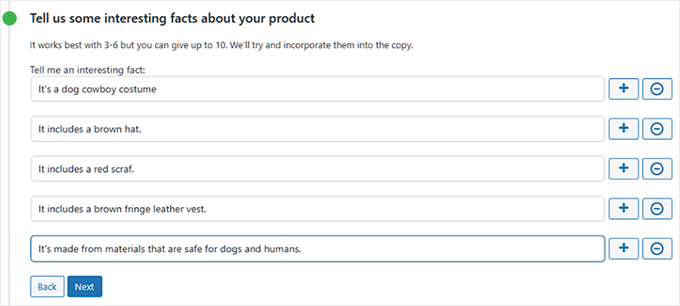
For details, see our guide on how to automatically generate WooCommerce product descriptions with AI.
💬 Support and Retain Your Customers
Did you know that it is actually much cheaper to keep an existing customer than to find a new one?
The most profitable stores treat their existing buyers like VIPs. By focusing on excellent support and loyalty rewards, you can create a fan base that buys from you again and again.
17. Deliver Fast, Professional Customer Support
Excellent customer support is a powerful way to stand out from the competition.
When customers know they can get fast and helpful answers to their questions, they feel more confident buying from you. It’s a key factor in turning one-time buyers into loyal, repeat customers.
For immediate pre-sale questions, adding WPChat to your store can significantly boost conversions. It allows customers to contact you directly through popular messaging apps like WhatsApp, Telegram, and Facebook Messenger.
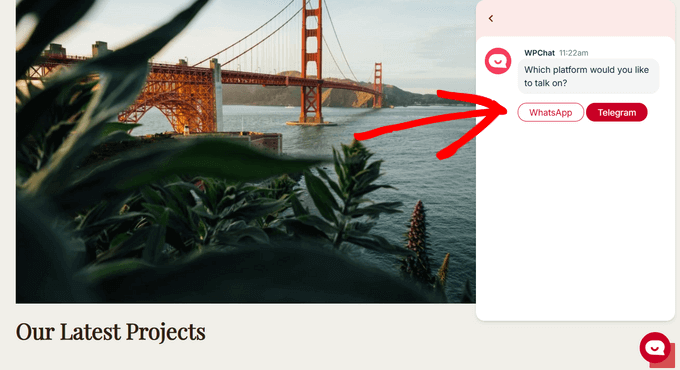
Plus, it allows you to create an AI-powered FAQ section so that customers can get quick answers to common questions about your online store.
This lets you resolve customer doubts in real time before they leave your site.
For more ideas, see our guide on how to use AI for customer service.
18. Foster Loyalty With Rewards Programs
Your most profitable customers are often your repeat customers.
A loyalty program is a proven strategy to encourage repeat business by making customers feel valued and rewarded for their continued support. It creates an emotional connection to your brand that goes beyond just price.
You can encourage your loyal customers to tell others about your store by setting up a refer-a-friend program using a plugin like RewardsWP. When someone responds to their invitation, both the customer and their friend receive a reward, such as a discount or free product.
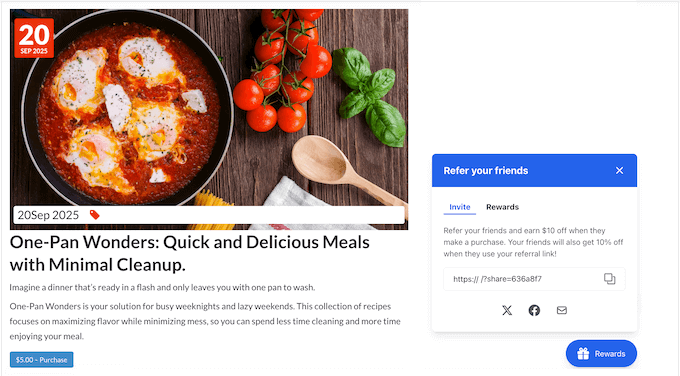
You can also easily create a loyalty system with the Advanced Coupons plugin. It allows you to set up a points-based system where customers earn points for actions like making a purchase or writing a review.
They can then redeem these points for coupons and other rewards, giving them a compelling reason to shop with you again instead of your competitors.
See my guide on how I set up a WooCommerce rewards program for step-by-step instructions.
Frequently Asked Questions About WooCommerce Store Success
Running a successful WooCommerce store involves many moving parts, and it’s natural to have questions about implementation, timing, and results.
Here are the most common questions I hear from store owners who are working to optimize their online businesses and turn more visitors into loyal customers.
How long does it take to see results after optimizing WooCommerce?
Most store owners start seeing improvements within 2-4 weeks of implementing these strategies, though the timeline varies depending on which changes you prioritize first.
Technical improvements like hosting upgrades and image optimization often show immediate results, while SEO and email marketing strategies typically take 1-3 months to gain momentum.
What can I do to give my WooCommerce store the best chance of success?
The most important factor is creating a smooth, trustworthy shopping experience from start to finish. This means having fast loading times, a mobile-friendly design, an easy checkout process, and reliable customer support working together seamlessly.
Where should I start with WooCommerce optimization?
It is best to implement these strategies gradually so you can measure the impact of each change. Start with the foundational elements like hosting and site speed, then move on to conversion optimization and customer retention strategies.
What is the biggest mistake new WooCommerce store owners make?
The biggest mistake is focusing only on getting more traffic without optimizing the conversion process. Many store owners spend heavily on advertising while ignoring cart abandonment, slow loading times, or poor mobile experience that prevent visitors from becoming customers.
Additional Resources for a Successful WooCommerce Store
I hope these tips help you achieve success with your WooCommerce store.
You may like to see some additional guides to learn advanced eCommerce strategies and solve common challenges:
If you liked this article, then please subscribe to our YouTube Channel for WordPress video tutorials. You can also find us on Twitter and Facebook.