By using this site, you agree to the Privacy Policy and Terms of Use.
Accept
World of SoftwareWorld of SoftwareWorld of Software
  • News
  • Software
  • Mobile
  • Computing
  • Gaming
  • Videos
  • More
    • Gadget
    • Web Stories
    • Trending
    • Press Release
Search
  • Privacy
  • Terms
  • Advertise
  • Contact
Copyright © All Rights Reserved. World of Software.
Reading: Simplifying Domain Management with Azure Front Door: A Step-by-Step Guide | HackerNoon
Share
Sign In
Notification Show More
Font ResizerAa
World of SoftwareWorld of Software
Font ResizerAa
  • Software
  • Mobile
  • Computing
  • Gadget
  • Gaming
  • Videos
Search
  • News
  • Software
  • Mobile
  • Computing
  • Gaming
  • Videos
  • More
    • Gadget
    • Web Stories
    • Trending
    • Press Release
Have an existing account? Sign In
Follow US
  • Privacy
  • Terms
  • Advertise
  • Contact
Copyright © All Rights Reserved. World of Software.
World of Software > Computing > Simplifying Domain Management with Azure Front Door: A Step-by-Step Guide | HackerNoon
Computing

Simplifying Domain Management with Azure Front Door: A Step-by-Step Guide | HackerNoon

News Room
Last updated: 2025/10/17 at 11:45 AM
News Room Published 17 October 2025
Share
Simplifying Domain Management with Azure Front Door: A Step-by-Step Guide | HackerNoon
SHARE

Managing multiple Azure resources with custom domains can quickly become messy. Instead of creating separate CNAME records for each service, Azure Front Door offers a cleaner, more centralized approach. In this post, I’ll walk you through setting up Azure Front Door to manage multiple custom domains from a single endpoint.

What We’re Building

I recently set up a demo environment that showcases how Azure Front Door can streamline domain management. Here’s what I created:

Azure Resources (Resource Group: “fd-demo”):

  • API Management: example-apim-1

  • Web App Service: web-app-1

  • Function App: fn-app

  • Front Door: house-door

Custom Domains:

  • gateway.somedns.xyz → API Management
  • web.somedns.xyz → Web App Service
  • function.somedns.xyz → Function App

Step 1: Add Custom Domains to Front Door

First, I added all my custom domains in the Front Door’s Domains section:

  • gateway.somedns.xyz

  • web.somedns.xyz

  • function.somedns.xyz

At this point, these domains are added but not yet validated or routed.

Step 2: Create Origin Groups

Next, I set up Origin Groups to define where traffic should go:

  • “gateway-origin” → Added the API Management service (example-apim-1) as the origin
  • “web-origin” → Added the Web App Service (web-app-1) as the origin
  • “function-origin” → Added the Function App (fn-app) as the origin

Think of origin groups as containers that hold your actual Azure resources.

Step 3: Configure Routes

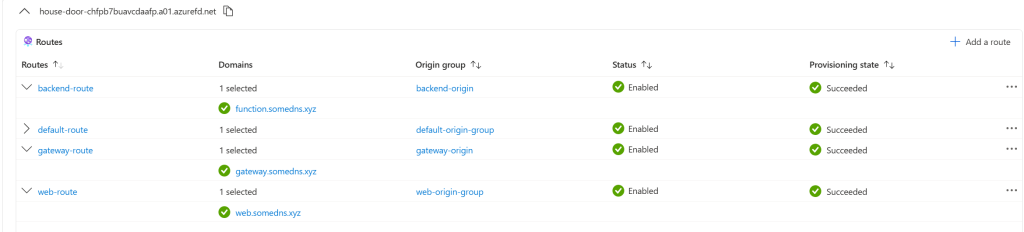
In the Front Door Manager section, under my main Front Door endpoint (house-door-chfpb7buavcdaafp.a01.azurefd.net), I created routes to connect domains with their respective origin groups:

  • “gateway-route” → gateway.somedns.xyz → gateway-origin
  • “web-route” → web.somedns.xyz → web-origin
  • “backend-route” → function.somedns.xyz → function-origin

Now Azure knows which domain should route to which service.Note: you can add more endpoints other than the default one and then add your routes.

Step 4: Update DNS Records

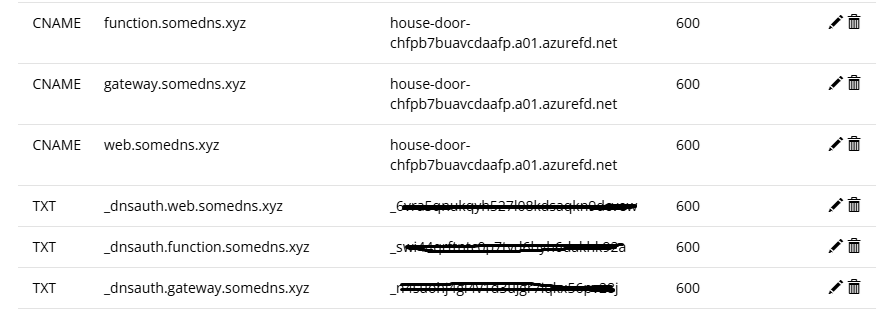
Here’s where the magic happens. Instead of creating separate CNAME records for each Azure service, I only needed to add one CNAME record in my domain registrar (Porkbun):

gateway.somedns.xyz    CNAME    house-door-chfpb7buavcdaafp.a01.azurefd.net 
web.somedns.xyz        CNAME    house-door-chfpb7buavcdaafp.a01.azurefd.net 
function.somedns.xyz   CNAME    house-door-chfpb7buavcdaafp.a01.azurefd.net

Pro tip: You can verify DNS propagation using dnschecker.org to make sure your records are live worldwide.

Step 5: Domain Validation with TXT Records

Back in Azure, each domain will show a “Pending” validation status. For each domain:

  1. Click the validation link

  2. Copy the Azure-generated TXT record

  3. Add it to your domain registrar

  4. Wait 5-60 minutes for validation to complete
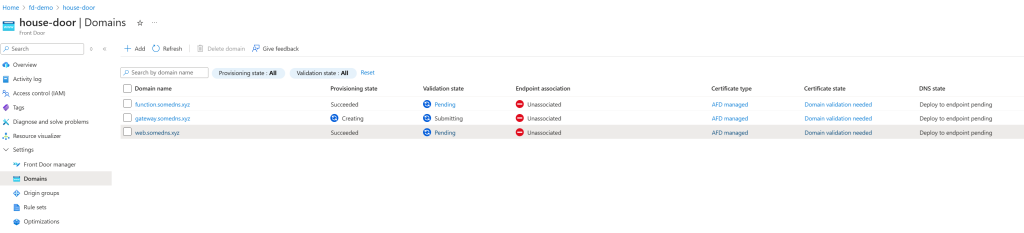
The TXT records look something like:

_dnsauth.gateway.somedns.xyz TXT “generated-validation-string”

Here is an example of how the records should look like in your domain registrar:
Step 6: Test Your Setup

Once validation is complete, all pending domains should be approved

and all routes verified:
test each URL:

  • https://gateway.somedns.xyz → Should hit your API Management

  • https://web.somedns.xyz → Should hit your Web App Service

  • https://function.somedns.xyz → Should hit your Function App

Why This Approach:

Before Front Door:

  • Separate CNAME records for each Azure service
  • Multiple SSL certificates to manage
  • Limited traffic control and routing options
  • Harder to implement global rules

With Front Door:

  • Single CNAME endpoint for all domains
  • Centralized SSL certificate management
  • Advanced routing, caching, and security rules
  • Better performance with global edge locations
  • Cleaner DNS management

Conclusion

Azure Front Door transforms domain management from a scattered approach to a centralized one. Instead of juggling multiple DNS records and configurations, you get a single point of control for all your domains and traffic routing.

This setup gives you a solid foundation for adding more advanced features like custom routing rules, caching policies, and security configurations—all managed from one place.


Sign Up For Daily Newsletter

Be keep up! Get the latest breaking news delivered straight to your inbox.
By signing up, you agree to our Terms of Use and acknowledge the data practices in our Privacy Policy. You may unsubscribe at any time.
Share This Article
Facebook Twitter Email Print
Share
What do you think?
Love0
Sad0
Happy0
Sleepy0
Angry0
Dead0
Wink0
Previous Article Galaxy S26 battery and charging: Everything you need to know Galaxy S26 battery and charging: Everything you need to know
Next Article Keeper review – a sparkling ecological fantasy of pure imagination Keeper review – a sparkling ecological fantasy of pure imagination
Leave a comment

Leave a Reply Cancel reply

Your email address will not be published. Required fields are marked *

Stay Connected

248.1k Like
69.1k Follow
134k Pin
54.3k Follow

Latest News

Akamai acquires WebAssembly function-as-a-service startup Fermyon –  News
Akamai acquires WebAssembly function-as-a-service startup Fermyon – News
News
I’m Going to Save You Big Bucks With These Cyber Monday Wi-Fi Mesh & Router Deals From Netgear and TP-Link
News
From Prompt to Pixel: Inside the 10Web AI Website Builder API Pipeline
Computing
Tesla drops free 40-day Full Self-Driving trial for car owners
Software

You Might also Like

From Prompt to Pixel: Inside the 10Web AI Website Builder API Pipeline
Computing

From Prompt to Pixel: Inside the 10Web AI Website Builder API Pipeline

14 Min Read
⚡ Weekly Recap: Hot CVEs, npm Worm Returns, Firefox RCE, M365 Email Raid & More
Computing

⚡ Weekly Recap: Hot CVEs, npm Worm Returns, Firefox RCE, M365 Email Raid & More

25 Min Read
Jumia’s new business model is made in China
Computing

Jumia’s new business model is made in China

11 Min Read
Supercharging AI Workflows: Distributed Document Processing with Node.js, Python, and RabbitMQ | HackerNoon
Computing

Supercharging AI Workflows: Distributed Document Processing with Node.js, Python, and RabbitMQ | HackerNoon

15 Min Read
//

World of Software is your one-stop website for the latest tech news and updates, follow us now to get the news that matters to you.

Quick Link

  • Privacy Policy
  • Terms of use
  • Advertise
  • Contact

Topics

  • Computing
  • Software
  • Press Release
  • Trending

Sign Up for Our Newsletter

Subscribe to our newsletter to get our newest articles instantly!

World of SoftwareWorld of Software
Follow US
Copyright © All Rights Reserved. World of Software.
Welcome Back!

Sign in to your account

Lost your password?