Ever since the demise of Google Reader way back in 2013, it feels like the internet has been moving away from RSS feed readers. Corporations have been opting for something much more easily monetized with personalized feed readers, such as Google Discover. Of course, if you’ve had the pleasure of using Google Discover by wading through its ads and AI clickbait titles, it’s easy to see why Google Reader and its more traditional use of RSS are still held in high regard.
Many AI-driven readers that personalize results like Discover end up pushing things you don’t want to see, whereas a typical RSS reader only shows you content from the sites you’ve subscribed to. As it turns out, leaving bots to do the hard work of sorting your interests isn’t always in your best interest. This is why RSS apps that offer a middle ground of recommended content, built specifically from your chosen RSS feeds, are a much more dependable way to consume news.
Instead of relying on bots to serve up your news, you can start using a typical RSS reader that provides you more control over your content, which is why we’ve compiled a list of the top RSS readers to get you started in 2026. Kick off the new year with less slop in your life by taking advantage of these three killer RSS reading apps.
Inoreader
To kick things off with a bang, let’s start with Inoreader, an RSS feed reader that nails the basics, while still offering features for power users. Not only is the UI straightforward to navigate on any platform, but it’s also very versatile, as it lets you add more than just RSS feeds to the service. This way, if you’d like to see content from a specific Reddit sub or X (Twitter) user within your feed, you absolutely can. Basically, you can use Inoreader to scrape a lot of content from the web, RSS or not, which is very handy for anyone looking to stay on top of their interests in one place.
What’s really nice is that the core service is free to use at up to 150 feeds, with support for a custom view and alerts. However, the free tier omits some features, such as custom scraping of social media and newsletters. If you’d like to jump up to the paid Pro plan, that’ll run you $10 a month ($7.50 a month if you pay annually). That’s a pretty reasonable price if you’re a power user who needs to go beyond the typical features, with support of up to 2,500 RSS feed subscriptions. This is handily one of the highest offerings for a paid tier out of any comparable service.
Yes, Inoreader offers AI features called Inoreader Intelligence, which are part of the Pro plan. This includes article summaries, and the AI can even suggest tags to better sort your content. More or less, AI isn’t the main focus of the service, which is a refreshing change of pace. Basically, Inoreader is our top pick for those looking for a free and clean RSS reader that offers all of the basics you need to round up all of your favorite RSS feeds, with a few power-user tools in the mix.
Feedly
Feedly and Inoreader are pretty similar, thanks to their easy-to-navigate UIs and free tiers that offer all the basics anyone would expect from an RSS reader. Feedly tends to excel with its simple UI more so than Inoreader: It’s a bit more approachable and user-friendly for those unaccustomed to RSS readers, thanks to its magazine view. However, you are limited to 100 feeds on the free tier (versus Inoreader’s 150), which may be plenty for most users, but is still less than the competition.
Then again, if you’re willing to pay $6 per month for the Pro plan, you can bump that to 1,000 feeds, which is cheaper than Inoreader’s Pro plan. There’s also a Pro+ plan that doubles the price at $12 per month, which’ll net you 2,500 feeds. You’ll also get AI features like content curation and filtering, along with Evernote support to easily save your favorite articles outside of the app/service.
Where Inoreader is designed a little more for power users, Feedly’s ethos is all about keeping things simple. Even though both RSS services are similar, thanks to pricing and features, Feedly is easily the better reader for first-timers dipping their toes into the wonders of RSS, whether they want to read in a free mobile app or on a website on their desktop.
Readwise Reader
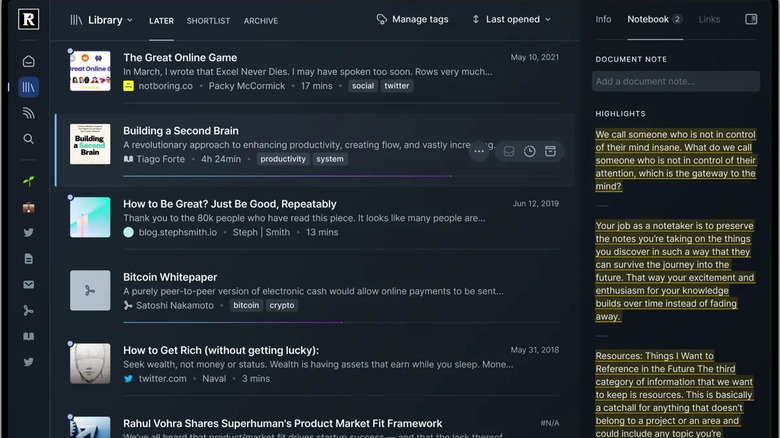
Since Feedly and Inoreader are pretty much neck-and-neck in terms of features and pricing, Readwise Reader offers something a little different. Think of Readwise Reader as comparable to services like Pocket: You can save all of the cool things you find on the web into Readwise Reader. Better yet, Readwise Reader also doubles as an RSS feed reader, which means it’s more of an all-in-one solution for users interested in saving everything they find online in one place. This is especially helpful when essentials like a desktop app are available, alongside the mobile apps; something few other RSS readers offer.
What’s especially nice about Readwise Reader is that there is no limit on how many RSS feeds you can add to the service, though there are limits to the Daily Digest; keeping what you see to 20-25 posts per day, and five saved items. This means you can save your feeds for offline reading. However, unlike Feedly and Inoreader, there is no free tier. Instead, you can trial Readwise Reader for free for 30 days. After that, you have the choice to sign up for the Readwise Lite tier at $5.59 per month, or the full Readwise plan at $9.99 per month, which’ll net you access to a reading app, exports, and early access beta features.
Readwise Reader is for those who are looking for something that goes above and beyond what Feedly and Inoreader offer, with the ability to save a wide range of content to the service beyond RSS. It may not offer as many sorting options as Feedly or Inoreader, which are more tuned as traditional RSS readers, but it excels at serving up things like YouTube, Newsletters, ePubs, and even PDFs, all in one place. Readwise Reader offers the best blend of features from apps like Instapaper and Pocket, combined with a traditional RSS feed reader, and it’s well worth considering if you need more from your RSS reader.