By using this site, you agree to the Privacy Policy and Terms of Use.
Accept
World of SoftwareWorld of SoftwareWorld of Software
  • News
  • Software
  • Mobile
  • Computing
  • Gaming
  • Videos
  • More
    • Gadget
    • Web Stories
    • Trending
    • Press Release
Search
  • Privacy
  • Terms
  • Advertise
  • Contact
Copyright © All Rights Reserved. World of Software.
Reading: The Reason Why Your Keyboard’s ‘F’ And ‘J’ Keys Have Little Bumps On Them – BGR
Share
Sign In
Notification Show More
Font ResizerAa
World of SoftwareWorld of Software
Font ResizerAa
  • Software
  • Mobile
  • Computing
  • Gadget
  • Gaming
  • Videos
Search
  • News
  • Software
  • Mobile
  • Computing
  • Gaming
  • Videos
  • More
    • Gadget
    • Web Stories
    • Trending
    • Press Release
Have an existing account? Sign In
Follow US
  • Privacy
  • Terms
  • Advertise
  • Contact
Copyright © All Rights Reserved. World of Software.
World of Software > News > The Reason Why Your Keyboard’s ‘F’ And ‘J’ Keys Have Little Bumps On Them – BGR
News

The Reason Why Your Keyboard’s ‘F’ And ‘J’ Keys Have Little Bumps On Them – BGR

News Room
Last updated: 2026/03/05 at 6:31 AM
News Room Published 5 March 2026
Share
The Reason Why Your Keyboard’s ‘F’ And ‘J’ Keys Have Little Bumps On Them – BGR
SHARE


Moleql/Getty Images

We may receive a commission on purchases made from links.

Many of us use desktop computers, workstations, or even gaming laptops regularly. When interacting with these devices, you’ll most likely use a keyboard and mouse. Whether you’ve closely observed the keys or tried cleaning your laptop keyboard, you’ve probably seen a small, useful feature on standard QWERTY keyboards that may be helping you type, without you even knowing it. Most computer keyboards feature a small tactile bump on their ‘J’ and ‘F’ keys. You may have noticed these bumps before, but never known their purpose, or this could be the first time you’ve spotted them.

While the bumps on these keys may go unnoticed, they’re a valuable design feature, especially if you type a lot. The design of these keys helps you type faster and more efficiently by ensuring you can find your finger placement on your keyboard without looking at the keys. Here’s a breakdown of why your keyboard’s ‘F’ and ‘J’ keys have bumps on them.

Why do the keyboard ‘F’ and ‘J’ keys have bumps?
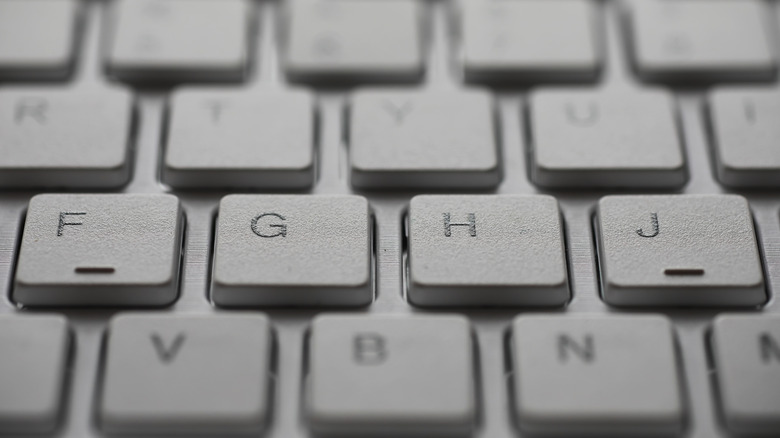

A close up of a keyboard showing bumps on the 'F' and 'J' keys
alexkich/Shutterstock

Tactile bumps (also known as “homing bars/bumps”) on the ‘F’ and ‘J’ keys help you quickly navigate your keyboard when touch-typing. Touch-typing is when you type without looking at your keyboard, as opposed to the “hunt and peck” method, which sees you using two fingers to find and press each key. The touch-typing method utilizes muscle memory and efficient positioning for faster, more accurate typing. To efficiently touch-type, your fingers should be in the “home row” (the middle line of keys) position. This involves your left index finger being placed on the ‘F’ key, with the other three fingers on your left hand positioned on the ‘D’ (middle finger), ‘S’ (ring finger), and ‘A’ (little finger) keys.

With your right hand, position your index finger on the ‘J’ key, your middle finger on the ‘K’ key, and your ring finger on the ‘L’ key. The bumps on the ‘F’ and ‘J’ keys help you to find this position again quickly and easily, without having to look down at your keys. Starting from the “home row” minimizes the travel distance of your fingers when typing, improving typing speed, accuracy, and accessibility, while reducing hand strain.

Why does the numeral ‘5’ key also have a bump?
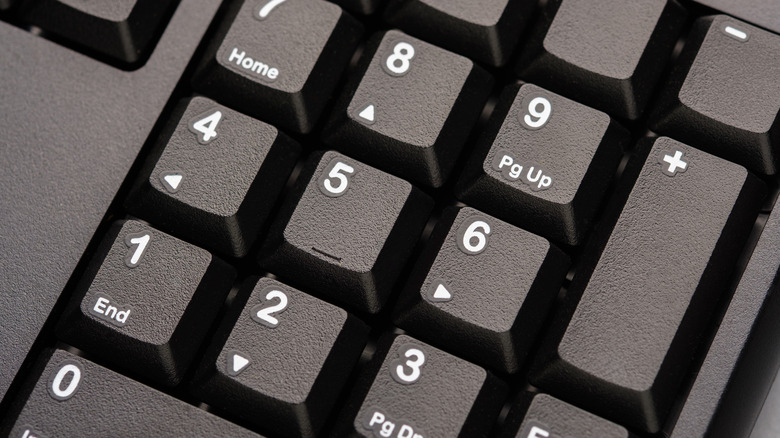

A keyboard numeral keypad, showing the '5' key with a raised line on it
patpitchaya/Shutterstock

Like the ‘F’ and ‘J’ keys, the ‘5’ key on your keyboard’s numpad also has a tactile bump to help you quickly navigate when touch-typing. Your numerical keypad also has a “home row”: the ‘4’, ‘5’, and ‘6’ keys. The optimal position for touch-typing on this keypad is to place your right index finger on ‘4’, your middle finger on ‘5’, and your ring finger on ‘6’. Again, this allows for minimal finger travel distance, with the raised bump on the ‘5’ allowing you to quickly and easily find your positioning again without having to look at the keys.

It’s worth noting that these tactile bumps are primarily found on devices with physical keys, such as laptops and computer keyboards. However, if you do wish to add these tactile bumps to your phone or iPad to turn it into a laptop replacement, bump dots can be a great option. These tactile markers are particularly useful for the visually impaired and can be placed on a touchscreen, ideally on top of a screen protector, for a tactile reference for typing. 


Sign Up For Daily Newsletter

Be keep up! Get the latest breaking news delivered straight to your inbox.
By signing up, you agree to our Terms of Use and acknowledge the data practices in our Privacy Policy. You may unsubscribe at any time.
Share This Article
Facebook Twitter Email Print
Share
What do you think?
Love0
Sad0
Happy0
Sleepy0
Angry0
Dead0
Wink0
Previous Article Big tech companies sign Trump’s voluntary pledge to protect Americans from rising electricity costs –  News Big tech companies sign Trump’s voluntary pledge to protect Americans from rising electricity costs – News
Next Article AMD HSMP Linux Driver Preps For Zen 6 EPYC With Finer Power Controls AMD HSMP Linux Driver Preps For Zen 6 EPYC With Finer Power Controls
Leave a comment

Leave a Reply Cancel reply

Your email address will not be published. Required fields are marked *

Stay Connected

248.1k Like
69.1k Follow
134k Pin
54.3k Follow

Latest News

Beat the Spinner: Optimistic UI for LangGraph.js Agents | HackerNoon
Computing
LG Sound Suite system knows the shape of your room is a bit weird
Gadget
Best Apple deal: Save 9.01 on AirPods Max at Amazon
Best Apple deal: Save $119.01 on AirPods Max at Amazon
News
Pepeto Crypto Price Prediction: Where the God of Frogs Movement Could Be in 12 Months
Gadget

You Might also Like

Best Apple deal: Save 9.01 on AirPods Max at Amazon
News

Best Apple deal: Save $119.01 on AirPods Max at Amazon

3 Min Read
Edge AI: Business cost, risk and control | Computer Weekly
News

Edge AI: Business cost, risk and control | Computer Weekly

14 Min Read
4 Of The Best Android Tablets Under 12 Inches You Can Buy In 2026 – BGR
News

4 Of The Best Android Tablets Under 12 Inches You Can Buy In 2026 – BGR

11 Min Read
Russian army faces comms crisis amid Starlink cut and Kremlin crackdown
News

Russian army faces comms crisis amid Starlink cut and Kremlin crackdown

7 Min Read
//

World of Software is your one-stop website for the latest tech news and updates, follow us now to get the news that matters to you.

Quick Link

  • Privacy Policy
  • Terms of use
  • Advertise
  • Contact

Topics

  • Computing
  • Software
  • Press Release
  • Trending

Sign Up for Our Newsletter

Subscribe to our newsletter to get our newest articles instantly!

World of SoftwareWorld of Software
Follow US
Copyright © All Rights Reserved. World of Software.
Welcome Back!

Sign in to your account

Lost your password?