By using this site, you agree to the Privacy Policy and Terms of Use.
Accept
World of SoftwareWorld of SoftwareWorld of Software
  • News
  • Software
  • Mobile
  • Computing
  • Gaming
  • Videos
  • More
    • Gadget
    • Web Stories
    • Trending
    • Press Release
Search
  • Privacy
  • Terms
  • Advertise
  • Contact
Copyright © All Rights Reserved. World of Software.
Reading: This Music Selection Tweak in iOS 26.4 Will Save You Bags of Time
Share
Sign In
Notification Show More
Font ResizerAa
World of SoftwareWorld of Software
Font ResizerAa
  • Software
  • Mobile
  • Computing
  • Gadget
  • Gaming
  • Videos
Search
  • News
  • Software
  • Mobile
  • Computing
  • Gaming
  • Videos
  • More
    • Gadget
    • Web Stories
    • Trending
    • Press Release
Have an existing account? Sign In
Follow US
  • Privacy
  • Terms
  • Advertise
  • Contact
Copyright © All Rights Reserved. World of Software.
World of Software > News > This Music Selection Tweak in iOS 26.4 Will Save You Bags of Time
News

This Music Selection Tweak in iOS 26.4 Will Save You Bags of Time

News Room
Last updated: 2026/04/05 at 1:41 AM
News Room Published 5 April 2026
Share
This Music Selection Tweak in iOS 26.4 Will Save You Bags of Time
SHARE

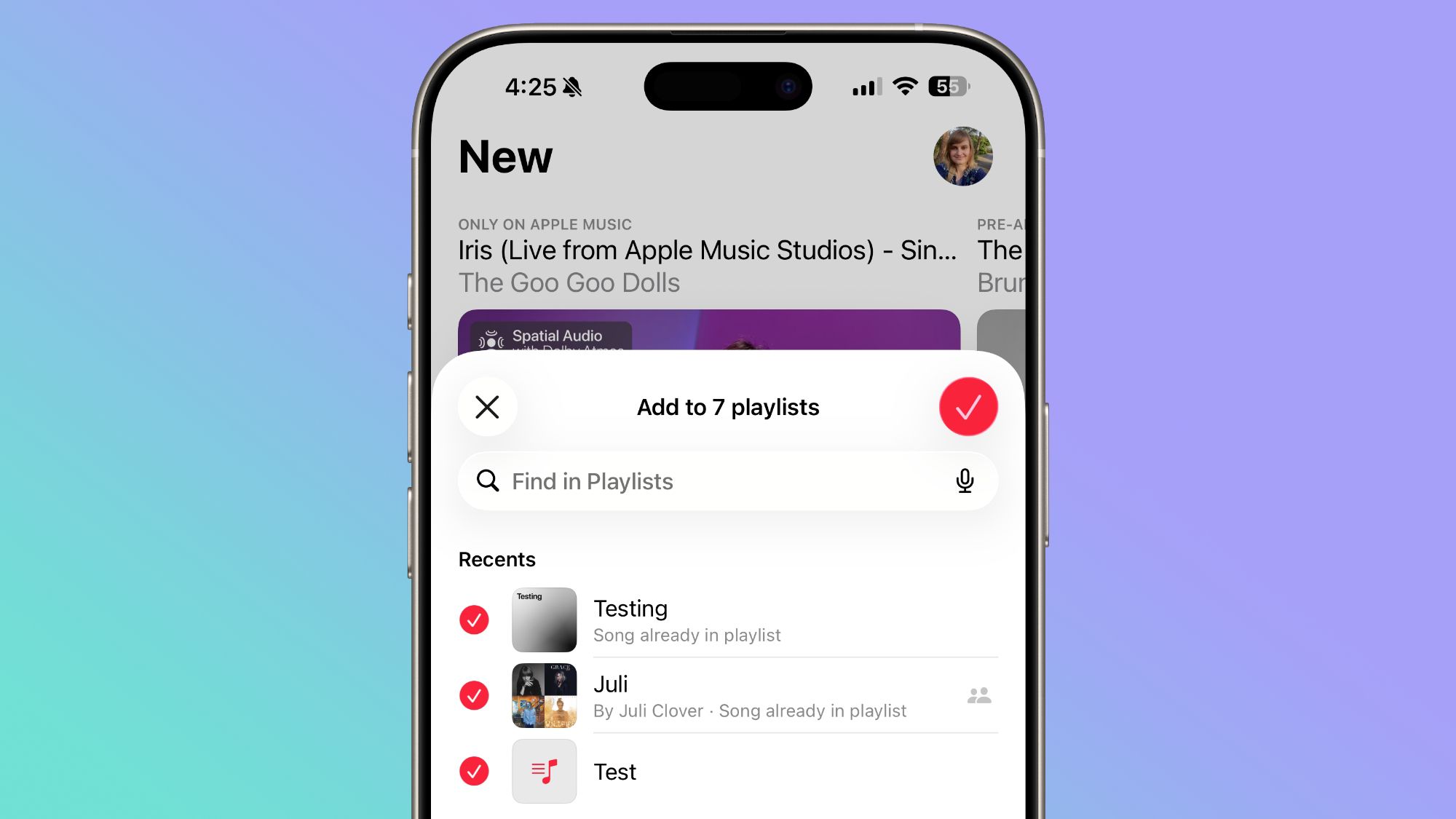
If you often find yourself adding a track to an Apple Music playlist, going back, and then adding it to other playlists, iOS 26.4 includes an option that could save you bags of time: You can now select multiple playlists when adding a song.

Previously, tapping Add to Playlist would take you to a list of your playlists, and you could only pick one at a time. In iOS 26.4, there’s a new multi-select option that lets you check off as many playlists as you like in one go. Here’s how it works.

  1. In the Music app, find the song you want to add.
  2. Long press the song, or tap the three-dot menu (…) next to it.
  3. Tap Add to Playlist.
    musicmusic
  4. In the bottom-right corner, tap the new multi-select button.
  5. Select all the playlists you want to add the song to – each one gets a red checkmark.
  6. Tap the checkmark button in the top-right corner to confirm.
    musicmusic

The header at the top of the screen will update to reflect how many playlists you’ve selected, so you can keep track before confirming.

It might seem like a minor addition, but if you maintain several playlists organized by mood, genre, or occasion, it eliminates so much back-and-forth navigation. It’s no exaggeration to say that some users will have been waiting years for this option.

In iOS 26.4, Apple has also given albums and playlists a new fullscreen design so that the album artwork colors style the entire background of the track list and other UI elements to give each album a more immersive, authentic look. To check out what’s new, make sure your iPhone is up-to-date with the latest version by going to Settings ➝ General ➝ Software Update.


Sign Up For Daily Newsletter

Be keep up! Get the latest breaking news delivered straight to your inbox.
By signing up, you agree to our Terms of Use and acknowledge the data practices in our Privacy Policy. You may unsubscribe at any time.
Share This Article
Facebook Twitter Email Print
Share
What do you think?
Love0
Sad0
Happy0
Sleepy0
Angry0
Dead0
Wink0
Previous Article 36 Malicious npm Packages Exploited Redis, PostgreSQL to Deploy Persistent Implants 36 Malicious npm Packages Exploited Redis, PostgreSQL to Deploy Persistent Implants
Next Article Ethereum Price Struggles at ,050 While “Smart Money” Whales Rotate Gains Into the AlphaPepe Presale Before Q2 Launch Ethereum Price Struggles at $2,050 While “Smart Money” Whales Rotate Gains Into the AlphaPepe Presale Before Q2 Launch
Leave a comment

Leave a Reply Cancel reply

Your email address will not be published. Required fields are marked *

Stay Connected

248.1k Like
69.1k Follow
134k Pin
54.3k Follow

Latest News

What already works today – and what doesn’t
Gadget
How Albert Camus, the great symbol of the philosophy of the absurd, had the most absurd of deaths
Gaming
Signal plans changes to protect against phishing
Software
this connected bracelet wants to know your emotions before you
Mobile

You Might also Like

5 reasons why you shouldn’t buy a Samsung phone
News

5 reasons why you shouldn’t buy a Samsung phone

4 Min Read
Agentic AI: Blindly leading to doom?
News

Agentic AI: Blindly leading to doom?

2 Min Read
EU defuses AI Act: reprieve for high-risk systems
News

EU defuses AI Act: reprieve for high-risk systems

1 Min Read
Double GPU efficiency at no additional cost
News

Double GPU efficiency at no additional cost

10 Min Read
//

World of Software is your one-stop website for the latest tech news and updates, follow us now to get the news that matters to you.

Quick Link

  • Privacy Policy
  • Terms of use
  • Advertise
  • Contact

Topics

  • Computing
  • Software
  • Press Release
  • Trending

Sign Up for Our Newsletter

Subscribe to our newsletter to get our newest articles instantly!

World of SoftwareWorld of Software
Follow US
Copyright © All Rights Reserved. World of Software.
Welcome Back!

Sign in to your account

Lost your password?