

By using this site, you agree to the Privacy Policy and Terms of Use.
Accept
World of SoftwareWorld of SoftwareWorld of Software
  • News
  • Software
  • Mobile
  • Computing
  • Gaming
  • Videos
  • More
    • Gadget
    • Web Stories
    • Trending
    • Press Release
Search
  • Privacy
  • Terms
  • Advertise
  • Contact
Copyright © All Rights Reserved. World of Software.
Reading: Using Visual Studio Code with local LLM – here’s how
Share
Sign In
Notification Show More
Font ResizerAa
World of SoftwareWorld of Software
Font ResizerAa
  • Software
  • Mobile
  • Computing
  • Gadget
  • Gaming
  • Videos
Search
  • News
  • Software
  • Mobile
  • Computing
  • Gaming
  • Videos
  • More
    • Gadget
    • Web Stories
    • Trending
    • Press Release
Have an existing account? Sign In
Follow US
  • Privacy
  • Terms
  • Advertise
  • Contact
Copyright © All Rights Reserved. World of Software.
World of Software > News > Using Visual Studio Code with local LLM – here’s how
News

Using Visual Studio Code with local LLM – here’s how

News Room
Last updated: 2026/06/26 at 3:41 AM
News Room Published 26 June 2026
Share
Using Visual Studio Code with local LLM – here’s how
SHARE

Third-party language models are managed through the Visual Studio Code LLM list. To access this, use the key combination Ctrl+Shift+P and enter in the following window Manage Language Models a.

By default, only models that are accessible via external APIs are visible in the VS Code model list.

Foundry

First, you’ll see a list of integrated models, all hosted externally. To add a new model, click on the corresponding button in the top right and then select Custom Endpoint. A series of prompts will then appear:

  • Group Name: By default this is “Custom Endpoint”, but you can choose any name you like. This is used solely to organize the model list and has no influence on aspects such as model recognition or connectivity.
  • API Key: If you have configured LM Studio to use an API key to deploy models, provide it here. If you are hosting the model locally and have not explicitly set up API keys, you can leave this field blank.
  • API Type: The options here are Chat Completions, Responses and Messages. In most cases, you will want to use the latter as the most universal option of the three mentioned.

Once you’ve provided this information, you’ll be taken to a modal editor for a JSON file containing the details of the endpoint you’re configuring.
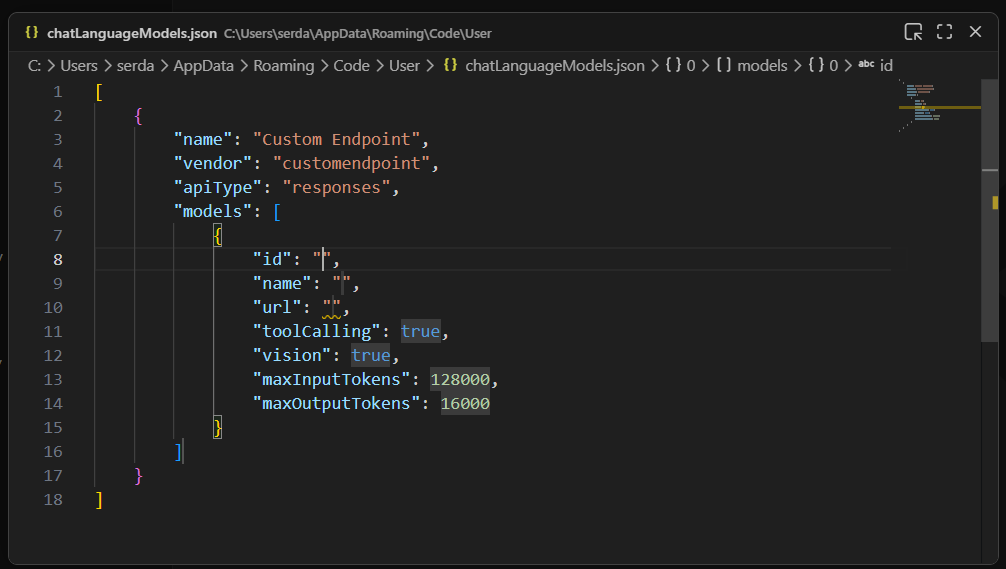
A newly created custom endpoint for a locally hosted model
A newly created custom endpoint for a locally hosted model – which still needs some information.

Foundry

Here you need to fill out a few more fields:

  • id is a text field that uniquely identifies a specific entry. The choice of ID is largely arbitrary – if you only use a single model, the ID could also be the model name.
  • name is the name of the model through which it is identified on the model server. In LM Studio, you can get this name by clicking My Models in the main interface, then selecting the three-dot icon for the model in question, then clicking Copy Default Identifier click. In the case of Qwen 2.5, this field could be filled with: qwen2.5-coder-7b-instruct.
  • url maps the address to the endpoint of the server. In LM Studio this defaults to something like this http://127.0.0.1:1234/v1. The /v1 at the end is important because this endpoint is used for the automatic detection of models and their functions.

The remaining fields generally do not need to be edited. Most models have tool calling functionality. If you know for sure that the model you are using does not offer vision support, bet vision on false.

Once these steps are completed, you can close the modal editor to save the changes. Now you would have to use the newly set up endpoint in the Manage Language Models-You can also see the overview (after a reload):


Sign Up For Daily Newsletter

Be keep up! Get the latest breaking news delivered straight to your inbox.
By signing up, you agree to our Terms of Use and acknowledge the data practices in our Privacy Policy. You may unsubscribe at any time.
Share This Article
Facebook Twitter Email Print
Share
What do you think?
Love0
Sad0
Happy0
Sleepy0
Angry0
Dead0
Wink0
Previous Article New in .NET 10.0 (29): Check IP addresses with IPAddress.IsValid() New in .NET 10.0 (29): Check IP addresses with IPAddress.IsValid()
Next Article From Donna to Britta: How a coach organizes her business with over 20 AI agents From Donna to Britta: How a coach organizes her business with over 20 AI agents
Leave a comment

Leave a Reply Cancel reply

Your email address will not be published. Required fields are marked *

Stay Connected

248.1k Like
69.1k Follow
134k Pin
54.3k Follow

Latest News

How to Build a Secure Document Workflow for Fully Remote Teams
Computing
Google Wallet and Ticketmaster introduce new kinds of tickets
Mobile
From Donna to Britta: How a coach organizes her business with over 20 AI agents
Gadget
New in .NET 10.0 (29): Check IP addresses with IPAddress.IsValid()
Software

You Might also Like

31 Ways to Evaluate LLMs
News

31 Ways to Evaluate LLMs

11 Min Read
Podcast: Smart Cities – how AI is changing our cities
News

Podcast: Smart Cities – how AI is changing our cities

2 Min Read
Gartner Hype Cycle is nonsense
News

Gartner Hype Cycle is nonsense

2 Min Read
IT manufacturers offer these free courses
News

IT manufacturers offer these free courses

4 Min Read
//

World of Software is your one-stop website for the latest tech news and updates, follow us now to get the news that matters to you.

Quick Link

  • Privacy Policy
  • Terms of use
  • Advertise
  • Contact

Topics

  • Computing
  • Software
  • Press Release
  • Trending

Sign Up for Our Newsletter

Subscribe to our newsletter to get our newest articles instantly!

World of SoftwareWorld of Software
Follow US
Copyright © All Rights Reserved. World of Software.
Welcome Back!

Sign in to your account

Lost your password?