By using this site, you agree to the Privacy Policy and Terms of Use.
Accept
World of SoftwareWorld of SoftwareWorld of Software
  • News
  • Software
  • Mobile
  • Computing
  • Gaming
  • Videos
  • More
    • Gadget
    • Web Stories
    • Trending
    • Press Release
Search
  • Privacy
  • Terms
  • Advertise
  • Contact
Copyright © All Rights Reserved. World of Software.
Reading: What is it and how to enter to use AI as if it were Google Translate
Share
Sign In
Notification Show More
Font ResizerAa
World of SoftwareWorld of Software
Font ResizerAa
  • Software
  • Mobile
  • Computing
  • Gadget
  • Gaming
  • Videos
Search
  • News
  • Software
  • Mobile
  • Computing
  • Gaming
  • Videos
  • More
    • Gadget
    • Web Stories
    • Trending
    • Press Release
Have an existing account? Sign In
Follow US
  • Privacy
  • Terms
  • Advertise
  • Contact
Copyright © All Rights Reserved. World of Software.
World of Software > Mobile > What is it and how to enter to use AI as if it were Google Translate
Mobile

What is it and how to enter to use AI as if it were Google Translate

News Room
Last updated: 2026/01/14 at 8:16 AM
News Room Published 14 January 2026
Share
What is it and how to enter to use AI as if it were Google Translate
SHARE

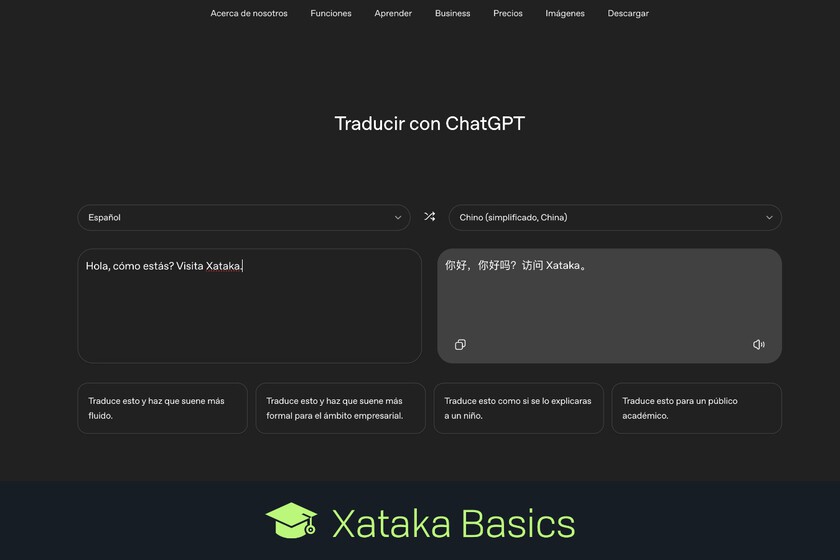
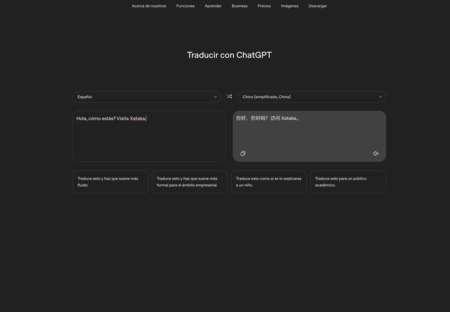
Let’s explain to you how to use ChatGPT translator. No, it is not about using ChatGPT as a translator as you have been able to do for years. This is a not-too-well-known page about artificial intelligence itself in which you are shown a translator interface.

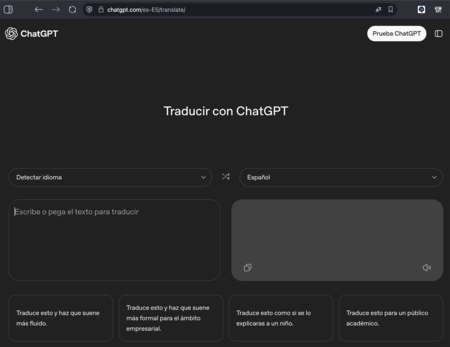
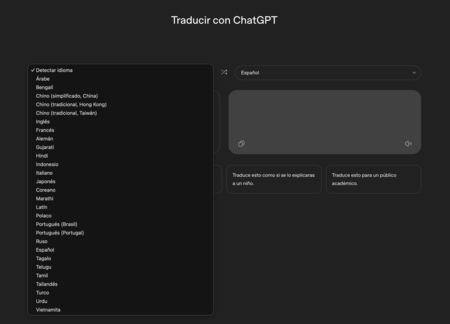
At the moment, the ChatGPT translator is a fairly simple page with two writing fields, one where you write and another where the translation comes out. You can choose between several languagesalthough you do not have Google Translator or DeepL functions such as real-time conversations or translating by voice messages. It is something quite minimal but simple.

How to use ChatGPT Translate
Interface

To access the ChatGPT translator you have to go to the page chatgpt.com/translate.Vamos, which is like the normal AI website, but then you have to add the /translate.
Choose language
Choose language

The translator interface is very simple. In the left box you write what you want to translate, and in the right box the translation will be shown. You can have the language detected automatically or choose by hand the one from which you want to do the translation and to which you are going to translate the text.
Translated
Translated

When you make a translation, in the results field you will have a button to copy the resulting text, and another to listen to how it sounds spoken the translated message. And that’s how easy it is to use.

ChatGPT apps: what they are and how to use them to give ChatGPT more features

Commands
Commands

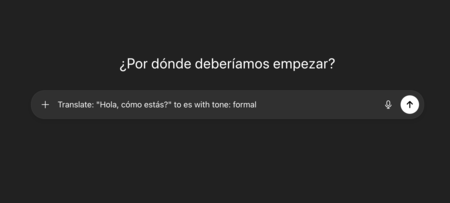
Below the translator you have several options to alter text and rewrite it. These functions are not the translator’s, but when you click on them they take you to ChatGPT with the precise prompt to do that task.

In WorldOfSoftware Basics | How to create a character in ChatGPT and Gemini to use it in all the images you make with artificial intelligence

Sign Up For Daily Newsletter

Be keep up! Get the latest breaking news delivered straight to your inbox.
By signing up, you agree to our Terms of Use and acknowledge the data practices in our Privacy Policy. You may unsubscribe at any time.
Share This Article
Facebook Twitter Email Print
Share
What do you think?
Love0
Sad0
Happy0
Sleepy0
Angry0
Dead0
Wink0
Previous Article “Be careful,” Avengers: Doomsday directors warn fans “Be careful,” Avengers: Doomsday directors warn fans
Next Article Get Ready for 2026: 15 New Movies We Think Everyone Will Be Talking About Get Ready for 2026: 15 New Movies We Think Everyone Will Be Talking About
Leave a comment

Leave a Reply Cancel reply

Your email address will not be published. Required fields are marked *

Stay Connected

248.1k Like
69.1k Follow
134k Pin
54.3k Follow

Latest News

Why You Should Never Use Hotel Wi-Fi – BGR
News
Tesla is shifting FSD to a subscription-only model, confirms Elon Musk
News
Instagram algorithm tips for 2026: Everything you need to know
Computing
Women's groups, watchdogs call on Google, Apple to pull X, Grok from app stores
News

You Might also Like

“Be careful,” Avengers: Doomsday directors warn fans
Mobile

“Be careful,” Avengers: Doomsday directors warn fans

5 Min Read
Red Hat and NVIDIA Expand Collaboration on Enterprise AI
Mobile

Red Hat and NVIDIA Expand Collaboration on Enterprise AI

7 Min Read
iPhone 18 Series And iPhone Air 2 Display Details Leak Ahead Of Launch This Year
Mobile

iPhone 18 Series And iPhone Air 2 Display Details Leak Ahead Of Launch This Year

4 Min Read
Blind spots in AI and LLM security
Mobile

Blind spots in AI and LLM security

5 Min Read
//

World of Software is your one-stop website for the latest tech news and updates, follow us now to get the news that matters to you.

Quick Link

  • Privacy Policy
  • Terms of use
  • Advertise
  • Contact

Topics

  • Computing
  • Software
  • Press Release
  • Trending

Sign Up for Our Newsletter

Subscribe to our newsletter to get our newest articles instantly!

World of SoftwareWorld of Software
Follow US
Copyright © All Rights Reserved. World of Software.
Welcome Back!

Sign in to your account

Lost your password?