By using this site, you agree to the Privacy Policy and Terms of Use.
Accept
World of SoftwareWorld of SoftwareWorld of Software
  • News
  • Software
  • Mobile
  • Computing
  • Gaming
  • Videos
  • More
    • Gadget
    • Web Stories
    • Trending
    • Press Release
Search
  • Privacy
  • Terms
  • Advertise
  • Contact
Copyright © All Rights Reserved. World of Software.
Reading: What The Three Dots On The Back Of Your iPad Are Actually For – BGR
Share
Sign In
Notification Show More
Font ResizerAa
World of SoftwareWorld of Software
Font ResizerAa
  • Software
  • Mobile
  • Computing
  • Gadget
  • Gaming
  • Videos
Search
  • News
  • Software
  • Mobile
  • Computing
  • Gaming
  • Videos
  • More
    • Gadget
    • Web Stories
    • Trending
    • Press Release
Have an existing account? Sign In
Follow US
  • Privacy
  • Terms
  • Advertise
  • Contact
Copyright © All Rights Reserved. World of Software.
World of Software > News > What The Three Dots On The Back Of Your iPad Are Actually For – BGR
News

What The Three Dots On The Back Of Your iPad Are Actually For – BGR

News Room
Last updated: 2026/02/14 at 1:24 PM
News Room Published 14 February 2026
Share
What The Three Dots On The Back Of Your iPad Are Actually For – BGR
SHARE


Christian de Looper/BGR

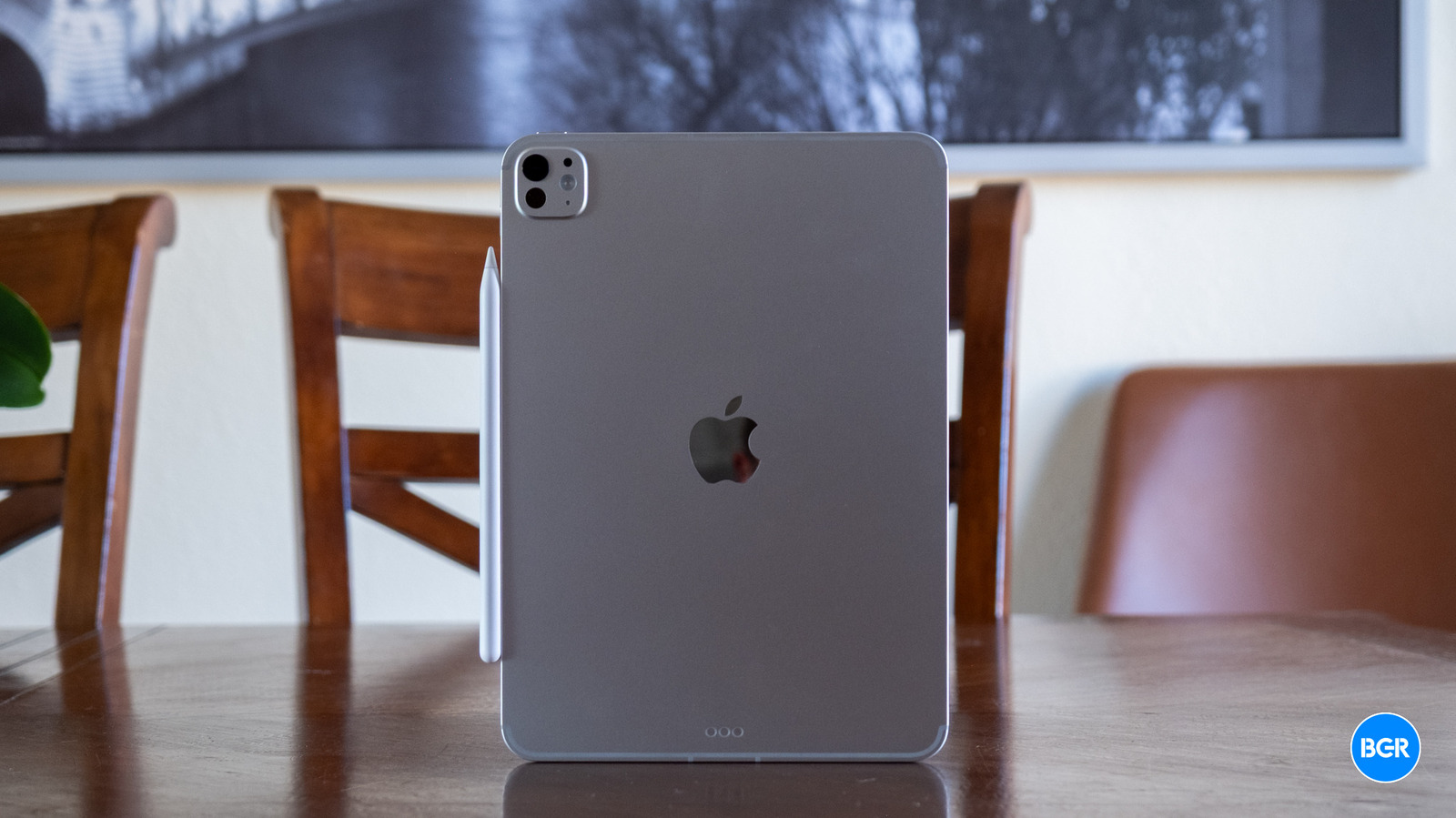
If you own a relatively new iPad model, or you’ve just bought one, it’s very likely your device has three dots on the back or side; the iPad mini is the only exception. Apple placed those dots on the back for a practical reason. The company wanted the iPad to work with keyboard accessories as soon as you attached it, with the three-pin connector carrying data and power. The three dots have an official name: the Smart Connector, which Apple announced in 2015 alongside the 12.9-inch iPad Pro. “The Smart Keyboard, available for purchase separately, attaches to iPad Pro’s innovative Smart Connector port, eliminating the need for a separate battery, on/off switch, or Bluetooth pairing,” Apple wrote at the time.

Some people may not like the appearance of the three dots on the back of the iPad, but, as Apple notes above, the three-dot connector helps users avoid two potential problems. First, the Smart Connector transfers power from the iPad to the keyboard dock. You won’t have to worry about charging the keyboard. The support for data transfer may be even more important. The keyboard will work with the iPad as soon as the iPad is placed in the keyboard dock, without requiring a setup process for a wireless connection between the two.

Keyboard accessories must have the same three-pin connector to work with the iPad’s Smart Connector. Apple explains in a support document for the Smart Keyboard and Smart Keyboard Folio that the three dots contain magnets to ensure a perfect attachment to the accessory.

What iPad models have three dots on the back?
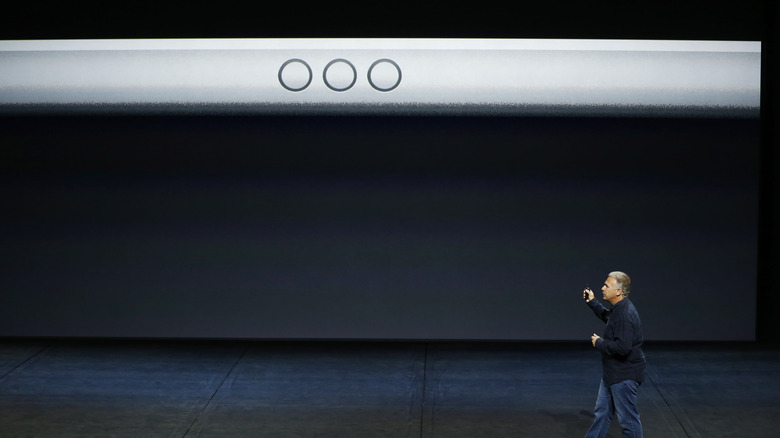

Apple Senior Vice President of Worldwide Marketing Phil Schiller speaks about the iPad's new Smart Connector in 2015.
Stephen Lam/Getty Images

The iPad Pro was the first tablet in Apple’s lineup to feature the Smart Connector, which Apple launched alongside the Smart Keyboard. All iPad Pro models launched since then feature the three-dot connector, including the M5 iPad Pro launched last year. Apple added Smart Keyboard support to the iPad Air (3rd generation) in 2019, meaning the iPad Air also received the same rear port as the iPad Pro. All iPad Air models launched since then support Smart Connector accessories. The base iPad model also received Smart Keyboard support in 2019. The standard iPad models that launched since then also feature three dots, but on the side.

As of this writing, the iPad mini remains the only iPad in Apple’s lineup without a three-pin connector. It’s unclear why Apple hasn’t given its smallest tablet the same Smart Connector port. iPad mini keyboard accessories exist, but users would have to rely on Bluetooth connectivity to pair the keyboard with the tablet and maintain a connection. The keyboard will need to be charged via a wire connected to a power adapter.

Apple isn’t the only tablet vendor to rely on magnetic dots for connecting to keyboards. Microsoft uses magnetic pogo pins on its Surface Pro tablets to connect to the Surface Type Cover. The technology works similarly, with the pogo pins handling power and data transfer.

What accessories work with the Smart Connector?
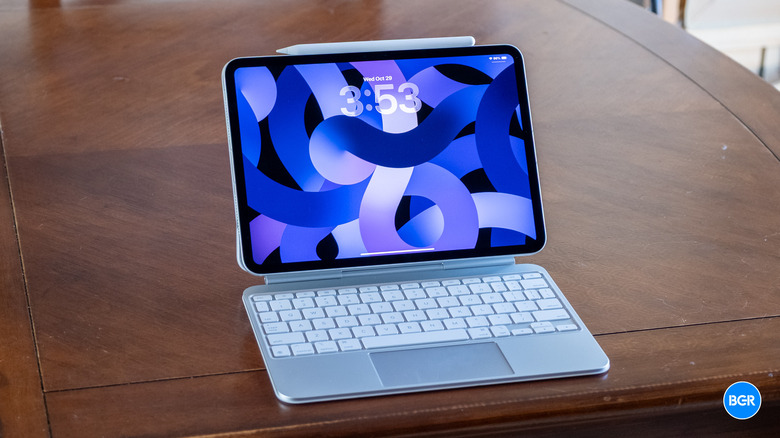

The M5 iPad Pro attached to the Magic Keyboard.
Christian de Looper/BGR

Apple’s Magic Keyboard cases for the iPad Pro and iPad Air make use of the Smart Connector. They feature a USB-C port, but the connector is used only for power pass-through (to recharge the iPad). Apple also sells a Magic Keyboard Folio that attaches magnetically to the standard iPad. For the base iPad, the Smart Connector dots are placed on the side, not on the back.

Third-party accessory makers also sell keyboards that support the three-pin connector. Logitech is one of them, noting on its website that the Combo Touch keyboard “instantly pairs with your iPad via Smart Connector. Batteries aren’t included, because you’ll never need them—power for Combo Touch is sourced directly from your iPad.” Apple may stock some of these third-party products online and in stores. For example, the Logitech Combo Touch Keyboard Case, compatible with M2 and M3 iPad Air models, is listed on its website.

That said, iPad owners aren’t limited to Smart Connector cases. They can always buy Bluetooth keyboards for any iPad Apple sells, whether it’s the expensive iPad Pro or the more affordable base version. In this case, they will have to remember to recharge the keyboard or replace batteries. They’ll also have to pair it manually with the iPad before first use and whenever the wireless connection is lost.




Sign Up For Daily Newsletter

Be keep up! Get the latest breaking news delivered straight to your inbox.
By signing up, you agree to our Terms of Use and acknowledge the data practices in our Privacy Policy. You may unsubscribe at any time.
Share This Article
Facebook Twitter Email Print
Share
What do you think?
Love0
Sad0
Happy0
Sleepy0
Angry0
Dead0
Wink0
Previous Article The HackerNoon Newsletter: Courts Are Drowning in Cases. Can AI Save the Day Without Becoming a Liability? (2/14/2026) | HackerNoon The HackerNoon Newsletter: Courts Are Drowning in Cases. Can AI Save the Day Without Becoming a Liability? (2/14/2026) | HackerNoon
Next Article Seasonal Pinterest Strategies for Etsy Success Seasonal Pinterest Strategies for Etsy Success
Leave a comment

Leave a Reply Cancel reply

Your email address will not be published. Required fields are marked *

Stay Connected

248.1k Like
69.1k Follow
134k Pin
54.3k Follow

Latest News

Android’s Quick Share is losing a key feature, but it may be for the best
News
Amazon's Presidents' Day Sale slashes Apple Watch, iPad, AirPods, Mac, accessories to as low as
Amazon's Presidents' Day Sale slashes Apple Watch, iPad, AirPods, Mac, accessories to as low as $13
News
Grocery delivery firm Dingdong Maicai becomes latest Chinese company to enter Saudi market · TechNode
Computing
Best Home Security Systems for 2026: Top Smart Hubs to Protect Your Home
News

You Might also Like

Android’s Quick Share is losing a key feature, but it may be for the best
News

Android’s Quick Share is losing a key feature, but it may be for the best

3 Min Read
Amazon's Presidents' Day Sale slashes Apple Watch, iPad, AirPods, Mac, accessories to as low as
News

Amazon's Presidents' Day Sale slashes Apple Watch, iPad, AirPods, Mac, accessories to as low as $13

1 Min Read
Best Home Security Systems for 2026: Top Smart Hubs to Protect Your Home
News

Best Home Security Systems for 2026: Top Smart Hubs to Protect Your Home

9 Min Read
I’m Calling It: Nioh 3 Is an Action-RPG Masterpiece
News

I’m Calling It: Nioh 3 Is an Action-RPG Masterpiece

4 Min Read
//

World of Software is your one-stop website for the latest tech news and updates, follow us now to get the news that matters to you.

Quick Link

  • Privacy Policy
  • Terms of use
  • Advertise
  • Contact

Topics

  • Computing
  • Software
  • Press Release
  • Trending

Sign Up for Our Newsletter

Subscribe to our newsletter to get our newest articles instantly!

World of SoftwareWorld of Software
Follow US
Copyright © All Rights Reserved. World of Software.
Welcome Back!

Sign in to your account

Lost your password?