By using this site, you agree to the Privacy Policy and Terms of Use.
Accept
World of SoftwareWorld of SoftwareWorld of Software
  • News
  • Software
  • Mobile
  • Computing
  • Gaming
  • Videos
  • More
    • Gadget
    • Web Stories
    • Trending
    • Press Release
Search
  • Privacy
  • Terms
  • Advertise
  • Contact
Copyright © All Rights Reserved. World of Software.
Reading: You Can Calibrate Your Smart TV Without Any Fancy Tools – Here’s How – BGR
Share
Sign In
Notification Show More
Font ResizerAa
World of SoftwareWorld of Software
Font ResizerAa
  • Software
  • Mobile
  • Computing
  • Gadget
  • Gaming
  • Videos
Search
  • News
  • Software
  • Mobile
  • Computing
  • Gaming
  • Videos
  • More
    • Gadget
    • Web Stories
    • Trending
    • Press Release
Have an existing account? Sign In
Follow US
  • Privacy
  • Terms
  • Advertise
  • Contact
Copyright © All Rights Reserved. World of Software.
World of Software > News > You Can Calibrate Your Smart TV Without Any Fancy Tools – Here’s How – BGR
News

You Can Calibrate Your Smart TV Without Any Fancy Tools – Here’s How – BGR

News Room
Last updated: 2026/01/05 at 8:22 PM
News Room Published 5 January 2026
Share
You Can Calibrate Your Smart TV Without Any Fancy Tools – Here’s How – BGR
SHARE


RSplaneta/Shutterstock

When you first bring home a brand new smart TV, there’s a distinct possibility it won’t have the ideal picture the first time you turn it on. Everyone watches TV a little differently, including different lighting and different seating arrangements, so to get your new TV optimized for your unique setup, you’ll need to do a bit of calibration. While a detailed calibration does require specialized equipment, you can perform a simpler calibration with nothing but the TV’s settings, some test images, and your own eyes.

Getting a new TV professionally calibrated requires time, money, and special equipment like a calibration disc. Some models of smart TV, like Apple TV, have built-in calibration features and procedures, but unless you’re a die-hard videophile setting up the ultimate home theater experience, you don’t really need to bother with all that. If you just want your TV to look good from your favorite perch on the couch, you can perform a quick D.I.Y. calibration by bringing up a test image on the screen, then adjusting the TV’s display settings until you have everything the way you like it.

All you’ll need are some test images and your eyes
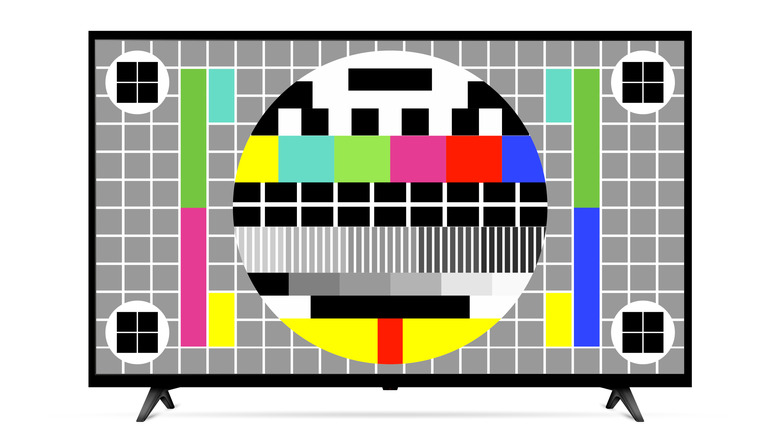

An illustration of a test pattern on a flatscreen TV.
Fad1986/Getty Images

Performing a D.I.Y. TV calibration is all about adjusting the basic display settings to create a balanced picture, one optimized for your seating arrangement. All you really need to facilitate this is some test images and patterns, as well as your own eyes. You’re the one who’s going to be watching the TV, after all, so it’s most important that it looks clear to you, though you can also ask anyone else who will be using the TV regularly to assist you. Just make sure you’re seated directly across from the TV while calibrating, looking right at the center of the screen.

For test images, you can actually find a variety of test images and patterns on YouTube for testing things like black levels, brightness, contrast, and more. Just load up one of these videos via the YouTube app on the TV, pause it, and remove the YouTube interface. In addition to these patterns, you can also load up a show or movie you like for a similar point of comparison. If you’re going this route, try to pick something that’s particularly vibrant, like an animated film. Just make sure whatever you load up is in high quality, as older, low-quality films and streams may lead to incorrect calibration.

Choose a neutral preset, then adjust the individual settings

A couple on a couch watching TV.
Naypong Studio/Shutterstock

Once you’ve got your test image or pattern of choice loaded up on your TV, you can begin the calibration process. Open your TV’s display settings and check the presets. If this is the first time you’re doing this, it will probably be on a default, no-frills preset with a name like “Natural” or “Cinema.” You want it to be on a neutral preset to get the most accurate calibration possible. If it’s on a preset with more vivid, exemplified colors or brights, your end results may end up skewed, so switch it to a neutral one. You should also disable any enhancement settings like motion enhancement or dynamic contrast.

With the preset established, you can then go through the individual settings one by one to find the optimal levels. Check the contrast, brightness, color, tint, sharpness, and whatever other miscellaneous meters are present, adjusting them against the test patterns or images until it all looks right to your eyes. Brightness in particular should be specifically tested with a test pattern, turning the meter all the way up or down and then adjusting it until only part of the image is visible.

Once you’ve gotten all the levels where you want them, consider writing the levels down on a note or taking a picture of them with your phone. If, for example, you performed a factory reset on your Fire TV, you can use that note to quickly restore the levels to your custom preferences.




Sign Up For Daily Newsletter

Be keep up! Get the latest breaking news delivered straight to your inbox.
By signing up, you agree to our Terms of Use and acknowledge the data practices in our Privacy Policy. You may unsubscribe at any time.
Share This Article
Facebook Twitter Email Print
Share
What do you think?
Love0
Sad0
Happy0
Sleepy0
Angry0
Dead0
Wink0
Previous Article Dell brings XPS back with a bang – new XPS 14 and XPS 16 ultraportables unveiled Dell brings XPS back with a bang – new XPS 14 and XPS 16 ultraportables unveiled
Next Article Apple in talks with China Mobile to launch Apple TV+ in China: report · TechNode Apple in talks with China Mobile to launch Apple TV+ in China: report · TechNode
Leave a comment

Leave a Reply Cancel reply

Your email address will not be published. Required fields are marked *

Stay Connected

248.1k Like
69.1k Follow
134k Pin
54.3k Follow

Latest News

Why Personalised Gifts Are the Smartest Purchase You’ll Ever Make (And the Most Overlooked)
Gadget
nnnGssusfGhysSuvyh3sGnSvj,BnvsU
News
JD.com reportedly launches intelligent robotics division · TechNode
Computing
Samsung is no longer being subtle about its next big display trick
News

You Might also Like

nnnGssusfGhysSuvyh3sGnSvj,BnvsU

0 Min Read
Samsung is no longer being subtle about its next big display trick
News

Samsung is no longer being subtle about its next big display trick

3 Min Read
Today's NYT Connections Hints, Answers for Jan. 28 #962
News

Today's NYT Connections Hints, Answers for Jan. 28 #962

3 Min Read
What you should know about the owners of US TikTok |  News
News

What you should know about the owners of US TikTok | News

4 Min Read
//

World of Software is your one-stop website for the latest tech news and updates, follow us now to get the news that matters to you.

Quick Link

  • Privacy Policy
  • Terms of use
  • Advertise
  • Contact

Topics

  • Computing
  • Software
  • Press Release
  • Trending

Sign Up for Our Newsletter

Subscribe to our newsletter to get our newest articles instantly!

World of SoftwareWorld of Software
Follow US
Copyright © All Rights Reserved. World of Software.
Welcome Back!

Sign in to your account

Lost your password?