By using this site, you agree to the Privacy Policy and Terms of Use.
Accept
World of SoftwareWorld of SoftwareWorld of Software
  • News
  • Software
  • Mobile
  • Computing
  • Gaming
  • Videos
  • More
    • Gadget
    • Web Stories
    • Trending
    • Press Release
Search
  • Privacy
  • Terms
  • Advertise
  • Contact
Copyright © All Rights Reserved. World of Software.
Reading: You Can Uninstall Google Play Services Updates On Android, But Should You? – BGR
Share
Sign In
Notification Show More
Font ResizerAa
World of SoftwareWorld of Software
Font ResizerAa
  • Software
  • Mobile
  • Computing
  • Gadget
  • Gaming
  • Videos
Search
  • News
  • Software
  • Mobile
  • Computing
  • Gaming
  • Videos
  • More
    • Gadget
    • Web Stories
    • Trending
    • Press Release
Have an existing account? Sign In
Follow US
  • Privacy
  • Terms
  • Advertise
  • Contact
Copyright © All Rights Reserved. World of Software.
World of Software > News > You Can Uninstall Google Play Services Updates On Android, But Should You? – BGR
News

You Can Uninstall Google Play Services Updates On Android, But Should You? – BGR

News Room
Last updated: 2025/12/29 at 10:23 PM
News Room Published 29 December 2025
Share
You Can Uninstall Google Play Services Updates On Android, But Should You? – BGR
SHARE


One Artist/Shutterstock

When you get a new phone, it is a good idea to debloat it. This means removing pre-installed stock or sponsored apps you don’t want or don’t plan to use. Preloaded social media apps are a great example, or ads-laden games like “Candy Crush.” In some instances, you can’t just completely remove the app, as is the case with Google Play Services. Not quite an application on its own, Google Play Services is a core component of Android. It connects a wide variety of applications that use Google’s online services, such as Google Maps and Google’s suite of applications, including Drive, Gmail, and so on.

If you don’t want to use Google’s services or want more privacy, it is technically possible to disable or stop Google Play Services. You’ll need to find alternatives for some things, like another app store besides the Google Play Store. You’ll also need to accept that some things might break altogether. The consequences of its removal may not become apparent until the deed is done. Google Play Services is necessary for many Android experiences, including games, fitness, location sharing, contactless payments, system diagnostics, and much more.

You can’t actually uninstall Google Play Services, at least not without rooting, which is something you should never do on your Android phone. However, you can remove updates and disable it. Navigate to Settings > Apps > All Apps > Google Play Services. You should see an option to uninstall updates. Select that first. Let it finish. Then, choose Disable. You will see a warning that disabling Google Play Services can cause unexpected behavior. Confirm, and you’re done. As mentioned, you may run into issues with other apps and services afterward.

What will happen if you disable Google Play Services?
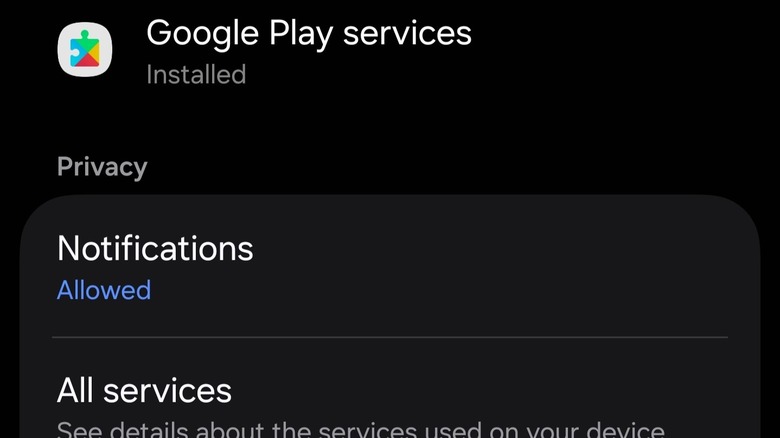

Google Play Services app information page on Samsung
Briley Kenney/BGR

Disabling Google Play Services on an Android phone can be hit-or-miss, depending on how you use your phone and which apps and services you rely on. The beauty of Android is the level of personalization it offers, from custom launchers and UI changes to new app stores, core apps, and beyond. You can find alternatives for almost everything that could be considered a system-included app — including Gmail or the Google Play Store. You can find other email apps, and you can certainly find other app stores. Some devices, like the best Samsung phones, even come with alternatives pre-installed. You will also lose access to important services, like the added security of Google Play Protect, which helps scan for potentially malicious apps, even those sideloaded.

If you try to use an app that relies on Google Play Services, you could see one of two things. The app may continue working, with some features disabled, despite giving you frequent warnings and requesting you to enable Google Play Services. Or, the app could crash and stop working altogether. In either case, it’s up to you to assess whether you want to continue using the app as-is or if you’d rather look for an alternative. If your favorite apps don’t work, you could always re-enable Google Play Services and reinstall the updates.


Sign Up For Daily Newsletter

Be keep up! Get the latest breaking news delivered straight to your inbox.
By signing up, you agree to our Terms of Use and acknowledge the data practices in our Privacy Policy. You may unsubscribe at any time.
Share This Article
Facebook Twitter Email Print
Share
What do you think?
Love0
Sad0
Happy0
Sleepy0
Angry0
Dead0
Wink0
Previous Article SMIC buys out subsidiary for .8B as China’s chipmaking progress accelerates –  News SMIC buys out subsidiary for $5.8B as China’s chipmaking progress accelerates – News
Next Article Meta Acquires Chinese AI Startup Manus for Billions in Third-Largest Deal · TechNode Meta Acquires Chinese AI Startup Manus for Billions in Third-Largest Deal · TechNode
Leave a comment

Leave a Reply Cancel reply

Your email address will not be published. Required fields are marked *

Stay Connected

248.1k Like
69.1k Follow
134k Pin
54.3k Follow

Latest News

Xiaomi’s newly-launched YU7 reportedly being swiped by scalpers · TechNode
Computing
Get 0 Off Apple Watch Series 11 In Time For New Year’s, Starting at 9
Get $100 Off Apple Watch Series 11 In Time For New Year’s, Starting at $299
News
18 of the Best Design Apps For Creating Gorgeous Instagram Stories
Computing
Next Millionaire Moment in 2026? 11 Best Altcoins to Watch in 2026 Revealed
Gadget

You Might also Like

Get 0 Off Apple Watch Series 11 In Time For New Year’s, Starting at 9
News

Get $100 Off Apple Watch Series 11 In Time For New Year’s, Starting at $299

6 Min Read
Power surge: Meet the 5 longest-lasting phones we tested in 2025
News

Power surge: Meet the 5 longest-lasting phones we tested in 2025

8 Min Read
Roomba expands Matter and HomeKit support to more vacuums – 9to5Mac
News

Roomba expands Matter and HomeKit support to more vacuums – 9to5Mac

3 Min Read
Today's NYT Connections: Sports Edition Hints, Answers for Dec. 30 #463
News

Today's NYT Connections: Sports Edition Hints, Answers for Dec. 30 #463

3 Min Read
//

World of Software is your one-stop website for the latest tech news and updates, follow us now to get the news that matters to you.

Quick Link

  • Privacy Policy
  • Terms of use
  • Advertise
  • Contact

Topics

  • Computing
  • Software
  • Press Release
  • Trending

Sign Up for Our Newsletter

Subscribe to our newsletter to get our newest articles instantly!

World of SoftwareWorld of Software
Follow US
Copyright © All Rights Reserved. World of Software.
Welcome Back!

Sign in to your account

Lost your password?