What is YouTube monetization?
YouTube monetization is a set of features that let creators earn money from their YouTube channel, not a single switch you turn on. Access to those features depends on eligibility, a channel review, and ongoing compliance with YouTube monetization policies and community guidelines.
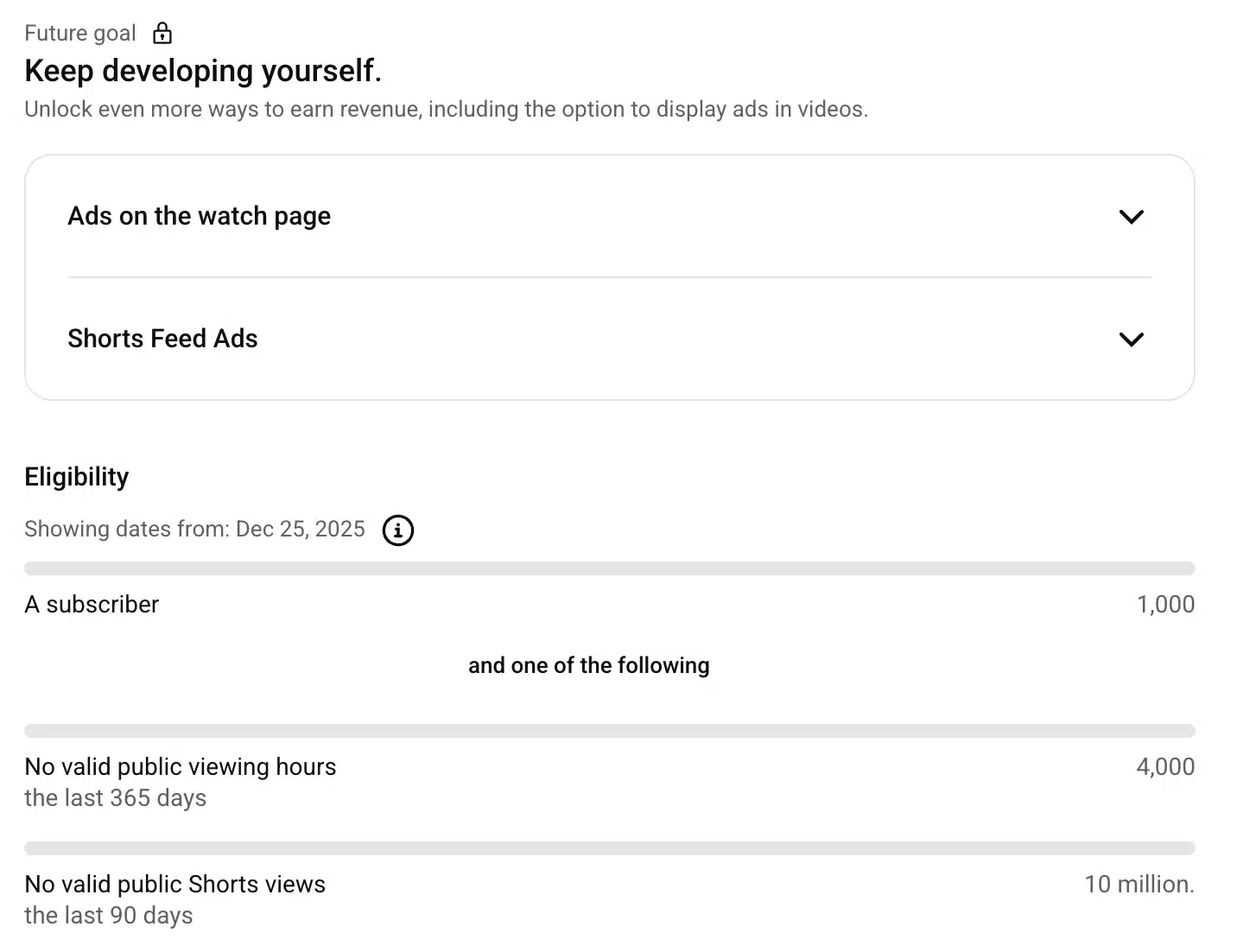
Most monetization options become available after you’re accepted into the YouTube Partner Program. To qualify, your channel must meet requirements like 1,000 subscribers and valid public watch hours in the last 12 months, then pass a manual review.
YouTube checks your content, monetization status, and compliance with advertiser-friendly content guidelines, copyright guidelines, and reused content rules before approving access.
Once you’re approved, you can earn revenue in several ways, depending on your content and YouTube audience:
- Ad revenue from YouTube ads shown on long-form videos and live streams
- YouTube Premium revenue sharing, which pays you when Premium members watch your content.
- Fan funding features like Super Chat, Super Stickers, and Super Thanks during live streams and regular videos
- YouTube Shopping and affiliate features, where you can tag products directly in your videos and posts
- Brand deals and paid partnerships, which happen outside YouTube’s revenue share but still rely on an active, monetized channel
Not every monetized YouTube channel uses all of these options. The key is understanding which monetization features fit your content type, whether you focus on long-form video, live streams, Shorts, or a mix of formats. Once you find the perfect balance, the earning opportunities are huge; between 2021 and 2023, YouTube paid over $70 billion to creators and media companies.
How to enable YouTube monetization
To enable YouTube monetization, you must meet the YouTube Partner Program eligibility requirements, apply through YouTube Studio, and pass a manual review. Monetization is not automatic, and approval depends on your content, account status, and compliance with YouTube monetization policies and community guidelines.
These are the YouTube monetization requirements in 2026:
- An active YouTube channel with original content
- At least 1,000 YouTube subscribers and the required valid public watch hours in the last 12 months for long-form videos (4000) and 90 days for Shorts (10 million)
- No active community guideline strikes or copyright strikes; YouTube takes guideline violations very seriously. Almost 8.4 million videos were removed in the second quarter of 2024, the majority of which were flagged by automatic systems.
- A verified YouTube account with two-step verification enabled
- A linked and approved Google AdSense account under your own name
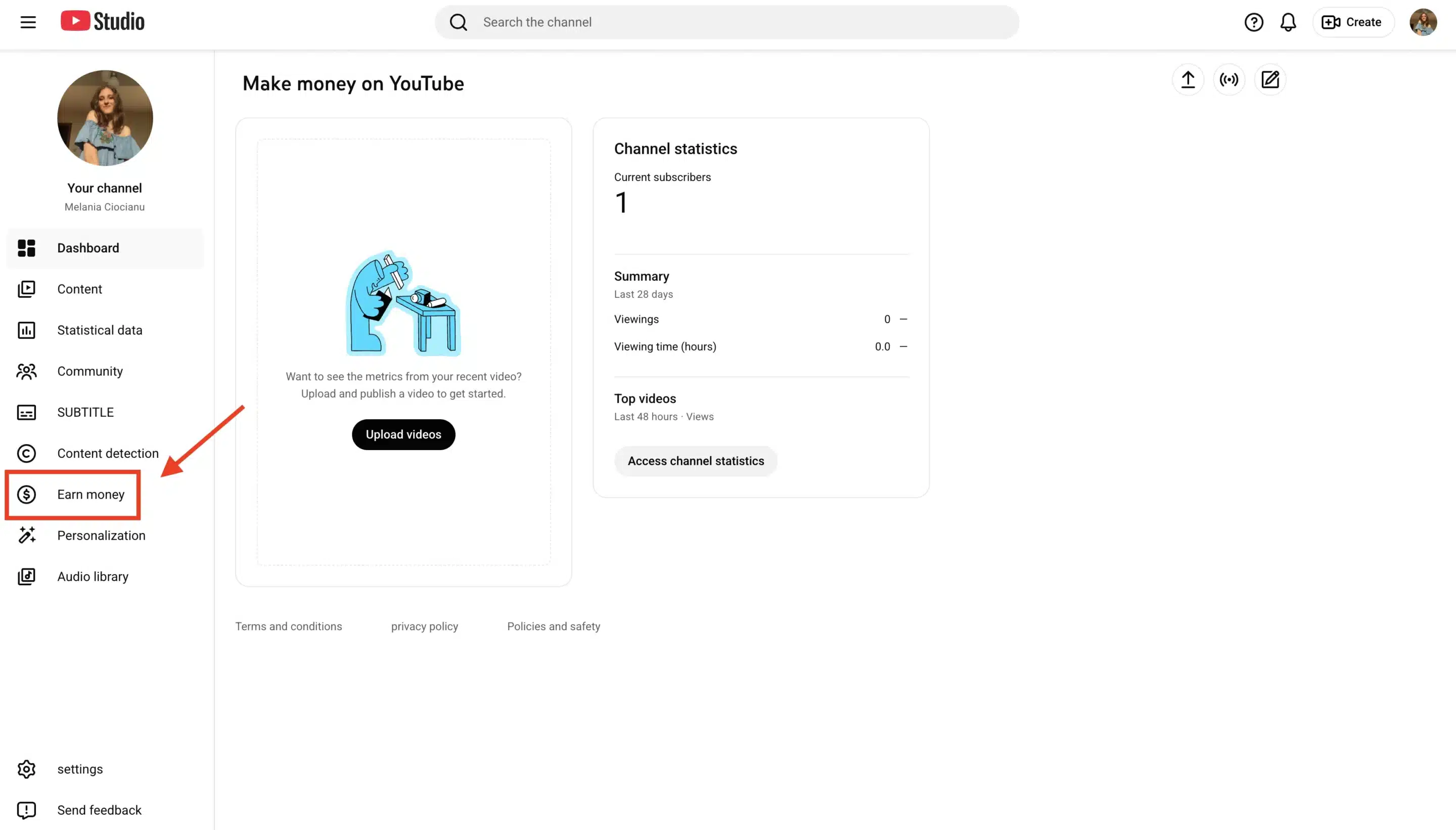
Once those boxes are checked, follow these steps in YouTube Studio:
- Go to YouTube Studio
- Select Earn money from the left-hand menu
- Click Get started under the YouTube Partner Program section
- Review and accept the YouTube monetization policies and advertiser-friendly content guidelines
- Connect your AdSense account
- Submit your channel for review and wait for a monetization decision
During the review, YouTube’s creator support team evaluates your channel as a whole, not just one particular video. They look for original content, consistent value for viewers, and if you follow YouTube’s rules and copyright guidelines. Approval can take days or weeks, depending on review volume.
YouTube has now also introduced alternative ways to monetize, such as subscriptions and shopping. For those, a 500-subscriber minimum is necessary, as well as a lower number of public watch hours compared to earning from ads.
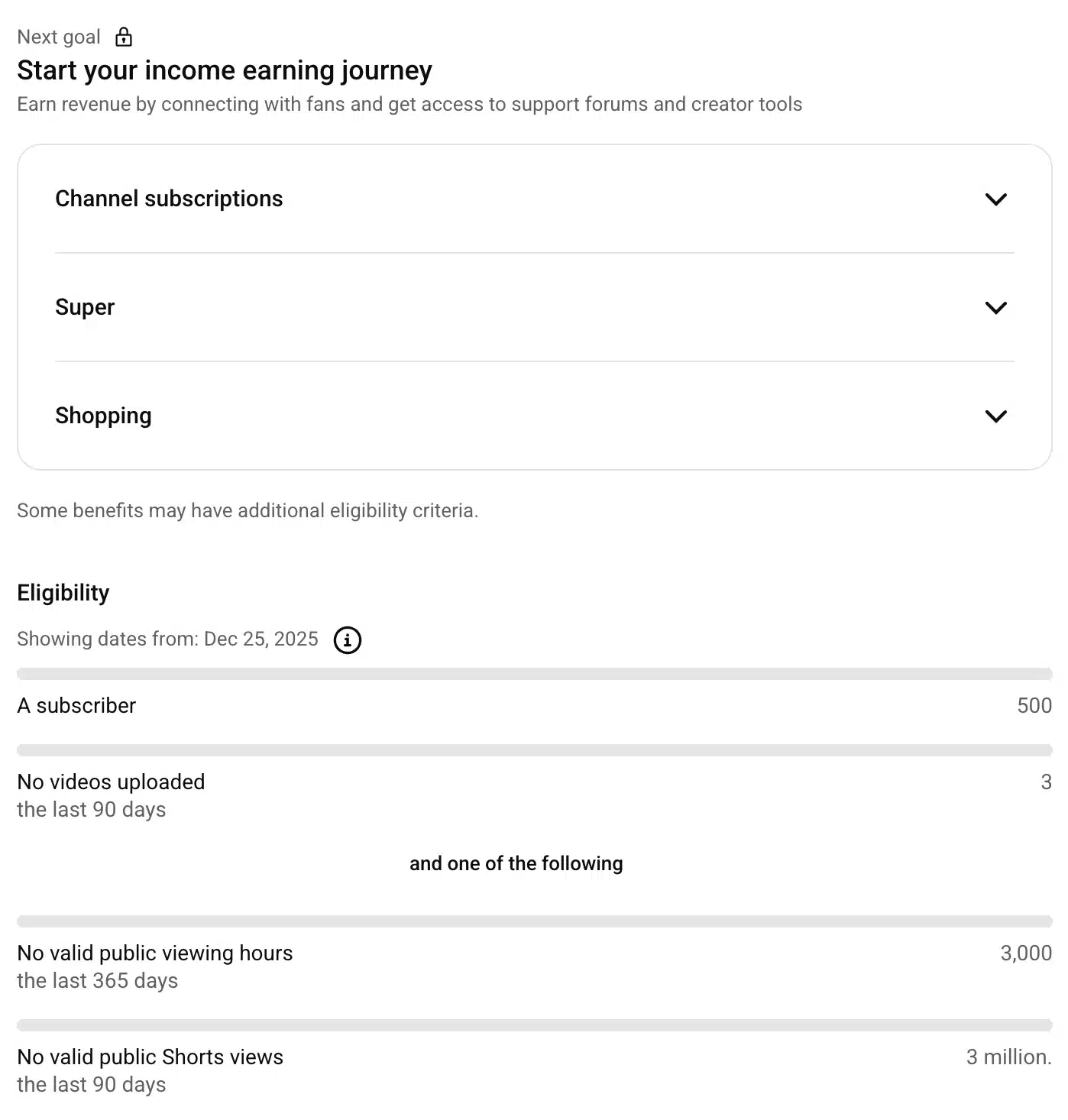
If you don’t see the “Earn” tab in YouTube Studio, this usually means your account isn’t eligible yet. Common reasons include living in a country where the partner program isn’t available, using a restricted account type, or not meeting the minimum subscriber or watch hour requirements.
10 ways to monetize YouTube videos
Once your channel meets the YouTube Partner Program requirements, you can earn money on YouTube through multiple monetization features. The strongest monetized channels don’t rely on a single money source, they stack multiple revenue streams based on content type, audience behavior, and watch time.
1. Unlock ad revenue through the YouTube Partner Program
Best for: long-form video with consistent watch hours
YouTube ads are the most common monetization method, and for good reason. YouTube made $36.1 billion from advertising in 2024, and that number wouldn’t be possible without the creators who have the ads on their videos.
Once approved, ads may appear before, during, or after your videos, and you earn a share of that advertising revenue. This might tempt you to make videos as long as possible to fit more ads, but VidIQ explains why that isn’t a good idea:
“Just because your videos are longer doesn’t mean they’re necessarily going to make more money. Sure, you can spam ads yourself in the video all throughout, but if users aren’t watching the video long enough to even reach those points where you’ve placed an ad, they’re not going to end up paying out anything.”
Example: A 10–15 minute tutorial that maintains strong watch time continues earning ad revenue long after it’s published.
2. Make money with affiliate marketing
Best for: tutorials, reviews, unboxing videos
Affiliate marketing works when the product is a natural extension of the video. Links usually live in the description, pinned comment, or a dedicated resources section. As part of the YouTube Partner Program, you can also join the YouTube Shopping affiliate program and get your revenue directly when people buy from your YouTube Shop.
Example: A creator reviewing editing workflows has an affiliate link to a camera, microphone, or software used in the video.