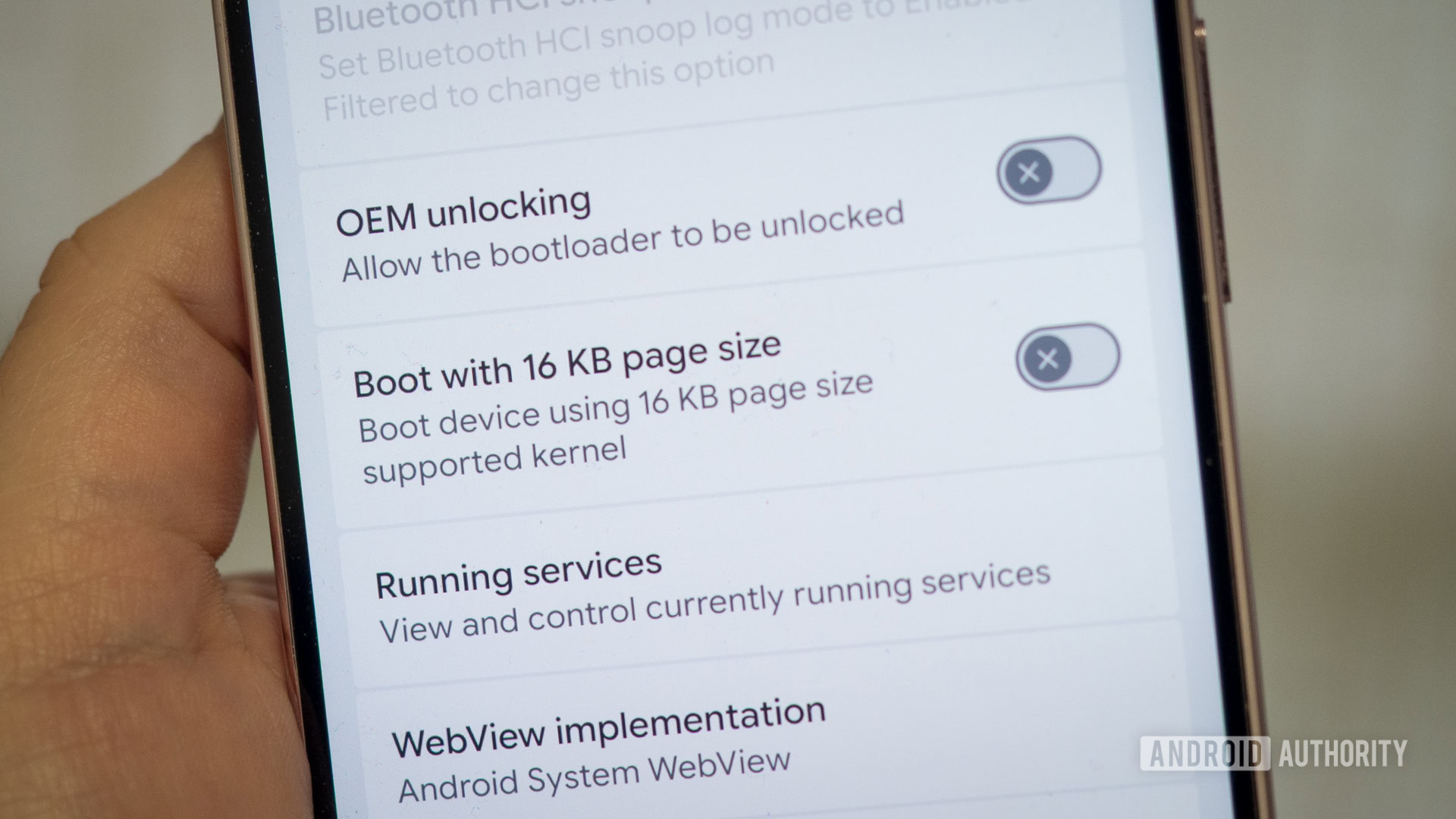
The Android Authority team has been diving into the new Android 17 QPR1 Beta and stumbled across an interesting toggle hidden in the developer settings menu on our Pixel 9 Pro XL — “boot with 16KB page size.” Computer aficionados may be familiar with the concept of page size; it’s all about how apps interact with your phone’s RAM. Specifically, this setting changes the smallest possible memory allocation from the long-running 4KB default up to 16KB — a seemingly significant 4× increase.
Android’s support for different page sizes isn’t actually new. This developer-level toggle was actually introduced back with the Android 15 QPR1 beta for the Pixel 8, but it seems to have gone in and out of fashion in recent betas. Still, we’ve spotted the feature reappear on some Pixels in the recent Android 17 beta, so it’s worth revisiting its importance.
Page size explained
Rita El Khoury / Android Authority
Computer page size is named after the analogy with a printed book, and it remains a good way to think about the concept. Imagine the entirety of your phone’s RAM (8GB, 12GB, etc.) as a book — you could make it pocket-sized but thick, with small pages that hold only a few sentences each. Alternatively, you could use larger pages to hold more information, making the book thinner. It’s the same content, just organized differently. That’s all there is to it.
When an app requests memory, the CPU uses page indexes to map virtual memory, allowing it to store and retrieve data from the physical RAM on your phone. By default, Android smartphones use 4KB page sizes, meaning an app is allocated memory in multiples of 4KB. However, Android’s developer toggle increases this minimum size to 16KB. Why?

Think about it this way: an app’s memory request is rounded up to the nearest page, so it might need 9KB but receives 12KB (three pages), but would be given a larger, more wasteful slice if the page size were bigger. Smaller page sizes are therefore more memory-efficient. However, keeping 8GB of RAM in 4KB blocks requires tracking about 2 million pages. Managing so many page requests requires splitting this number across multiple levels of page tables, and sifting through these levels to find the memory the CPU wants can be computationally expensive. RAM-intensive tasks, such as loading a bulky app, can take longer to complete, resulting in a slower user experience.
Equally, if newer, larger applications usually request memory in blocks larger than 4KB — for example, 16KB, 64KB, or more — the tiny granularity incurs significant overhead. By moving to larger pages, the CPU benefits from tracking fewer, larger pages, which is exactly what Android moving to 16KB page sizes provides. Google estimates that moving to 16KB boosts app launch times by 3%-30% and system boot-up times by 8%. However, it’s not a free improvement.
Why have we stuck with 4KB for so long?

Robert Triggs / Android Authority
Why did Android start out with 4KB pages rather than simply picking a larger size to begin with? This is a surprisingly complicated question, because page size is largely determined by CPU architecture. Inside the CPU is a Memory Management Unit (MMU) that defines how virtual addresses are structured and translated, as well as the supported page sizes.
Whenever a memory-access instruction is received, specific bits of the instruction contain the memory address. The lower bits of a virtual address can be used as an offset or page within a specific table, while the upper bits are used to index page tables. For example, a 12-bit offset gives 212 bytes, or 4KB per page; 14 bits gives 16KB; 16 bits gives 64KB.
ARMv7 cores (Cortex-A7/A9) found in early Android phones like the Samsung Galaxy S2 were 32-bit, meaning each CPU instruction register was only 32 bits wide. For memory access, the architecture used the upper 20 bits for the virtual page address lookup (split into 12-bit level-1 and 8-bit level-2 table indexes) and the lower 12 bits for the page offset, giving 4KB pages.

Fleshing out the math: 4KB pages arranged into 1MB regions (L2 tables consisting of 256 entries of 4KB), accessible across 4,096 L1 table entries, covers a total of 4GB of RAM — the full 232 limit of the register size and the limit of older 32-bit devices.
The exact reason for the 4KB/1MB split is even more nuanced. In ARMv7, 1MB section mappings allowed the MMU to bypass the L2 table for better performance when accessing sequential memory, improving translation lookaside buffer (TLB) efficiency and reducing memory traffic — critical for early battery-powered smartphones. Later, ARM introduced the optional Large Physical Address Extensions (LPAE) for ARMv7, supporting 16MB sections and 64KB pages via 40-bit addressing, but 4KB pages remained the standard for Android.
4KB pages are a hangover from early smartphone CPUs.
It wasn’t until ARMv8 in 2011 that things changed more meaningfully. ARMv8 introduced 64-bit support with wider registers for addressing more memory via more tables (among other things). ARMv8-A typically uses 48-bit virtual addresses (optionally 52-bit in ARMv8.2+). With 4KB pages, you can use 12 bits for page offset like before and split the remaining 36 bits for additional tables, allowing the CPU to address far more than 4GB of memory. ARMv8 also introduced configurable page sizes of 16KB and 64KB, providing flexibility for servers and high-end devices while still allowing for optimal table sizes.
TLDR: Android eventually incorporated support for 16KB pages once hardware evolved to support it efficiently, but 4KB remains the legacy default for compatibility and storage efficiency.
Should I enable Android’s larger pages?

Rita El Khoury / Android Authority
In theory, moving over to 16KB has quite a few benefits. Each page table maps 4x the memory, resulting in fewer memory accesses and better cache coverage, improving performance and power efficiency. There are trade-offs, however.
Internal memory fragmentation is slightly worse, resulting in some additional RAM being wasted when apps request small amounts of memory. Android itself has been page size agnostic since Android 15, but that doesn’t mean older applications are. Many older “native code” applications (such as those written in C or using the Android NDK) were built with 4KB pages in mind and need to be rebuilt with 16KB alignment (which remains 4KB-compatible as well). Google expects that most apps built with Kotlin are already compatible, but this is still a potentially significant developer burden. It presents a particular problem for apps that are no longer maintained or use libraries that have not yet been updated.
Google hasn’t yet flicked the switch on 16KB pages as Android’s default, but this is certainly the platform’s future. As of November 2025, all new apps and updates to existing apps submitted to Google Play that target Android 15+ devices must support 16 KB page sizes on 64-bit devices.
Developers must support 16KB pages when updating their Google Play apps.
Clearly, the indication is that Android will default to 16KB pages in the near future. It doesn’t look like this deadline will arrive with Android 17, given that 4KB is still the default on my Pixel running the beta and 16KB is a hidden developer opt-in, but it might not be far away.
As for whether you should jump in right now, well, you’ll have to be in the Android beta program for a start, and then you need to go through the hassle of unlocking your bootloader. This means you have to wipe your phone and reinstall the OS from scratch to make the switch. This option also doesn’t appear on every Pixel we’ve looked at, but even if you can make the stars align, you’ll still have to hope that all your apps work correctly. So while the performance benefits of 16KB pages sound nice, we should probably sit tight a little longer before reaping the rewards of Google’s and developers’ hard work.
Don’t want to miss the best from Android Authority?


Thank you for being part of our community. Read our Comment Policy before posting.