By using this site, you agree to the Privacy Policy and Terms of Use.
Accept
World of SoftwareWorld of SoftwareWorld of Software
  • News
  • Software
  • Mobile
  • Computing
  • Gaming
  • Videos
  • More
    • Gadget
    • Web Stories
    • Trending
    • Press Release
Search
  • Privacy
  • Terms
  • Advertise
  • Contact
Copyright © All Rights Reserved. World of Software.
Reading: Here’s Why Your iPhone Won’t Let You Decline Certain Calls – BGR
Share
Sign In
Notification Show More
Font ResizerAa
World of SoftwareWorld of Software
Font ResizerAa
  • Software
  • Mobile
  • Computing
  • Gadget
  • Gaming
  • Videos
Search
  • News
  • Software
  • Mobile
  • Computing
  • Gaming
  • Videos
  • More
    • Gadget
    • Web Stories
    • Trending
    • Press Release
Have an existing account? Sign In
Follow US
  • Privacy
  • Terms
  • Advertise
  • Contact
Copyright © All Rights Reserved. World of Software.
World of Software > News > Here’s Why Your iPhone Won’t Let You Decline Certain Calls – BGR
News

Here’s Why Your iPhone Won’t Let You Decline Certain Calls – BGR

News Room
Last updated: 2026/02/22 at 8:28 PM
News Room Published 22 February 2026
Share
Here’s Why Your iPhone Won’t Let You Decline Certain Calls – BGR
SHARE


Tran Thu Hang/Shutterstock

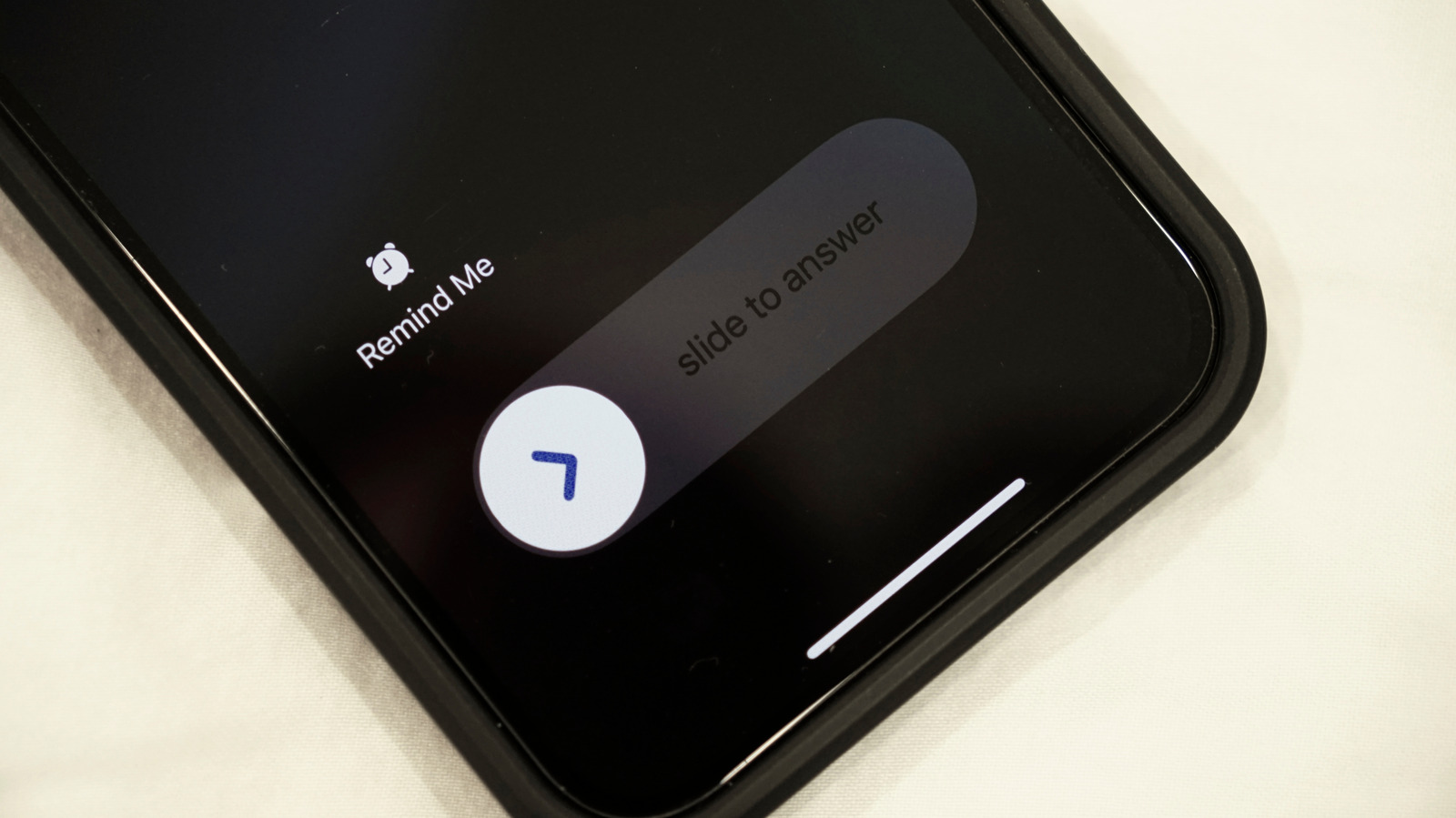
Your iPhone sometimes shows an option to decline calls, and in other instances, you only see a “slide to answer” option to pick up calls with no button to reject them. This is one of the worst parts of iOS, and even long-time iPhone users don’t know that it’s a feature working in their favor. The Accept and Decline options appear only if the iPhone is unlocked. When it’s locked, you can only slide to answer.

The simple reason behind this is to prevent accidental inputs, whether it’s picking up or declining a call. When your iPhone is locked, it’s assumed that you are not actively looking at the display. It could be in your pocket, your bag, or on a table right in front of you.

Now imagine if the Accept and Decline options appeared on the lock screen and your iPhone rang. You could easily tap on one of them while pulling the phone out of your pocket or picking it up from the table. To avoid this, Apple replaced those options on the lock screen with the “slide to answer” option. With the latter, even a few inadvertent taps on the screen won’t do any harm. It will neither pick up nor reject the call, but you can still decline calls from the lock screen.

Use the side button to decline calls
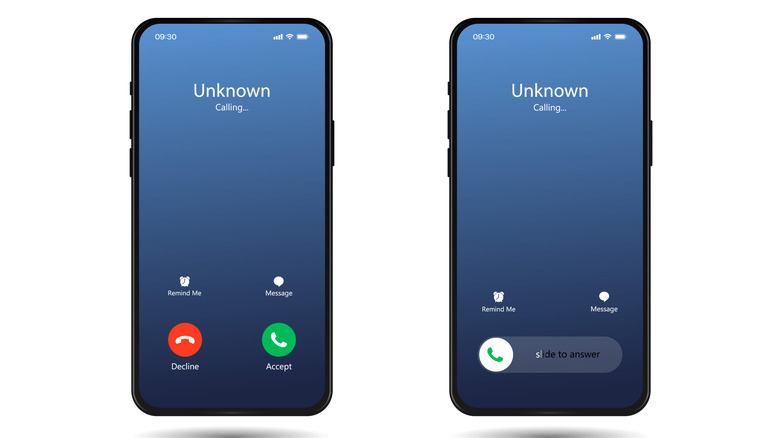

two iphones with incoming calls, one has Accept and Decline options while the other shows slide to answer
Titrit/Getty Images

When Apple removed the Decline option from the iPhone lock screen, it moved it to the side button instead of entirely removing the functionality. You can still reject calls by simply pressing the side button (also called the power button or lock button) twice. Pressing it once will instead silence the call. Doing so is much more convenient, as you can quickly decline a call without even looking at the screen, especially when you don’t want to pick up the phone.

It’s one of those Apple decisions that feel confusing at first, but once you get to know the logic, things start to make sense. And it’s not like this has always been the case. Until iOS 5, incoming calls looked the same, irrespective of whether the iPhone was locked or unlocked. Starting with iOS 6, Apple introduced the “slide to answer” screen. Even many Android devices later adopted a similar approach to prevent users from accidentally picking up or declining calls.



Sign Up For Daily Newsletter

Be keep up! Get the latest breaking news delivered straight to your inbox.
By signing up, you agree to our Terms of Use and acknowledge the data practices in our Privacy Policy. You may unsubscribe at any time.
Share This Article
Facebook Twitter Email Print
Share
What do you think?
Love0
Sad0
Happy0
Sleepy0
Angry0
Dead0
Wink0
Previous Article This Refurbished Business-Class Microsoft Surface Pro 6 Is Only 0 This Refurbished Business-Class Microsoft Surface Pro 6 Is Only $230
Next Article iOS 26.3.1 Update for iPhones Coming Soon as ‘Apple Experience’ Nears iOS 26.3.1 Update for iPhones Coming Soon as ‘Apple Experience’ Nears
Leave a comment

Leave a Reply Cancel reply

Your email address will not be published. Required fields are marked *

Stay Connected

248.1k Like
69.1k Follow
134k Pin
54.3k Follow

Latest News

We Know You Can Pay a Million by Anja Shortland review – the terrifying new world of ransomware
News
Apple’s iPhone 18 to feature TSMC’s 2nm chip next year · TechNode
Computing
Global robotic vacuum shipments reach 5.1 million in Q1, top four Chinese brands hold 54.1% market share · TechNode
Computing
Alibaba reportedly plans to order more than 40,000 AMD MI308 chips · TechNode
Computing

You Might also Like

We Know You Can Pay a Million by Anja Shortland review – the terrifying new world of ransomware
News

We Know You Can Pay a Million by Anja Shortland review – the terrifying new world of ransomware

8 Min Read
Elon Musk unveils chip manufacturing plans for SpaceX and Tesla |  News
News

Elon Musk unveils chip manufacturing plans for SpaceX and Tesla | News

1 Min Read
1 Software stock for long-term investors and 2 We brush off
News

1 Software stock for long-term investors and 2 We brush off

5 Min Read
Broadcom expands Kubernetes support with VKS upgrades, open-source contributions and new partnerships –  News
News

Broadcom expands Kubernetes support with VKS upgrades, open-source contributions and new partnerships – News

7 Min Read
//

World of Software is your one-stop website for the latest tech news and updates, follow us now to get the news that matters to you.

Quick Link

  • Privacy Policy
  • Terms of use
  • Advertise
  • Contact

Topics

  • Computing
  • Software
  • Press Release
  • Trending

Sign Up for Our Newsletter

Subscribe to our newsletter to get our newest articles instantly!

World of SoftwareWorld of Software
Follow US
Copyright © All Rights Reserved. World of Software.
Welcome Back!

Sign in to your account

Lost your password?