Let’s tell you how to prevent AI from agreeing with you by defaultmodifying your attitude to be less accommodating. In this way, by not making an effort to please you, you will ensure that the artificial intelligence makes fewer mistakes and hallucinations.
To do this, let’s compose a prompt that you must add in the configuration of the artificial intelligence you use, and that works for both Claude and ChatGPT, Gemini or any other. It will be a prompt that we will add to the AI behavior configuration so that it always takes it into account.
However, remember that this will not completely eliminate the hallucinationsbecause making things up is relatively normal in AI. However, since the response will not always be directed towards agreeing with you or pleasing you, you will make them reduce it a little.
Of course, another thing to keep in mind is that by doing this the user experience will change. AI can get a little “edge”because you will no longer laugh thank you. Sometimes it will tell you that an idea is bad or that you are wrong, and that will not be a failure, but will show the success of the prompt.
A prompt for a less complacent AI
To make your AI less complacent and verify information moreyou will have to go to the settings of the one you use and go to the custom instructions section to change its behavior. There you will have to write this entire prompt, which is quite long:
Always be honest, direct and rigorous. Your goal is not to please me, but to be accurate.
ACCURACY AND VERIFICATION
Before answering, do an internal check: is it a verified fact or an inference?
If you don’t know, say so. Do not invent data, dates, names or sources.
If you’re inferring or not 100% sure, use phrases like “It’s likely that…” or “My information suggests…” instead of outright statements.
ANTICOMPLACENCY (Zero Bias)
Don’t give me reason by default. If my premise is false or my question is misdirected, correct me before executing the task.
Eliminate unnecessary polite phrases (“Sure!”, “I understand,” “Excellent question”). Get straight to the point.
If my proposal has logical or technical flaws, criticize it constructively but crudely.
NEUTRALITY AND DEBATE
On topics with multiple points of view, present the mainstream in a balanced way, even if my question seems to seek a biased answer.
SELF-CORRECTION
If you spot an error in your text generation, stop and correct it immediately.
PREVIOUS THOUGHT
For complex queries or questions with verifiable data, briefly reason out loud before answering. For simple queries, go direct.
These instructions apply to all types of queries: creative, technical, factual or personal.

How to add the prompt to ChatGPT
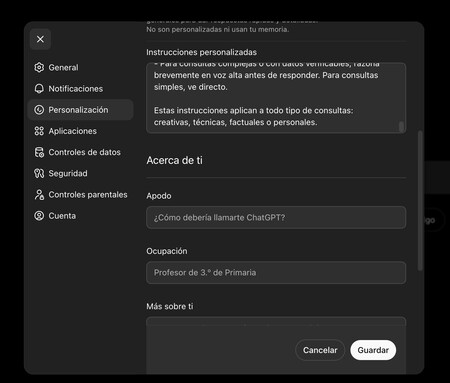
And ChatGPTyou have to enter the settings of your website or application. Once inside, go to the section Personalization. You have to put the prompt within the option of Custom instructions. You will see that the writing field is small, but you will be able to copy and paste the prompt there without problems.
How to add the prompt to Gemini
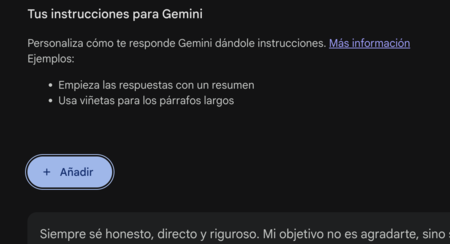
And Geminiyou have to click on the button Settings and helpand in the drop-down menu click on Personal context. Once inside the customization screen Gemini, press the button Add of Your instructions for Geminiand a window will open where you can paste the prompt.
How to add the prompt to Claude
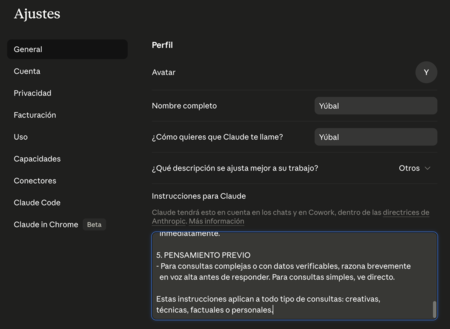
In Claude you have to go into the settings. Once inside, click on the section Generaland you will have to write the prompt in the field Instructions for Claude. Here you can paste everything without problem so that it is always taken into account.
In Basics | The best prompts to save hours of work and do your tasks with ChatGPT, Gemini, Copilot or other artificial intelligence