Antivirus, VPN, firewall… the names pile up on boxes and websites, the promises are similar, and in the end, we’re a little lost. It feels like we’re facing a wall of technical jargon, without knowing where to start. Do we really need to install all this equipment? Is one software enough? Spoiler: the answer is not that simple. Behind these terms lie distinct gatekeepers for your digital life. Let’s untangle this web together so that you can make the right choice, without hassle and with full knowledge of the facts.
the basics: who does what?
To get started, you need to understand that each tool has a well-defined role. Thinking that a VPN replaces a antivirusit’s like thinking that a bulletproof vest protects you from drowning. It just doesn’t make sense.
What is the concrete difference between an antivirus, a VPN and a firewall?
Think of your computer as a house. L’antivirus is the bodyguard inside, who checks that no one with bad intentions (a virus) has already entered or is taking up residence. THE VPN is a secret, armored tunnel that runs from your front door: no one outside can see where you’re going or what you’re carrying. Finally, the firewall is the bouncer at the door, who checks the comings and goings and refuses entry to any suspicious person who is not on the list.
My computer already has a built-in firewall and antivirus (Windows Defender). Is this enough?
Yes and no. For basic everyday use, such as browsing and emails, Windows Defender has become very competent and offers really solid basic protection. This is a great place to start. However, specialized paid solutions often provide additional layers of protection (more advanced anti-ransomware, dedicated banking protection, etc.) and sometimes faster updates in the face of brand new threats. It’s a bit like comparing the basic lock on your door to an armored three-point lock.
Can a VPN protect me from viruses?
No, not directly. A VPN encrypt your connectionbut it does not scan the files you download. If you download an infected file while connected to a VPN, your antivirus will still have to do the job of blocking it. However, some premium VPNs include features that block known malicious sites, reducing the risk of encountering a booby-trapped file in advance.
If I have a good antivirus, do I really need a VPN?
It totally depends on your usage. If the confidentiality is your priority, if you often use Wi-Fi publics (in cafes, train stations, airports) or if you want to bypass geo-restrictions for streaming, then yes, VPN is essential. Antivirus protects your machine. VPN protects your connection and your anonymity online.

antivirus in detail
Antivirus is often the first security software we think of. But his role has changed. It is no longer this simple “virus hunter” of the past, but a real control tower for the security of your device, a pillar of your security strategy. cybersecurity.
Is a free antivirus as effective as a paid one?
The detection engines of free versions are often identical to those of the paid versions from the same publisher. The difference lies in the additional features: advanced anti-phishing protection, intelligent firewall, password manager, customer support, and above all, no insistent advertisements or pop-ups encouraging you to checkout. The free one does the essential job, the paid one offers much more complete comfort and security.
How does an antivirus work to detect threats?
It mainly uses two complementary methods. The first is the signature detection : it compares the files on your computer to a huge database of known virus “signatures”. It’s like a fingerprint search at a crime scene. The second is theheuristic (or behavioral) analysis : it monitors the behavior of programs. If software tries to encrypt all your files at once for no reason, the antivirus will block it, even if it is not yet in its database.
Can antivirus slow down my computer?
This used to be a real problem, but much less so today. Modern antiviruses are optimized to have a minimal impact on performance. You might notice a slight slowdown during a full system scan, which is normal, but in real-time protection, they are designed to be as stealthy as a ninja. If your PC is slow, it’s rarely the fault of the antivirus alone.
Beyond viruses, what does a modern antivirus protect against?
The term “antivirus” is a bit dated. Today, we should talk about security suites. They protect you against ransomware (these plagues which block your files against a ransom), the spyware (spyware), the phishing (fake sites to steal your credentials), Trojan horsesand a myriad of other digital threats.
vpn, privacy shield
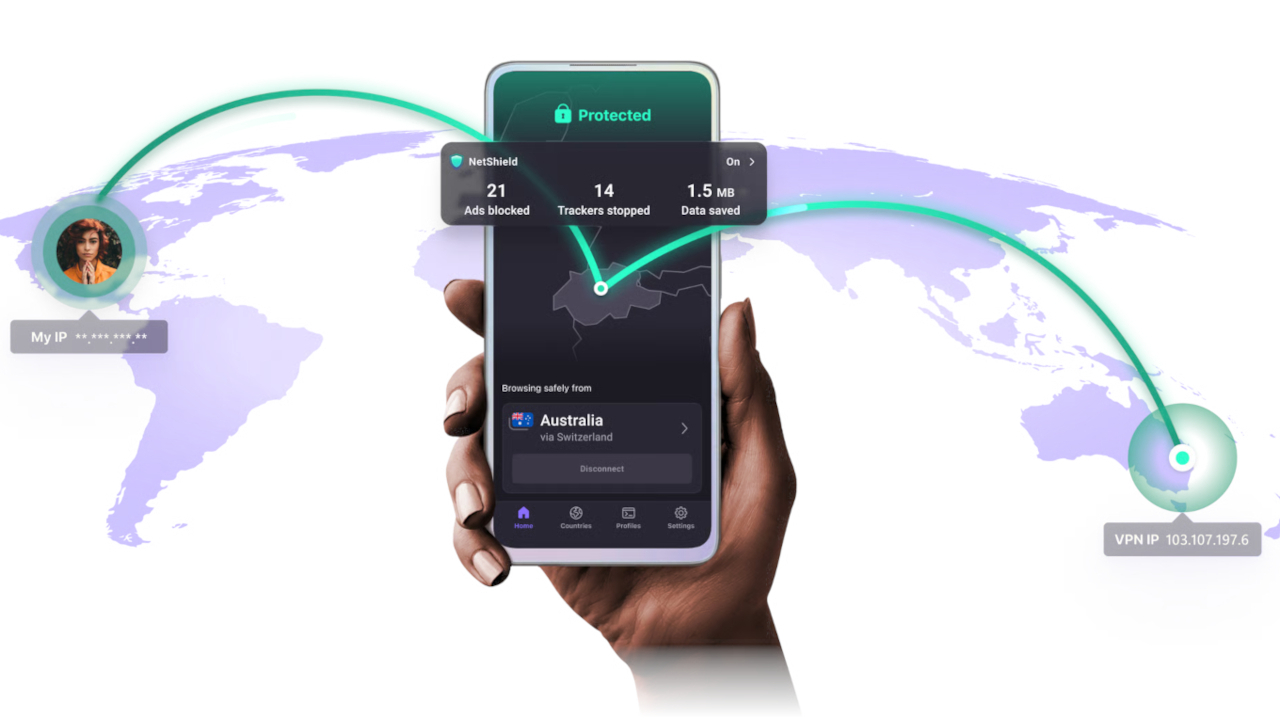
VPN is the tool that is on the rise. It doesn’t protect your machine, but it protects something just as valuable: your online privacy. It’s your digital invisibility cloak.
Concretely, what is a VPN used for on a daily basis?
Three main things:
- 1) Secure your connection on public Wi-Fi networks so that no one can intercept your data.
- 2) Hide your IP address real to browse in a more confidential way and avoid advertising tracking.
- 3) Bypass geoblocks to access streaming catalogs from other countries or sites blocked in your home.
Is it legal to use a VPN?
Yes, in the vast majority of countries, including France, the use of a VPN East perfectly legal. What may be illegal is what you do with it. Using a VPN to download illegally or commit crimes remains… illegal. Some very authoritarian countries restrict or prohibit their use, so check if you are traveling.
Is a free VPN a good or bad idea?
This is often a very bad idea. Managing VPN servers all over the world costs a fortune. If the product is free, you are often the product. These services can drastically limit your speed, impose data caps, flood you with advertisements or, worse yet, collect and resell your browsing data. It’s better to opt for a reputable paid service with a “no-logs” policy (which guarantees not to keep your activity logs).
Will a VPN necessarily slow down my internet connection?
Yes, there will always be one slight loss of flow. Your data goes to a remote server and is encrypted in real time. However, with the best VPNs on the market and choosing a server close to you, this loss is often imperceptiblefor browsing or streaming. It may become more noticeable for very heavy downloads or very demanding online games.
the firewall, this little-known guardian
It is the quietest of the three, but its role is fundamental. The firewall is the first wall of your digital fortress, it filters traffic before it even reaches your applications.
I hear about software and hardware firewalls. What’s the difference?
The software firewall is a program installed on your computer (like Windows). It only protects the machine on which it is installed. THE hardware firewall is a physical box, almost always integrated into your internet box or a router. Its advantage? He protects all connected devices to your upstream network. It’s a first line of defense for the entire home.
Do I have to configure my firewall myself?
In general, no. For domestic use, the firewall of Windows or that of your box is preconfigured with default rules which are very well made. It blocks unsolicited incoming connections while allowing legitimate traffic (your browsing, gaming, etc.) to pass. You will only need to touch it for very specific uses, such as hosting a game server or a file server.
Does my internet box’s firewall already protect me?
Yes, absolutely. It constitutes a essential basic protection for your entire home network. It prevents malicious people on the internet from “probing” your network ports and attempting to connect directly to your devices. This is a crucial barrier, but one that must be supplemented by a software firewall and antivirus on each machine for in-depth security.
Practical everyday questions
- I am teleworking, which solution should I choose? The winning triplet is Antivirus + Pare-feu + VPN. VPN is often mandatory to securely connect to the company network and ensure good data protection.
- And on Smartphone? And VPN takes priority if you use public Wi-Fi a lot. An antivirus is less critical than on PC (thanks to the “sandboxing” of apps), but remains a good idea, especially on Android if you download applications from outside the Play Store.
- For online games, is this useful? A VPN is rarely useful and can even increase your latency (ping). It is only used in very specific cases: protecting yourself from DDoS attacks if you are a pro streamer or accessing game servers in other regions.
- What about using public Wi-Fi? The VPN, without the slightest hesitation. It’s the number one tool for encrypting your connection and preventing a nosy (or malicious) table neighbor from spying on what you’re doing.
- Should I use multiple antiviruses? ESPECIALLY NOT! It’s the worst thing to do. Two antiviruses installed at the same time will conflict, consider each other as threats, and slow down your system to the point of rendering it unusable, while reducing your overall security. Just one, and a good one!
If you still have any misunderstandings, or questions not included in this guide, let us know in the comments below. We will complete this article to offer you the most comprehensive help possible.