By using this site, you agree to the Privacy Policy and Terms of Use.
Accept
World of SoftwareWorld of SoftwareWorld of Software
  • News
  • Software
  • Mobile
  • Computing
  • Gaming
  • Videos
  • More
    • Gadget
    • Web Stories
    • Trending
    • Press Release
Search
  • Privacy
  • Terms
  • Advertise
  • Contact
Copyright © All Rights Reserved. World of Software.
Reading: How to Mute Instagram Accounts Without Unfollowing Them – Blog
Share
Sign In
Notification Show More
Font ResizerAa
World of SoftwareWorld of Software
Font ResizerAa
  • Software
  • Mobile
  • Computing
  • Gadget
  • Gaming
  • Videos
Search
  • News
  • Software
  • Mobile
  • Computing
  • Gaming
  • Videos
  • More
    • Gadget
    • Web Stories
    • Trending
    • Press Release
Have an existing account? Sign In
Follow US
  • Privacy
  • Terms
  • Advertise
  • Contact
Copyright © All Rights Reserved. World of Software.
World of Software > Computing > How to Mute Instagram Accounts Without Unfollowing Them – Blog
Computing

How to Mute Instagram Accounts Without Unfollowing Them – Blog

News Room
Last updated: 2026/02/21 at 10:43 PM
News Room Published 21 February 2026
Share
How to Mute Instagram Accounts Without Unfollowing Them –  Blog
SHARE

When Instagram first introduced its mute feature for Instagram Stories last year, a lot of people wondered when a similar feature would be released for regular posts.

As it turns out, the answer is… today! 

Earlier this morning, Instagram announced it was testing a new “mute in feed” feature that lets you mute posts from accounts you follow without having to actually unfollow those accounts.

This is big news! Even though it’s a relatively small feature, it gives users way more control over the content they see in their feed, which seems to be a growing trend for Instagram in 2018.

Here’s everything you need to know about Instagram’s new mute feature:

We all have one… an irritating Instagram account that clogs your feed with photos and videos you have no intention of engaging with.

It could be an old friend or recent ex, but whatever the social dynamic, the ability to hide an accounts posts from appearing in your feed without actually unfollowing that account is a feature users have been requesting for years.

And it seems that Instagram was listening! Earlier this morning, Instagram announced a new mute feature that does just that — lets you hide posts from certain accounts from appearing on your feed.

As Engadget puts it, the feature sort of acts like a “soft unfollow.” When you mute an account, you can still see posts on their profile page and get notified about comments or posts you’re tagged in. 

The accounts you mute also won’t know that you’ve muted them — and you can always unmute an account to get their posts back in your feed.

How to Use Instagram’s New Mute Feature:

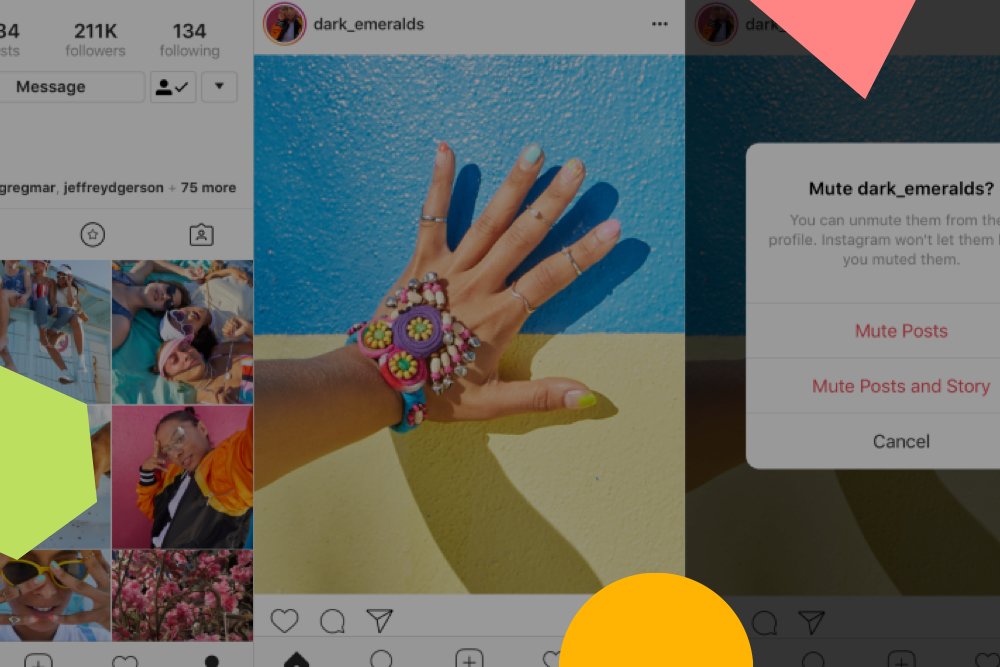
To mute an account, all you have to do is tap the ellipses button (…) in the top-right corner of any post. If you have access to the feature, you should see a new “Mute” option.

When you tap Mute, you’ll be given the option to mute posts or mute posts and stories from the account.

You can also mute posts and stories by pressing and holding on a story in your tray, or from a profile.

And that’s it! Like the original mute Instagram Stories feature, the ability to hide posts from appearing on your feed gives you way more control over the content they see — and makes your feed even more personalized to what matters to you.  

Excited about the new Instagram mute feature? Let us know what you think in the comments!

Always stay up-to-date with Instagram! Join over 1 million Instagram marketers and subscribe to the newsletter to keep up with all the latest Instagram trends:


Sign up for ’s free weekly newsletter for social news, tips, & resources!

Sign up

Sign Up For Daily Newsletter

Be keep up! Get the latest breaking news delivered straight to your inbox.
By signing up, you agree to our Terms of Use and acknowledge the data practices in our Privacy Policy. You may unsubscribe at any time.
Share This Article
Facebook Twitter Email Print
Share
What do you think?
Love0
Sad0
Happy0
Sleepy0
Angry0
Dead0
Wink0
Previous Article Survey reveals how YouTube’s latest anti-adblock move is impacting users Survey reveals how YouTube’s latest anti-adblock move is impacting users
Next Article 5 Smart Ways To Use Your Streaming Devices Beyond Watching TV – BGR 5 Smart Ways To Use Your Streaming Devices Beyond Watching TV – BGR
Leave a comment

Leave a Reply Cancel reply

Your email address will not be published. Required fields are marked *

Stay Connected

248.1k Like
69.1k Follow
134k Pin
54.3k Follow

Latest News

Double the Dazzle: April Brings Two Meteor Showers to the Night Sky
News
How to Become a Content Creator in 8 Simple Steps |
Computing
Hacks, Romulus, Dream Stage: What’s New to Watch on HBO Max the Week of April 3, 2026
News
miHoYo Developing Open-World UE5 Game Featuring Cinematic Storytelling and AI Elements · TechNode
Computing

You Might also Like

How to Become a Content Creator in 8 Simple Steps |
Computing

How to Become a Content Creator in 8 Simple Steps |

3 Min Read
miHoYo Developing Open-World UE5 Game Featuring Cinematic Storytelling and AI Elements · TechNode
Computing

miHoYo Developing Open-World UE5 Game Featuring Cinematic Storytelling and AI Elements · TechNode

1 Min Read
Instagram Avatars Have Arrived. Here’s What It Means
Computing

Instagram Avatars Have Arrived. Here’s What It Means

2 Min Read
Xiaomi CEO teardowns YU7 in livestream over safety concerns, sets 2026 delivery target at 550,000 · TechNode
Computing

Xiaomi CEO teardowns YU7 in livestream over safety concerns, sets 2026 delivery target at 550,000 · TechNode

3 Min Read
//

World of Software is your one-stop website for the latest tech news and updates, follow us now to get the news that matters to you.

Quick Link

  • Privacy Policy
  • Terms of use
  • Advertise
  • Contact

Topics

  • Computing
  • Software
  • Press Release
  • Trending

Sign Up for Our Newsletter

Subscribe to our newsletter to get our newest articles instantly!

World of SoftwareWorld of Software
Follow US
Copyright © All Rights Reserved. World of Software.
Welcome Back!

Sign in to your account

Lost your password?