What are the benefits of social media for artists?
Social media for artists works when it helps you get noticed, build trust over time, and turn attention into income. The right social media platforms make it easier for people to discover your artwork and feel confident buying from you, and that’s important given that 58% of consumers say they discover new businesses via social media, and that includes art businesses.
Here are the benefits of using social media as an artist:
- Social media platforms remove location limits. A gallery might bring in people from your city. An Instagram post or short video can reach someone across the world in the same week. If your art is very niche, that wider exposure often means finally finding the people who genuinely connect with it.
- A real community isn’t a big follower count. It’s the same names showing up in your comments. It’s someone saving your images or replying to your studio updates. It’s a DM asking about a painting they’ve been watching. Those repeated interactions build familiarity, and familiarity builds trust.
- Engagement gives you direction. If your work-in-progress videos get three times more saves than finished pieces, you’ve learned what to focus on. If a simple studio clip sparks more conversation than a polished photo, that’s useful feedback. Social media shows you what resonates, so you can adjust your content with intention.
- Social media platforms allow you to sell directly. You can share available artwork, link to your website, answer questions in DMs, and move from interest to commission without waiting for galleries to notice you.
Used thoughtfully, social media becomes a practical extension of your art practice. It helps the target audience discover your work and makes it easier for them to support it.
Top social media platforms every artist should consider
Most artists choose the best social media platforms based on popularity. That decision usually leads to scattered effort.
Platform choice should match two things:
- Where your audience already spends time
- What result you want from your work online
Start with the audience. If your collectors browse Instagram daily, that matters. If your target clients are art directors who review portfolios on Behance, that matters more.
Then factor in format. Some artists naturally document the process on video and create content. Others prefer structured project breakdowns. The platform has to fit how you create.
Finally, define your goal. Many platforms support different outcomes:
- Commission inquiries: Instagram, TikTok
- Print sales and website traffic: Pinterest, Instagram
- Portfolio visibility to clients or recruiters: Behance, ArtStation, LinkedIn
- Community and conversation: Instagram, X
A simple decision rule helps:
- Choose Instagram or TikTok if you can show your process on video and want visibility.
- Choose Pinterest if you want search-driven traffic to your shop or portfolio.
- Choose Behance or ArtStation if your priority is hiring intent.
- Choose LinkedIn if you want professional credibility and client relationships.
Now let’s look at each one in detail.
1. Instagram
Instagram remains one of the strongest social media platforms for visual artists who want consistent visibility and commission work. It works especially well for artists who are willing to show how the work comes together, not just the final result.
Why Instagram works for artists
Your grid functions as an online gallery. It shows the finished work in a clean, visual way. Reels and Stories give you space to show what happens in the studio: the sketches, the materials, the in-between stages. That mix builds familiarity over time.
The platform encourages browsing, saving, and revisiting work. When someone saves a post or sends a DM, that often signals real interest, not casual scrolling.
What to post
“You’ve got to treat your Instagram like an online portfolio. When somebody visits your profile, those first six or nine blocks on your grid are going to give them an impression of what you’re all about, so you want those things to be front and center,” says Brooke Cormier, painter and social media creator.
Artists who grow steadily tend to share:
- Time lapse videos of painting or drawing
- Close-ups that highlight texture or brushwork
- Work-in-progress stages
- Studio moments
- Final reveals
If your work-in-progress posts get more saves than your final images, pay attention to that. Saves usually mean someone plans to come back. That’s useful feedback.
How to package your content
Carousels work best when they tell a story. Start with the finished piece. Follow with a detail shot. Add a work-in-progress image. Write a short caption about the idea behind the piece or a challenge you faced. End with a simple note if the work is available as a print or commission.
Reels need a clear starting point. Open with something specific, such as “Turning this rough sketch into a commissioned portrait.” Then show a short time lapse and finish with a clear next step, like inviting commission inquiries.
When viewers understand what they’re looking at and what they can do next, they’re more likely to act.
Common Instagram mistake
Many artists chase reach spikes, but what usually drives commissions is recognition.
When the same audience sees your work consistently, they start to trust the quality. That familiarity makes it easier for them to inquire about a piece or request a commission. Occasional viral moments rarely replace steady visibility.
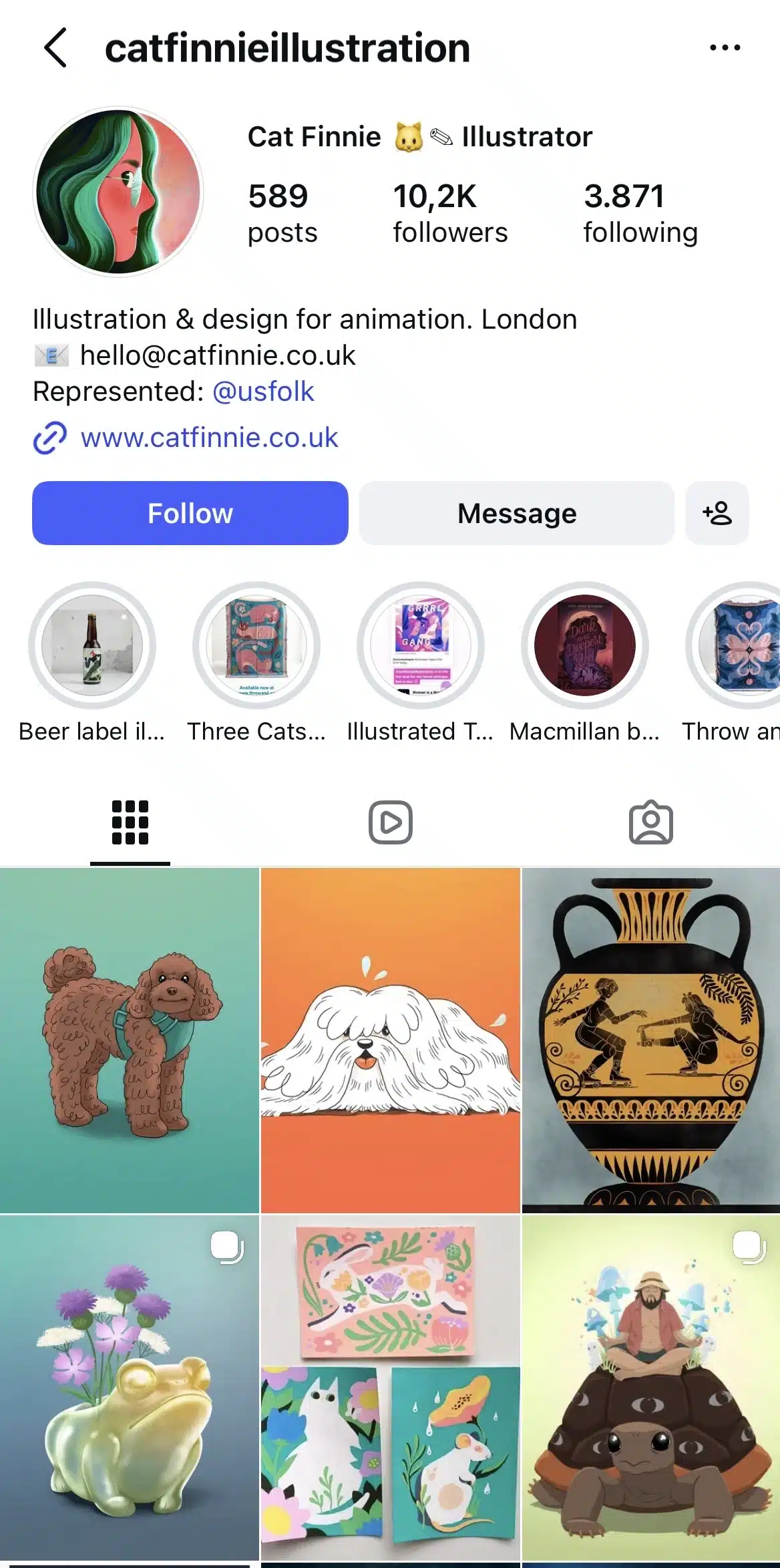
Instagram artist account example: @catfinne
Cat Finne’s Instagram works because it feels intentional without feeling staged. The feed reads like a digital gallery, but she also shares enough process to make the work feel accessible. It stays professional while still showing the human side of the practice.
2. Pinterest
Pinterest behaves differently from most social media platforms. It works more like a visual search engine than a social feed.
If your goal is to drive traffic to your website, online gallery, or print shop, Pinterest can outperform platforms that rely purely on engagement. Content on Pinterest lives longer. A strong pin can bring visitors months after you publish it.
Why Pinterest works for artists
People use Pinterest with intent. They search for ideas, inspiration, and products. That includes searches like “oil portrait commission,” “minimalist wall art print,” or “digital concept art portfolio.”
That search behavior makes Pinterest especially useful for artists who sell prints, offer commissions, or run an online shop.
Instead of relying on followers, Pinterest allows your artwork to appear in search results based on keywords. That shifts the game from chasing engagement to capturing demand.
What to post
High-quality vertical images perform best. Pinterest favors clarity and clean visuals.
Artists tend to see results from:
- Final artwork formatted vertically
- Step-by-step process graphics
- Before-and-after transformations
- Studio shots linked to blog posts or product pages
- Mockups showing prints in real spaces
Each image should link somewhere specific. A product page. A commission inquiry page. A portfolio section. Pinterest only works if it drives traffic.
How to package your pins
Pinterest runs on keywords, and Pinterest SEO is really important for discoverability. When someone types “oil portrait commission” into the search bar, Pinterest scans titles, descriptions, and board names to decide what to show. That means your wording matters as much as your image.
Start with your pin title. It should describe exactly what the viewer is looking at, using the same phrases they would type into a search. For example, “Custom oil portrait commission | realistic family painting” works better than “New artwork.”
The first version includes the medium (oil portrait), the intent (commission), and the style (realistic). That makes it searchable.
Then use your description to reinforce those terms naturally. Expand slightly without repeating awkwardly. Mention the medium, subject, and purpose again in a sentence or two.
For example: “This custom oil portrait commission captures a family in a realistic style. Ideal for anniversary gifts or heirloom artwork.”
Pinterest reads both the title and description to understand what your pin is about. If the words match what people are searching for, your visibility increases.
Next, pay attention to your board names. Boards also rank in search.
Instead of vague boards like “My Art”, create boards that reflect buying intent:
- Commission Examples
- Print Shop
- Studio Process
- Gift Ideas
- Portrait Commissions
When someone lands on your profile, they immediately understand what you offer. And when someone searches “portrait commission,” a board named “Portrait Commissions” has a stronger chance of appearing.
Common Pinterest mistake
A common mistake is treating Pinterest like Instagram. Pinterest is built for search and long-term traffic. If you post randomly styled images without thinking about keywords, links, or intent, your content won’t fain any visibility.
A better approach is consistency around one category. If you sell portrait commissions, create multiple pins around that exact offer. Different angles. Different examples. Different room mockups. Each pin linking to the same commission page. Over time, Pinterest understands what you’re known for.
Another mistake is linking everything to your homepage. That forces visitors to hunt. Every pin should send people to the exact page that matches the image. A portrait pin should link directly to your portrait commission page. A print mockup should link to that print product page.
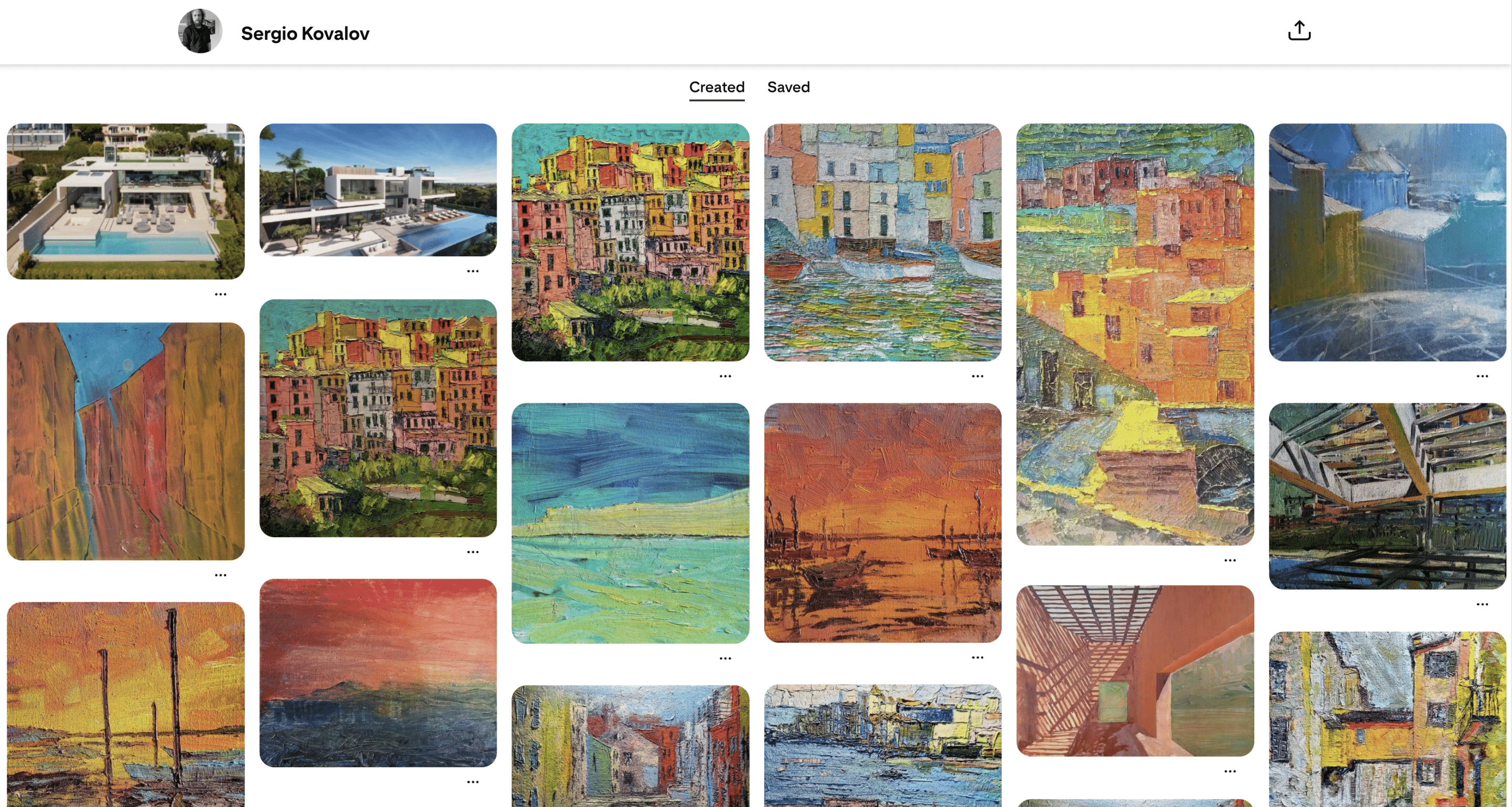
Pinterest artist account example: Sergio Kovalov
Sergio Kovalov separates created work from curated inspiration. Visitors can quickly see what he produces, and then switch to his curated boards and see what inspires him. That clarity improves navigation and gives a deeper look into his art and his goals and interests.
3. TikTok
TikTok works well for artists who are willing to show their work in motion. If you can film your process, even simply, you already have an advantage.
The platform pushes videos based on watch time. If people stay until the end, replay it, or comment, the video reaches more users. That means your content needs to hold attention. Process does that naturally.
Why TikTok works for artists
TikTok brings your content in front of a larger audience thanks to the For You page, so you don’t only rely on followers. A strong video can reach people who have never heard of you before. That makes it useful for discovery.
This is also the platform to be if you want higher engagement. TikTok has a higher social media engagement rate compared to Instagram, with smaller creators on TikTok seeing up to 7.5% engagement, compared to 3.65% on Instagram.
Artists who grow steadily on TikTok usually focus on one format and repeat it. Instead of reinventing their content every week, they build recognition around a pattern.
For example, a portrait artist might post:
- Daily time-lapse drawings
- Commission updates
- Redrawing old sketches
- One-minute breakdowns of technique
When viewers recognize the format, they return for it.
What to post
The most reliable TikTok content for artists shows change.
- Time-lapse videos work because they compress hours into seconds.
- Fixing old artwork performs well because it shows improvement.
- Commission updates keep followers invested in the outcome.
Instead of posting a finished painting with music, show the sketch. Show the mistakes. Show the layering. That’s what keeps people watching.
How to structure your videos
The first sentence should explain what’s happening:
- “I’m turning this sketch into a commissioned portrait.”
- “Client asked for a surreal pet painting.”
- “I’m repainting this piece from 2021.”
Then cut quickly into the process. Avoid long introductions or static frames, as they will have viewers lose interest fast.
End with a simple next step. Invite viewers to follow the series or mention commission availability if relevant. Keep it direct and make sure the steps are easy to follow (e.g. have a link in bio for commissions or prints).
Common TikTok mistake
Many artists treat TikTok like a trend machine instead of a positioning tool.
Jumping from one trend to another can bring temporary spikes in views, but it makes your account harder to understand. One week, you’re doing a trending audio. The next wee,k you’re reacting to memes. The week after that, you’re posting a serious commission piece. There’s no clear throughline.
When your content shifts constantly, new viewers don’t know what you’re known for. That confusion limits repeat engagement and commission inquiries.
Artists who grow steadily on TikTok usually narrow their focus. They stick to one medium, one subject area, or one recognizable format. For example, daily subway portraits. Weekly mural updates. Short fantasy character builds. The repetition builds recognition.
Recognition is what turns viewers into followers. Followers are what turn into clients.
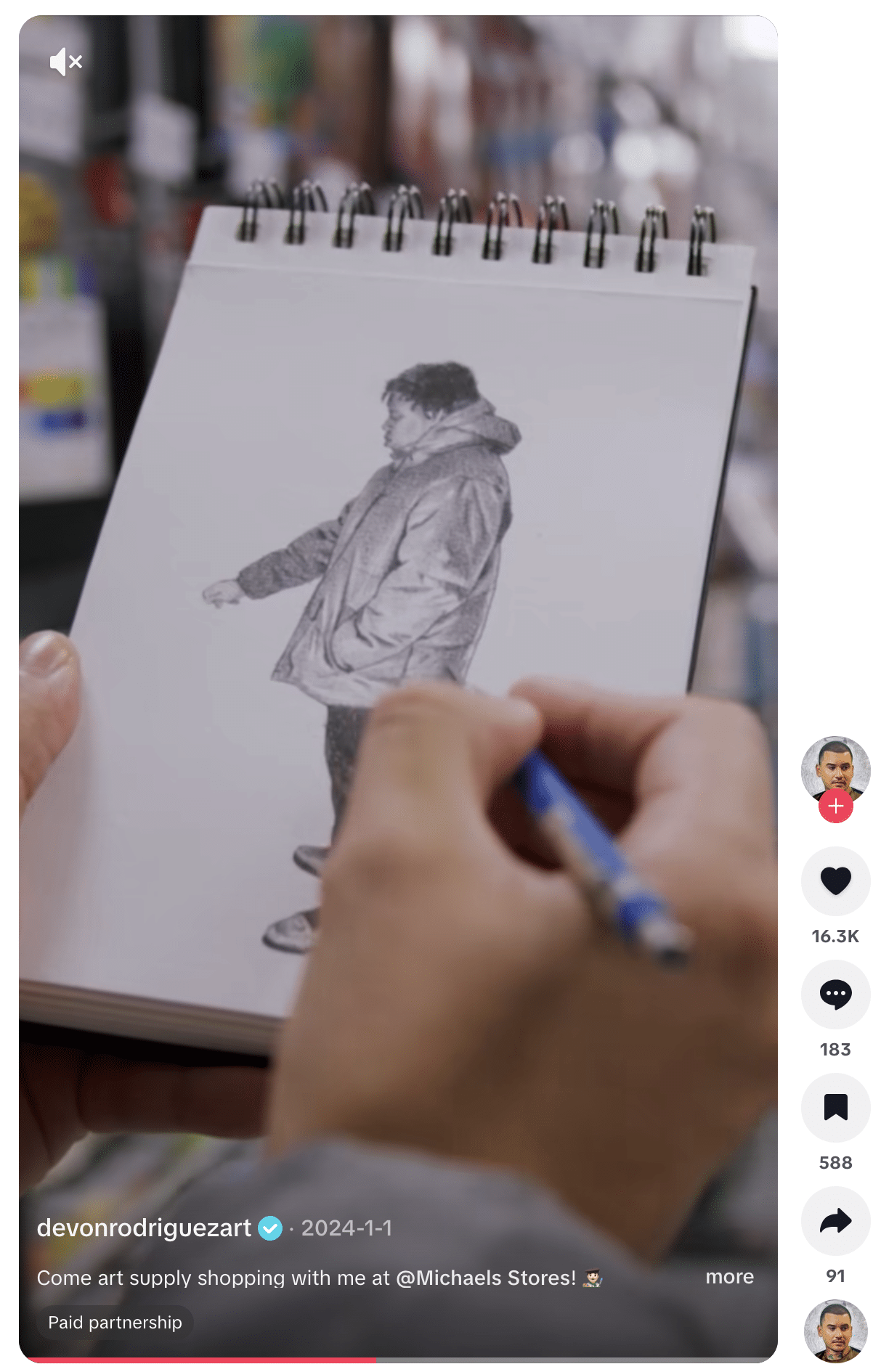
TikTok artist account example: @devonrodriguezart
Devon Rodriguez posts time-lapse portraits and captures the reactions of the people he draws. The format is simple and repeatable. The drawing remains the focus.
4. LinkedIn
LinkedIn is often overlooked by artists because it feels corporate, but that’s exactly why it works.
People log into LinkedIn with career intent. They’re thinking about hiring, collaborating, commissioning, or discovering professionals. That context changes how your work is perceived.
On Instagram, someone might admire your painting, but on LinkedIn, someone might ask if you’re available for a paid mural project.
Why LinkedIn works for artists
When you share artwork on LinkedIn, it sits inside a professional environment. People are scrolling with hiring, collaboration, or partnership in mind. That context turns a painting into a project. It turns a mural into a documented experience.
That difference matters if you’re aiming for:
- Corporate commissions
- Public art contracts
- Brand partnerships
- Creative industry roles
- Gallery representation
The platform gives your art professional weight simply because of where it’s being shown.
What to post
A single image with “New piece” as the caption won’t do much on LinkedIn. What performs better is context.
Instead of just showing the mural, explain who hired you and what they needed. Instead of announcing an exhibition, share what the theme was and what the response looked like. If you completed a commission, describe the brief and how you approached it.
You can also post directly about availability. If you’re open to commissions, murals, or freelance work, say it clearly. LinkedIn readers respond well to clarity.
How to structure your posts
Keep the structure of your posts simple and practical:
- Start with the situation. Who was involved? What was the objective?
- Explain your approach. What decisions did you make?
- Show the outcome. What did the finished work look like?
- End with a clear next step. Are you taking on similar projects?
For example: “A local restaurant commissioned a mural reflecting the city’s industrial history. I developed three concepts, refined the chosen direction, and completed the installation over two weeks. The final piece spans 18 feet. I’m currently available for mural commissions.”
That format helps potential clients quickly understand your experience and imagine working with you.
Common LinkedIn mistake
Posting artwork without explaining it. If you upload a finished piece with a short caption, it blends into the feed. LinkedIn readers expect a background. They want to know the context, the scale, the purpose.
Adding that layer turns a post from “look at this” into “this is how I work.”
LinkedIn artist account example: Refik Anadol
Refik Anadol regularly shares installations, exhibitions, and collaborations on LinkedIn. He includes enough context for readers to understand the scope and ambition behind the work.
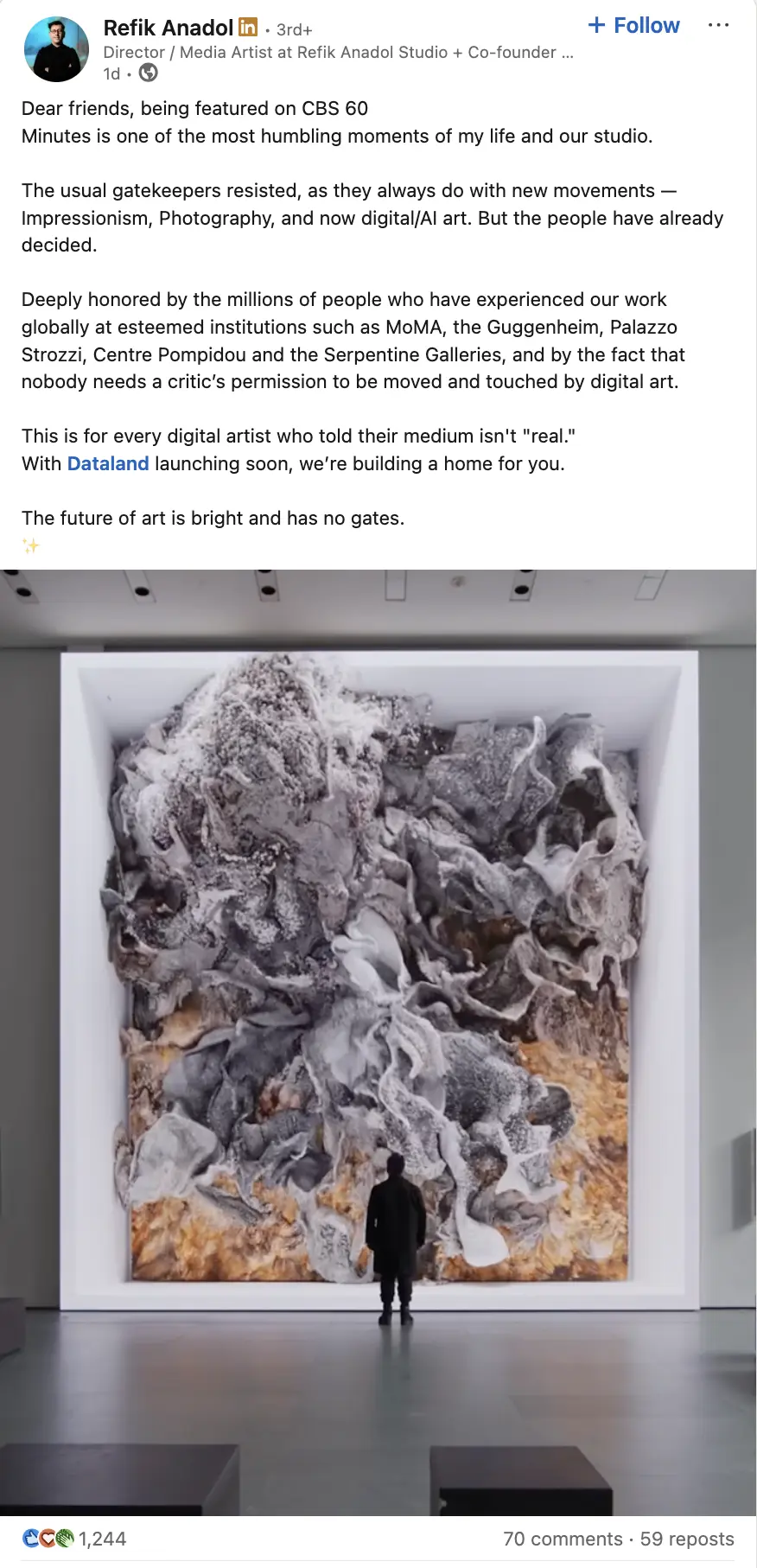
You don’t need large-scale projects to apply that approach. Share the project. Explain your role. Make it clear what kind of work you’re open to next.
5. X (formerly Twitter)
X works differently from Instagram or LinkedIn. It’s less about presentation and more about conversation.
If Instagram functions like a gallery and LinkedIn like a portfolio, X feels more like an ongoing studio dialogue. People share thoughts, works in progress, opinions, and reactions in real time. That makes it useful for artists who want visibility inside creative circles.
Why X works for artists
X favors consistency and participation.
Art challenges, prompt threads, and open commission announcements circulate quickly within artist communities. If you post regularly and engage with others, your work becomes visible inside those networks.
It’s also one of the easiest platforms for building peer relationships. Many collaborations, referrals, and shoutouts start from simple replies and threads.
What to post
Finished artwork still matters, but context helps.
Posts that tend to perform well include:
- Sharing a piece and briefly explaining the idea behind it
- Threading your process from sketch to final result
- Posting a weekly “commission slots open” update
- Participating in art prompts or themed challenges
- Sharing insights about materials, workflow, or industry experiences
Threads are especially useful. Instead of posting one image, show the progression: sketch → linework → color → final piece. That keeps people engaged and encourages replies.
How to structure your posts
If you’re posting artwork, add one or two lines that explain what it is and why it matters. Avoid generic captions and try to give viewers a reason to respond, whether it’s by asking questions or challenging them to share their own work.
If you’re opening commission slots, state it directly. Mention the type of work you’re offering and how to inquire. Pin that post to your profile for visibility.
If you’re building community, reply to other artists. Comment thoughtfully and quote-tweet work you admire with specific feedback.
Common X mistake
Posting artwork and disappearing. X rewards interaction. If you publish and never reply, your reach stays limited. The X algorithm prioritizes accounts that participate in conversations.
Artists who grow here tend to treat it as a two-way channel. They post their work, respond to comments, and engage with other artists consistently. Over time, that builds recognition inside the community.
X artist account example: Sam Spratt
Sam Spratt is a New York–based digital artist who shares his work and creative updates on X, often showcasing his richly detailed digital paintings and projects that blend traditional artistic techniques with modern digital expression. He’s best known for his ongoing Luci series, an evolving narrative told through digital paintings paired with written psalms that explore human values and storytelling in a futuristic context, and he uses X to engage his audience with new pieces, behind-the-scenes thoughts, and links to his latest drops.

6. Behance
Behance works best when your goal is client work or creative industry roles. The platform is structured around projects, not posts, and that affects how your work is evaluated.
People browsing Behance are usually reviewing portfolios. They’re comparing artists. They’re looking at how work is presented and how clearly it’s explained. That context makes depth more important than volume.
If you’re an illustrator, designer, or concept artist aiming for agency work, brand collaborations, or studio roles, Behance gives you room to show how you think through a project.
Why Behance works for artists
On Behance, a single image rarely communicates enough. Viewers want to understand the scope of the project, the reasoning behind design decisions, and the development process.
That’s especially important for commissioned work. A client reviewing your profile is trying to assess whether you can handle a brief, manage revisions, and deliver a cohesive outcome. Showing that process builds confidence.
The more clearly you document your approach, the easier it is for someone to picture hiring you.
What to publish
Strong Behance profiles are built around structured projects.
Instead of uploading standalone visuals, create project pages that include:
- A short explanation of the brief or concept
- Early sketches or exploratory directions
- Key iterations or revisions
- Final deliverables
- A note explaining your role and tools
For example, if you’re presenting a branding project, include the initial concept sketches, logo variations, typography decisions, and mockups in context. That level of detail shows the extent of your talent and work ethic.
If the project was self-initiated, frame it clearly. Define the objective you set and the audience you designed for.
How to structure a project page
When someone clicks on your Behance project, they’re trying to figure out one thing: can this person handle a real job?
Help them answer that without making them work for it.
Start by explaining what the project is. A few lines at the top are enough. Was it a branding job for a café? A self-initiated redesign? A commissioned illustration? Give people a starting point so they know what they’re looking at.
Then show how the work came together. Include sketches, alternate ideas, early drafts. You don’t need to upload every version, but showing progress matters. Clients want to know you can think through a project, not just produce a final image.
When you present the finished result, show it in use. A logo floating on a blank background feels incomplete. That same logo on packaging, signage, or social media graphics feels real. The same goes for illustration work. Show it placed inside a book layout, on a poster, or in context where it would live.
Also, be clear about what you actually did. If you handled everything from concept to final design, say that. If you only illustrated while someone else directed the project, say that too. Clear roles prevent confusion.
At the end, one simple line about availability is enough. Something like: “Available for branding and illustration projects.” That gives interested viewers a next step without turning the page into a sales pitch.
Common Behance mistake
Posting finished artwork without explaining it is one of the most common mistakes on Behance.
If someone opens your project and only sees polished visuals with no background, they have to fill in the gaps themselves. They don’t know who it was for, what the goal was, or how you approached it. Most people won’t spend time trying to piece that together. They’ll just move on.
Another problem is mixing everything together.
If your profile jumps from children’s book illustration to corporate branding to sci-fi character art with no clear direction, it becomes hard to tell what you actually want to be hired for. Clients look for specialists. When your portfolio reflects the type of work you want more of, it becomes easier for the right people to recognize themselves in it.
Behance artist account example: Jose Manuel Vega
Jose Manuel Vega presents his projects with a clear structure. Each one reads as a complete piece of work rather than a collection of images. The presentation makes it easy to understand both the creative direction and the execution.
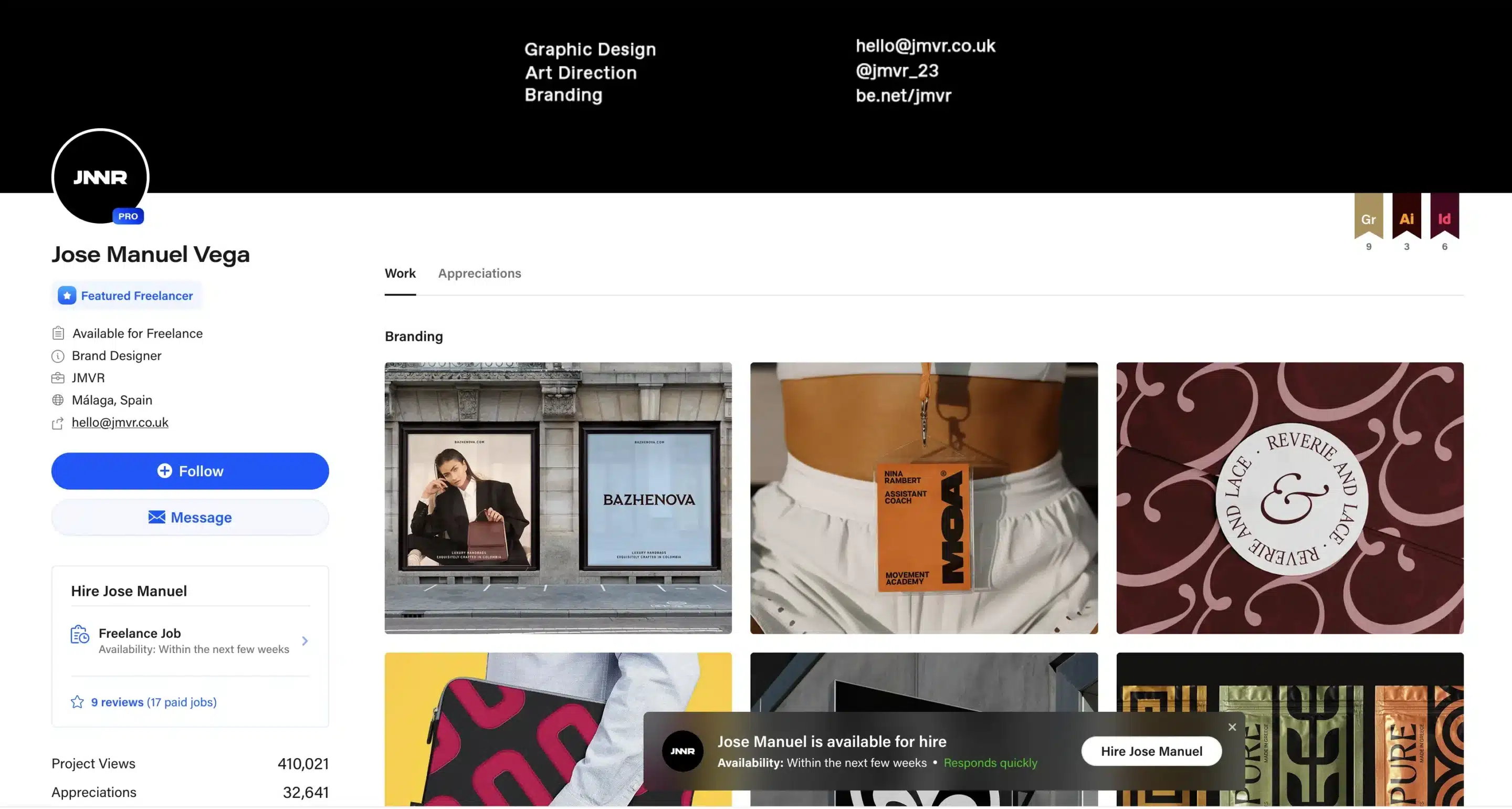
Behance also makes it easy for artists to be commissioned. It clearly states that Jose is ready to work, the timeframe he’ll be available in, and what type of projects he’s interested in.
7. ArtStation
ArtStation is where entertainment artists get evaluated. If you want concept art, character design, environment work, or 3D roles in games or film, your profile has one job: make it easy for someone to decide you’re hireable.
That decision rarely comes from one great image. It comes from a body of work that shows consistency, range inside your lane, and clean presentation.
Why ArtStation works for artists
ArtStation attracts people who understand production. Recruiters and art leads scan fast. They look for clues that you can deliver more than a single “hero” piece: repeatable design decisions, solid fundamentals, and work that fits a pipeline.
If your work already sits in a niche (stylized characters, hard-surface props, realistic environments, creature design), ArtStation helps you get in front of viewers who actively search for that niche.
What to post
Post projects that show you can repeat quality across multiple pieces. A simple way to think about it:
- Character artists: one “set” of characters from the same world (silhouettes, turnarounds, expressions, costume variants).
- Environment artists: one location shown from multiple angles (wide shot, mid shot, detail shots, lighting variation).
- Concept artists: one world-building series (factions, props, architecture language, materials, shape rules).
- 3D artists: one asset presented like a production-ready deliverable (beauty render, wireframe, texture sheets, close-ups).
If you only upload standalone artwork, you force the viewer to guess whether you can do it again on a deadline. A short series answers that without extra explanation.
How to package your work
This is where most portfolios fall apart, even when the art is strong. Here’s a structure that consistently reads well on ArtStation:
1. Open with the strongest image. Lead with the final render or the cleanest “hero” image. Recruiters skim thumbnails first.
2. Add 3–6 supporting images that prove control. Pick supporting images that show decisions, not decoration. Examples: a turnaround, a close-up of materials, a lighting pass, or a detail crop that shows edge control and texture.
3. Show process only when it helps the viewer trust you. A few sketches, iterations, or blockouts are useful when they show problem-solving. Ten screenshots of tiny changes usually add noise. Keep it tight.
4. Write a short project description people can scan. Two to four lines max:
- what the project is
- what you were responsible for
- tools used (only if relevant for the role)
5. Be specific about your role on team projects. If you modeled the props and someone else textured them, say so. If you handled the full pipeline, say that clearly. This prevents awkward follow-up and speeds up hiring decisions.
Common ArtStation mistake
Many artists upload work that points in five directions at once. The profile ends up looking like a folder of experiments: one anime portrait, one hard-surface gun, one painterly landscape, one logo. Each piece might be good, but together, they don’t tell a clear story.
A simple fix: pick one direction for the next month and publish around it. Same subject area, same style family, same type of deliverable. That creates a profile people can understand quickly.
Another common issue is presentation. Cropped screenshots, inconsistent aspect ratios, or cluttered collages make the work harder to review. Clean images with consistent sizing do better because they respect the viewer’s attention.
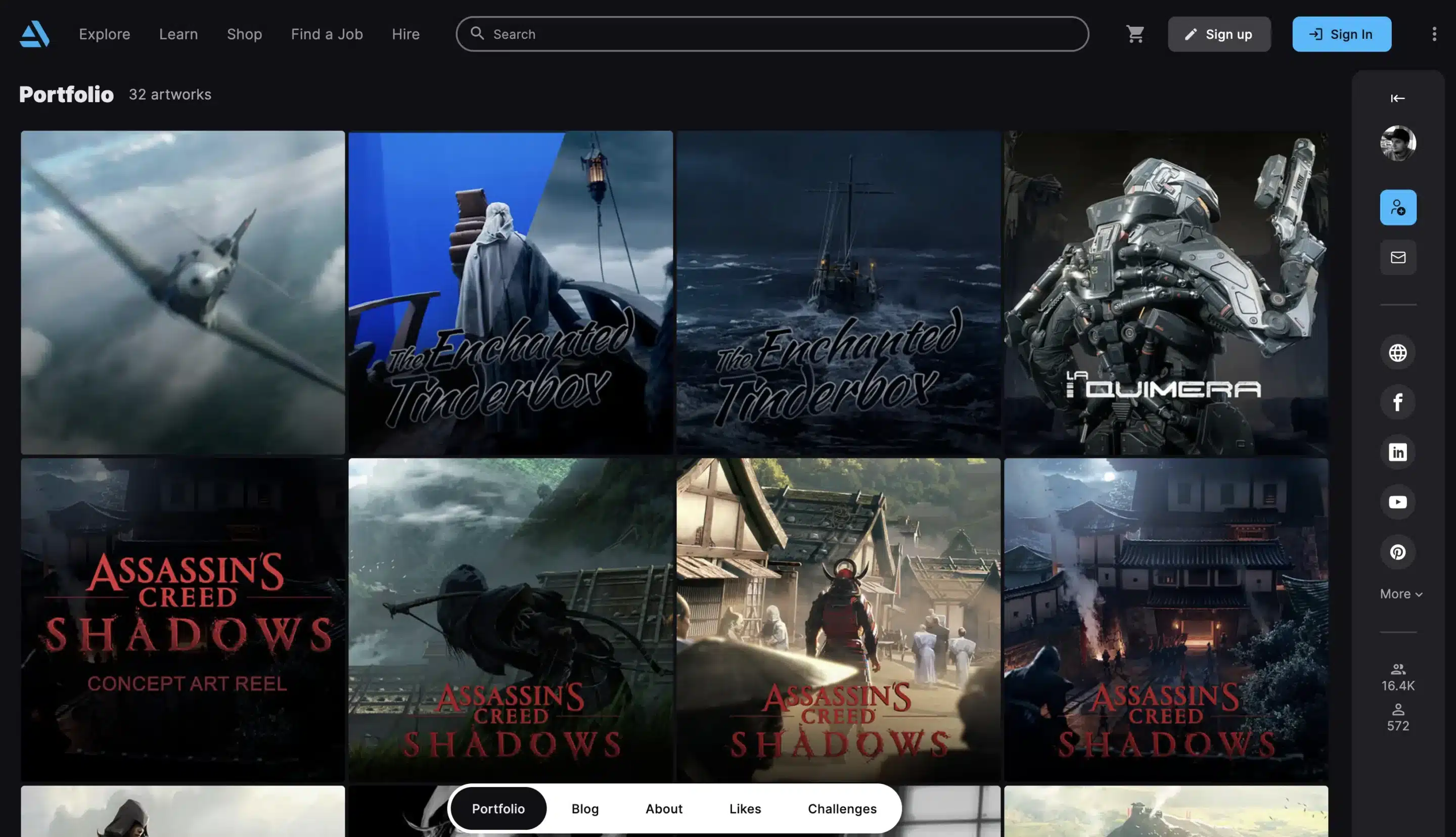
ArtStation artist example: Val Orlov
Val Orlov’s work reads as cohesive. The projects feel like they belong in the same creative universe, and the presentation stays clean. That combination makes it easier for someone scanning the page to understand the lane and evaluate the skill.
4 effective social media marketing strategies for artists
Posting artwork is just the start of your marketing strategy. If someone discovers one post, your profile and content need to guide them toward following, engaging, or buying.
These four strategies focus on making that happen:
- Optimize your profile so buyers can find and understand you
- Post content that shows both skill and process
- Schedule around when your audience is actually online
- Collaborate to borrow trust and expand reach
Let’s break them down.
1. Optimize your profile so buyers can find and understand you
If someone lands on your profile from a single post, they should immediately understand what you make and how to buy it. What you can do to make that happen is tighten your profile so it guides users towards what you want them to do.
Use this quick checklist to optimize every aspect of your profile:
Bio
- Your medium (oil painter, digital illustrator, mural artist)
- Your style or niche (realistic portraits, surreal landscapes, concept art)
- Location (optional, useful for local commissions)
- Clear buying path (“Commissions open,” “Shop prints below”)
Pinned post
- Pin your strongest work and label it clearly. Something like: “Start here: portrait commissions” or “Best of my 2024 paintings”
Link
- If the platform allows it, add a link in your bio that sends people to one focused page. Not your homepage, as that will mean people have to dig to find what they need. Link to a commission page, a print shop, a booking form, etc.
Content pillars
- Stick to 3–5 repeatable themes so your account feels coherent:
- Finished artwork
- Process (WIP, time lapse videos, studio clips)
- Proof (client work, testimonials, exhibitions)
- Offers (commissions open, print drops)
- Personality (studio life, materials, thoughts on art)
Jesperish has a very well optimized X profile:
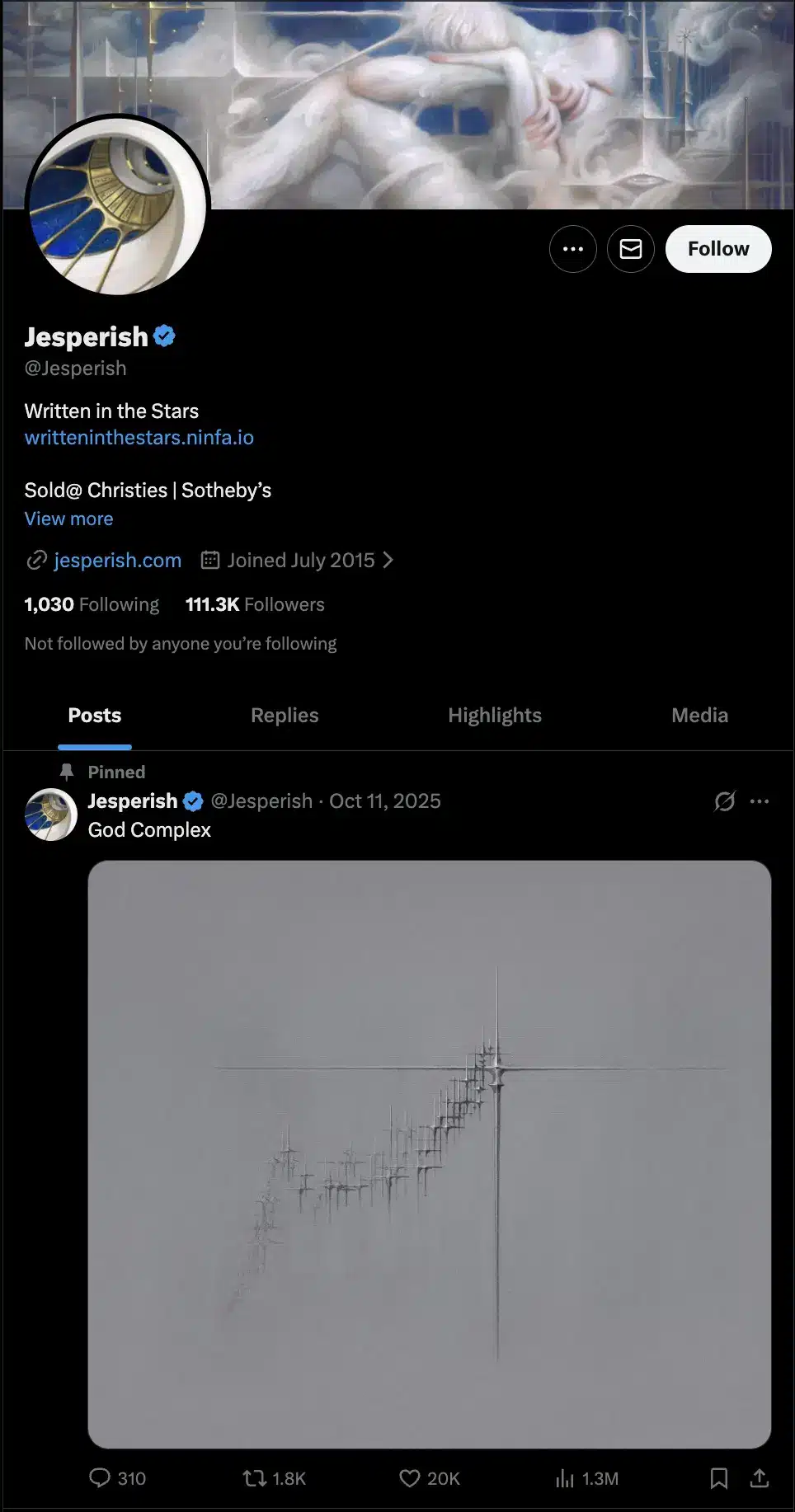
The cover image and profile picture showcase his style of art, his bio directly informs you where you can buy his art and links to a project and his website, and the pinned post is an example of what he creates.
2. Build a real community, not just followers
A high follower count doesn’t automatically mean people care. Community shows up in comments, saves, shares, and repeat names. If you want engagement, prompt it. Create posts that convince your followers to interact in any way: a reply, a comment, a DM, etc.
For example, CJ Hendry created this fun Reel where she prompted people to guess what she was drawing based on a close up, and it generated comments:
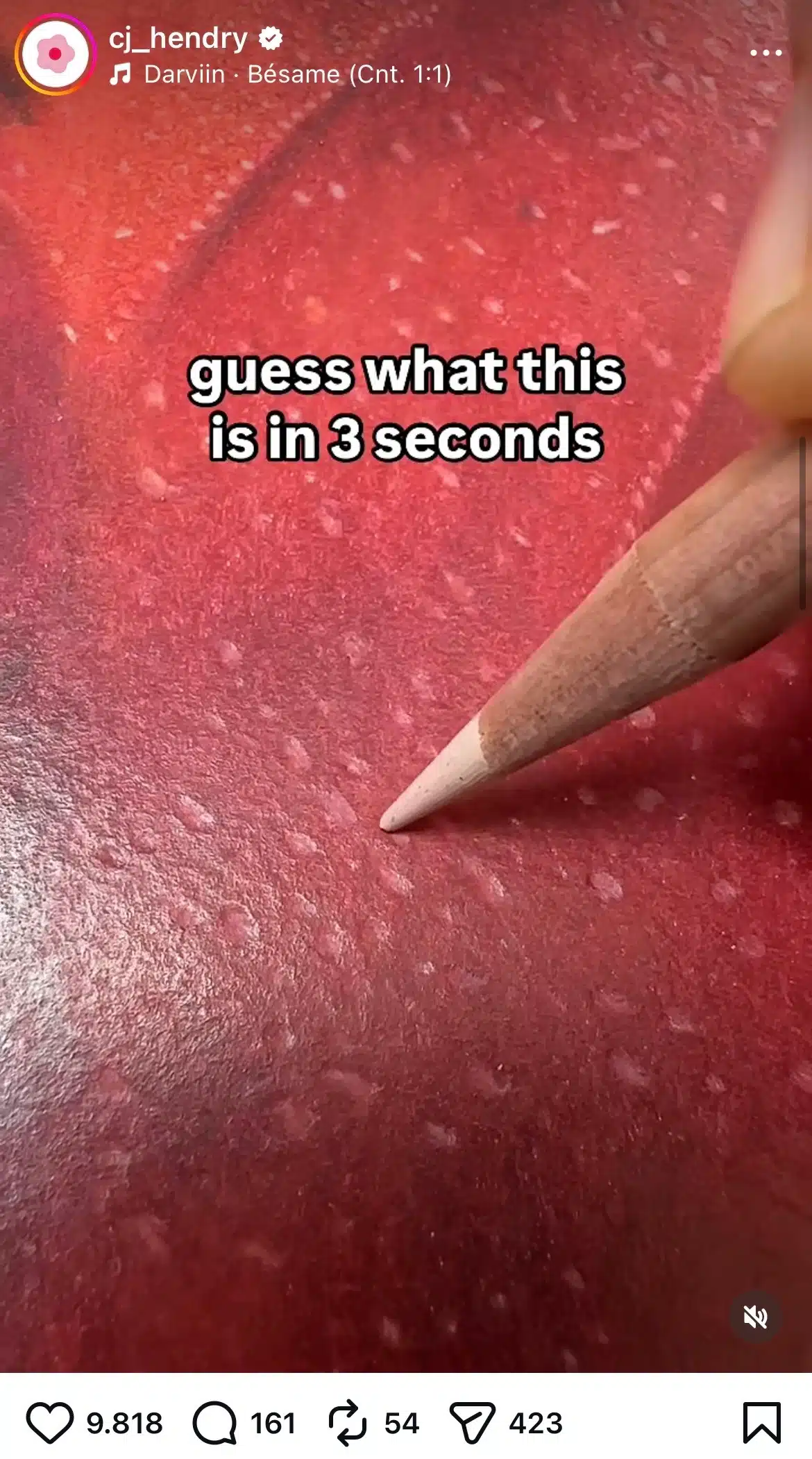
Here are examples artists can use directly:
- “Which version should I finish: A or B?”
- “Landscapes or portraits next?”
- “Want this as a free wallpaper? Comment ‘wallpaper’ and I’ll send it.”
- “Would you hang this in your living room or office?”
Behind-the-scenes content helps here. Studio setups, material choices, even small mistakes create conversation, especially with other artists who can relate to your content. Mutual support with other artists can make you appear more trustworthy, and you might be able to tap into their audience as well.