

By using this site, you agree to the Privacy Policy and Terms of Use.
Accept
World of SoftwareWorld of SoftwareWorld of Software
  • News
  • Software
  • Mobile
  • Computing
  • Gaming
  • Videos
  • More
    • Gadget
    • Web Stories
    • Trending
    • Press Release
Search
  • Privacy
  • Terms
  • Advertise
  • Contact
Copyright © All Rights Reserved. World of Software.
Reading: What does the green dot that sometimes appears at the top of your iPhone mean?
Share
Sign In
Notification Show More
Font ResizerAa
World of SoftwareWorld of Software
Font ResizerAa
  • Software
  • Mobile
  • Computing
  • Gadget
  • Gaming
  • Videos
Search
  • News
  • Software
  • Mobile
  • Computing
  • Gaming
  • Videos
  • More
    • Gadget
    • Web Stories
    • Trending
    • Press Release
Have an existing account? Sign In
Follow US
  • Privacy
  • Terms
  • Advertise
  • Contact
Copyright © All Rights Reserved. World of Software.
World of Software > Mobile > What does the green dot that sometimes appears at the top of your iPhone mean?
Mobile

What does the green dot that sometimes appears at the top of your iPhone mean?

News Room
Last updated: 2026/07/05 at 6:31 AM
News Room Published 5 July 2026
Share
What does the green dot that sometimes appears at the top of your iPhone mean?
SHARE

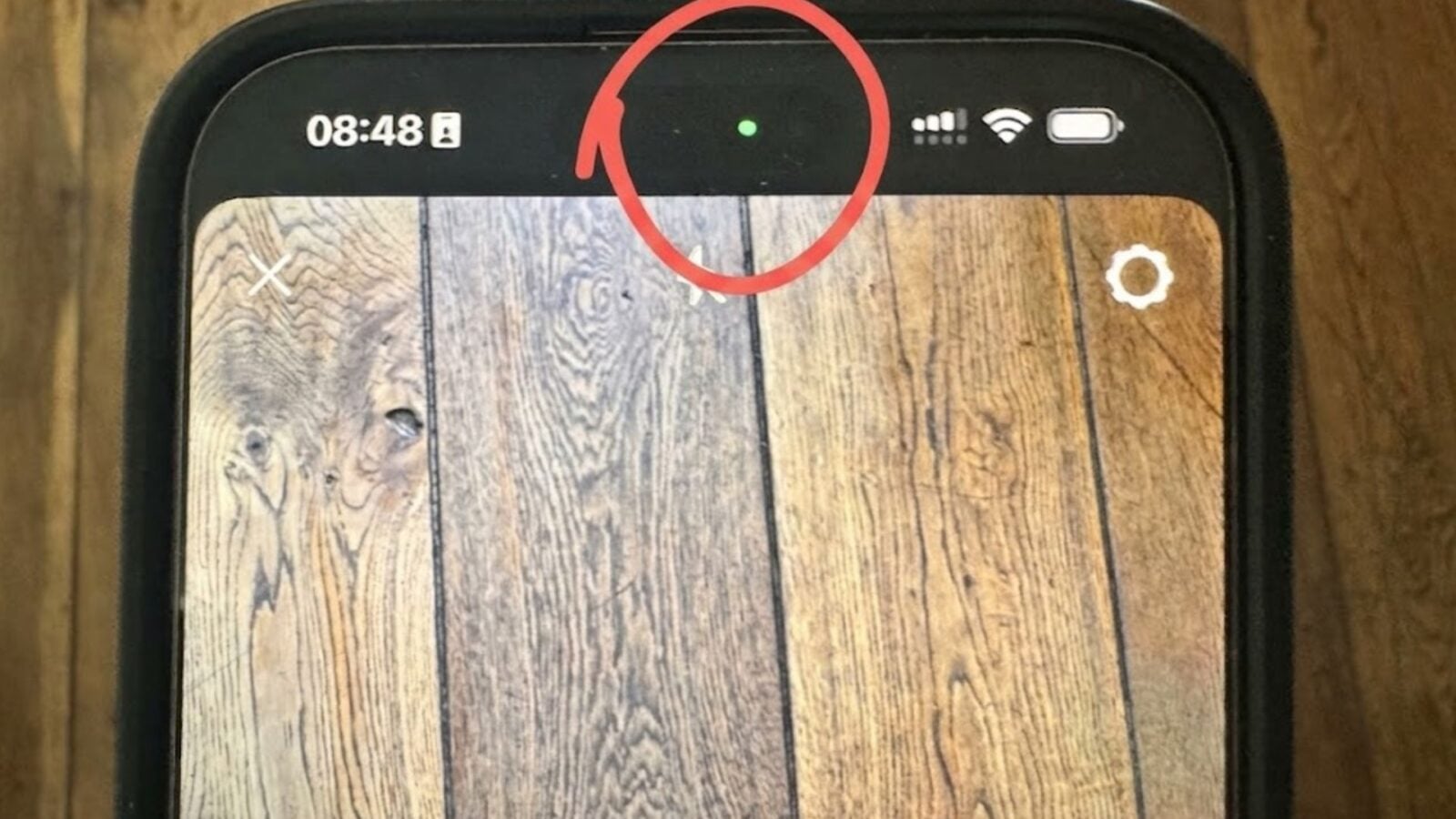
You’ve probably already seen a green dot at the top right of your iPhone screen, near the notch or in the Dynamic Island. Unsurprisingly, this green indicator has a very specific meaning. We explain to you what it is and why Apple wanted to add it to iOS.

In 2020, Apple launched a series ofprivacy indicators with iOS 14. The Cupertino company especially took advantage of this major update to strengthen the transparency of applications in terms of respect for private life. The new version of iOS requires applications to clearly indicate when a sensitive iPhone function is used. When a key function is used by the application, an indicator will appear on the screen.

Also read: A blue dot appears on Android? Here’s what it really means

A green dot to keep an eye out for

Among the indicators added to iOS are the famous green pastille which appears periodically in the right part of the screen. This simply indicates that an application is using your iPhone’s camera. The green dot also appears when you make a call with FaceTime. Clearly, the green dot shows that an application can see you, and it’s obviously better to know that. As you will have understood, the green dot in iOS has the same meaning as its Android counterpart.

To find out which app is using the camera, simply swipe from the top right corner of the screen to open the Control center of iOS. The name of the application then appears at the top, just below the indicator, in a large green banner. In the example below, we opened the camera through Instagram. Note that the green dot will remain displayed as long as the camera remains active. If you lock iPhone, the indicator disappears.

What apps have access to the iPhone camera?

This feature is particularly relevant when the green dot appears unexpectedly, without any application explicitly using the camera. If this green dot lights up when you are clearly not using the camera, it is possible thatan application uses it in the background. In some cases, a malicious application may be causing this suspicious behavior.

© 01net

If this green dot lights up for no reason, Apple recommends checking the permissions granted to the applications, by going to the Settings then in the section Privacy and security and finally in the part Camera. There you can find the complete list of apps that have requested access to the camera. You can then review all the apps and choose the ones that really need access to your camera.

Note that the camera access permission appears when opening the app. The app will display a pop-up window explicitly asking you to provide access. In theory, you should therefore not be surprised by the applications listed. However, sometimes access is authorized in a hurry. This is why it is important to block certain apps through the settings. Note that it is impossible for the user to disable this flag. It is aboutsystem protection imposed by Applewhich the applications themselves and users cannot control.

Other colored dots that appear on your iPhone

The green dot isn’t the only privacy indicator to keep an eye on on your iPhone. Since iOS 14, we also find an orange dotwhich indicates that the microphone is used by an app, and a blue dotwhich shows that your location is being monitored. Here again, these indicators are valuable to allow you to keep your smartphone and its most sensitive functions under control.

👉🏻 Follow tech news in real time: add 01net to your sources on Google, and subscribe to our WhatsApp channel.


Sign Up For Daily Newsletter

Be keep up! Get the latest breaking news delivered straight to your inbox.
By signing up, you agree to our Terms of Use and acknowledge the data practices in our Privacy Policy. You may unsubscribe at any time.
Share This Article
Facebook Twitter Email Print
Share
What do you think?
Love0
Sad0
Happy0
Sleepy0
Angry0
Dead0
Wink0
Previous Article How AI is transforming the enterprise software market How AI is transforming the enterprise software market
Next Article This planet survived the death of its star This planet survived the death of its star
Leave a comment

Leave a Reply Cancel reply

Your email address will not be published. Required fields are marked *

Stay Connected

248.1k Like
69.1k Follow
134k Pin
54.3k Follow

Latest News

Values-based leadership: 4 important principles for managers
News
c’t story: The emotionally unsupported vacuum cleaner owner
Software
Meta-AI boss LeCun: “Chatbots are yesterday” – his world model should do everything differently
Gadget
This planet survived the death of its star
Computing

You Might also Like

where to watch the free match live HD? 🔴
Mobile

where to watch the free match live HD? 🔴

8 Min Read
where to watch the free match live HD? 🔴
Mobile

where to watch the free match live HD? 🔴

8 Min Read
Are you looking for an air conditioner? Avoid these models at all costs, they are scams
Mobile

Are you looking for an air conditioner? Avoid these models at all costs, they are scams

6 Min Read
The 3 misconceptions and 3 true ideas about the electronic toll badge
Mobile

The 3 misconceptions and 3 true ideas about the electronic toll badge

7 Min Read
//

World of Software is your one-stop website for the latest tech news and updates, follow us now to get the news that matters to you.

Quick Link

  • Privacy Policy
  • Terms of use
  • Advertise
  • Contact

Topics

  • Computing
  • Software
  • Press Release
  • Trending

Sign Up for Our Newsletter

Subscribe to our newsletter to get our newest articles instantly!

World of SoftwareWorld of Software
Follow US
Copyright © All Rights Reserved. World of Software.
Welcome Back!

Sign in to your account

Lost your password?