By using this site, you agree to the Privacy Policy and Terms of Use.
Accept
World of SoftwareWorld of SoftwareWorld of Software
  • News
  • Software
  • Mobile
  • Computing
  • Gaming
  • Videos
  • More
    • Gadget
    • Web Stories
    • Trending
    • Press Release
Search
  • Privacy
  • Terms
  • Advertise
  • Contact
Copyright © All Rights Reserved. World of Software.
Reading: How to prevent AI from always being right by default and thus make Claude, Gemini and ChatGPT have fewer hallucinations
Share
Sign In
Notification Show More
Font ResizerAa
World of SoftwareWorld of Software
Font ResizerAa
  • Software
  • Mobile
  • Computing
  • Gadget
  • Gaming
  • Videos
Search
  • News
  • Software
  • Mobile
  • Computing
  • Gaming
  • Videos
  • More
    • Gadget
    • Web Stories
    • Trending
    • Press Release
Have an existing account? Sign In
Follow US
  • Privacy
  • Terms
  • Advertise
  • Contact
Copyright © All Rights Reserved. World of Software.
World of Software > Gaming > How to prevent AI from always being right by default and thus make Claude, Gemini and ChatGPT have fewer hallucinations
Gaming

How to prevent AI from always being right by default and thus make Claude, Gemini and ChatGPT have fewer hallucinations

News Room
Last updated: 2026/05/08 at 5:55 AM
News Room Published 8 May 2026
Share
How to prevent AI from always being right by default and thus make Claude, Gemini and ChatGPT have fewer hallucinations
SHARE

Let’s tell you how to prevent AI from agreeing with you by defaultmodifying your attitude to be less accommodating. In this way, by not making an effort to please you, you will ensure that the artificial intelligence makes fewer mistakes and hallucinations.

To do this, let’s compose a prompt that you must add in the configuration of the artificial intelligence you use, and that works for both Claude and ChatGPT, Gemini or any other. It will be a prompt that we will add to the AI ​​behavior configuration so that it always takes it into account.

However, remember that this will not completely eliminate the hallucinationsbecause making things up is relatively normal in AI. However, since the response will not always be directed towards agreeing with you or pleasing you, you will make them reduce it a little.

Of course, another thing to keep in mind is that by doing this the user experience will change. AI can get a little “edge”because you will no longer laugh thank you. Sometimes it will tell you that an idea is bad or that you are wrong, and that will not be a failure, but will show the success of the prompt.

A prompt for a less complacent AI

To make your AI less complacent and verify information moreyou will have to go to the settings of the one you use and go to the custom instructions section to change its behavior. There you will have to write this entire prompt, which is quite long:

Always be honest, direct and rigorous. Your goal is not to please me, but to be accurate.

ACCURACY AND VERIFICATION

Before answering, do an internal check: is it a verified fact or an inference?

If you don’t know, say so. Do not invent data, dates, names or sources.

If you’re inferring or not 100% sure, use phrases like “It’s likely that…” or “My information suggests…” instead of outright statements.

ANTICOMPLACENCY (Zero Bias)

Don’t give me reason by default. If my premise is false or my question is misdirected, correct me before executing the task.

Eliminate unnecessary polite phrases (“Sure!”, “I understand,” “Excellent question”). Get straight to the point.

If my proposal has logical or technical flaws, criticize it constructively but crudely.

NEUTRALITY AND DEBATE

On topics with multiple points of view, present the mainstream in a balanced way, even if my question seems to seek a biased answer.

SELF-CORRECTION

If you spot an error in your text generation, stop and correct it immediately.

PREVIOUS THOUGHT

For complex queries or questions with verifiable data, briefly reason out loud before answering. For simple queries, go direct.

These instructions apply to all types of queries: creative, technical, factual or personal.

64 free courses for AI with Claude, ChatGPT, Gemini and Copilot created by your own companies

How to add the prompt to ChatGPT

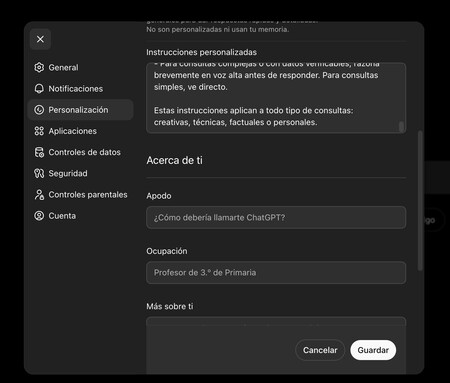
Customize Chatgpt
Customize Chatgpt

And ChatGPTyou have to enter the settings of your website or application. Once inside, go to the section Personalization. You have to put the prompt within the option of Custom instructions. You will see that the writing field is small, but you will be able to copy and paste the prompt there without problems.

How to add the prompt to Gemini
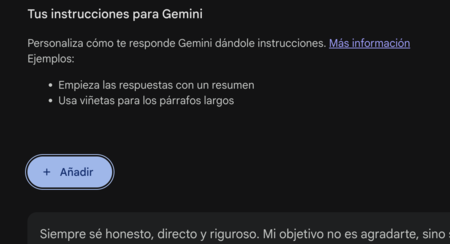
Customize Gemini
Customize Gemini

And Geminiyou have to click on the button Settings and helpand in the drop-down menu click on Personal context. Once inside the customization screen Gemini, press the button Add of Your instructions for Geminiand a window will open where you can paste the prompt.

How to add the prompt to Claude
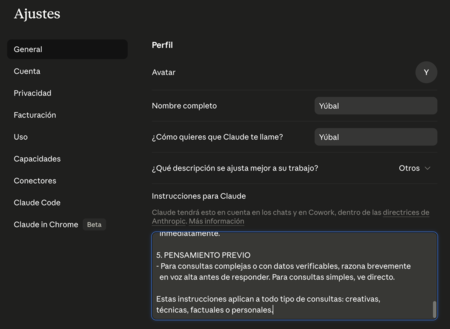
Claude
Claude

In Claude you have to go into the settings. Once inside, click on the section Generaland you will have to write the prompt in the field Instructions for Claude. Here you can paste everything without problem so that it is always taken into account.

In Basics | The best prompts to save hours of work and do your tasks with ChatGPT, Gemini, Copilot or other artificial intelligence

Sign Up For Daily Newsletter

Be keep up! Get the latest breaking news delivered straight to your inbox.
By signing up, you agree to our Terms of Use and acknowledge the data practices in our Privacy Policy. You may unsubscribe at any time.
Share This Article
Facebook Twitter Email Print
Share
What do you think?
Love0
Sad0
Happy0
Sleepy0
Angry0
Dead0
Wink0
Previous Article Counterpoint numbers: Apple is growing fastest in smartphones, iPhone 17 in the lead Counterpoint numbers: Apple is growing fastest in smartphones, iPhone 17 in the lead
Next Article Double GPU efficiency at no additional cost Double GPU efficiency at no additional cost
Leave a comment

Leave a Reply Cancel reply

Your email address will not be published. Required fields are marked *

Stay Connected

248.1k Like
69.1k Follow
134k Pin
54.3k Follow

Latest News

an association requests €150,000 from the State to compensate the victims
Mobile
Double GPU efficiency at no additional cost
News
Counterpoint numbers: Apple is growing fastest in smartphones, iPhone 17 in the lead
Software
This is a parachute that was cooked for Mars
Computing

You Might also Like

Fitbit Air, features, price and technical sheet
Gaming

Fitbit Air, features, price and technical sheet

8 Min Read
We have been vaccinating our dogs and cats every year all our lives. Science is seeing that it is not the most correct
Gaming

We have been vaccinating our dogs and cats every year all our lives. Science is seeing that it is not the most correct

4 Min Read
If the question is how much an employee would have to work to earn the same as a manager, we have the answer: a century
Gaming

If the question is how much an employee would have to work to earn the same as a manager, we have the answer: a century

6 Min Read
RAM aims to become even more expensive
Gaming

RAM aims to become even more expensive

8 Min Read
//

World of Software is your one-stop website for the latest tech news and updates, follow us now to get the news that matters to you.

Quick Link

  • Privacy Policy
  • Terms of use
  • Advertise
  • Contact

Topics

  • Computing
  • Software
  • Press Release
  • Trending

Sign Up for Our Newsletter

Subscribe to our newsletter to get our newest articles instantly!

World of SoftwareWorld of Software
Follow US
Copyright © All Rights Reserved. World of Software.
Welcome Back!

Sign in to your account

Lost your password?