How do you make your social media videos stand out? And how do you create videos in bulk to stay competitive?
Today, 58% of marketing videos already utilize AI-generated voiceovers, replacing traditional voice talent for faster and more scalable productions.
If you’re a creator, marketer, or social media manager, AI voices can help you as a smart strategy.
Continue reading to find out how.
What Are AI Voices?
AI voices refer to voiceovers generated by text-to-speech (TTS) or voice synthesis engines using artificial intelligence. Instead of you recording every line, the AI tool takes your script and turns it into spoken audio. It creates a video with a proper tone and pace depending on the tool.
These tools have come a long way. Early TTS sounded robotic. But now you get near-natural sound with human-like inflection and customizable style. Some of these tools are now among the best AI voices for TikTok and Instagram content.
Why is this important? Because on platforms where people scroll fast, say, your Instagram hooks or short-form video pieces, a quality voiceover can stop the swipe, build trust, and drive engagement.
So, when we talk about AI voice for social media videos, we’re talking about these synthetic speech tools as a core part of a video production workflow. They make voiceovers faster, cheaper, and consistent.
Why Creators Are Switching to AI Voices
(Image Source)
There are several key reasons why creators and brands are increasingly adopting AI voiceovers.
1. Speed and scale
Traditional voiceover production is time-consuming. It includes scriptwriting, finding voice talent, recording, editing, and mastering.
Unlike this, AI voice tools let you upload or type your script and get a ready-to-go voice file in minutes.
One study found that video creators who adopted AI voices increased their video output by 27%. Also, AI video production reduces labor, equipment, and revision costs.
2. Consistency of brand voice
When you’re managing a channel with many videos, using human voice talent might lead to subtle differences in tone, style, emotion, or quality.
With an AI voice, you can create a consistent voice personality like tone, pace, and style, and reuse it every time, so your content sounds similar on all platforms.
For creators using voice across multiple platforms like YouTube, Instagram, and TikTok, this becomes a branding asset.
3. Creative flexibility
AI voices open up possibilities like multilingual narration, quick updates of copy without hiring a team, and variations of tone, such as casual, dramatic, or friendly, with minimal effort.
You can experiment with what voice style resonates best with your audience. The best AI voice tools underscore that many options now let you adjust pitch, speed, and emotion.
4. Accessibility and inclusivity
AI voice tools also support multiple languages and accents, so you can create localized versions of your videos for different regions without hunting for voice talent in every market. This is a major advantage as social video becomes global.
Let us suppose you run a small e-commerce brand and publish a video every week about a product highlight, demonstration, or testimonial.
With a traditional voiceover, you have to wait for scheduling, recording, and editing. But an AI voice tool lets you type your script, choose your voice style, and within minutes, you have a narration ready. You then pair it with visuals and publish. You’re now able to create more videos, respond to trends faster, and scale your social presence.
Because of that, AI voice has become a workflow enhancer that frees up your time to focus on creative strategy like content pillars, social media animation, and story ideas rather than production logistics.
Step-by-Step: How to Create Social Videos Using AI Voices
Let’s walk through the practical steps you can implement right away.
Step 1: Define your video concept & script
Start with your core idea. It can be a product demo, a quick tip, a behind-the-scenes clip, or an Instagram hook?
Then plan the way you want your script to be. It can be a crisp 2 to 3-minute script for a short-form video, or it can be longer if you’re doing a tutorial or explanation. Remember, a good script is conversational, not overly formal.
Tip: Place a strong hook in your first sentence, e.g., “What if you could double your video output this month with zero extra voice talent cost?”
Step 2: Choose an AI voice tool
Pick an option from the best AI voice tools 2025 list. Choose the tools that deliver human-like sound, customization, and ease of use.
Ensure the tool supports your required languages/accents and lets you adjust pitch/speed/emotion if needed.
Step 3: Generate the voiceover
Upload your script or paste it in. Choose your voice style. Fine-tune pacing and emotion if your tool allows. Preview the voice and, if necessary, edit sentences, e.g., adjust phrasing to sound more natural when spoken. Download the voice file, usually MP3 or WAV.
Step 4: Create or edit video visuals
Now pair your voiceover with visuals. This can be footage you shot, stock clips, motion graphics, or text overlays. For a short social video, keep it dynamic but clear. Use the voiceover as your backbone and ensure the visuals match the narration.
Tip: If you’re doing a reel or short-form video, cut into vertical (9:16) format, make the opening 3 seconds visually punchy, and match beat/pacing to the voiceover for smooth flow.
Step 5: Add captions & polish
Many viewers watch social videos with audio off, so add captions synced to the voiceover. Many AI tools or video editors even auto-generate captions. Also, ensure your brand logo, colors, and outro appear in the right places.
Check final audio levels. The voice should be clear and not drowned out by background music or effects.
Step 6: Export and publish
Export your video in the format and resolution optimal for the platform, e.g., MP4 1080 × 1920 for Instagram Reels or Shorts. Craft a compelling caption with your Instagram hooks, add hashtags, and schedule at a peak time for your audience.
Step 7: Review performance and iterate
After publishing, check performance, views, engagement, and retention. Use that feedback to refine your next script, voice style, or visual pacing. Because you’re now faster at production, you can experiment more often and learn what voice style or pacing works best for your audience.
Now, let’s talk about extending your content’s reach through AI-powered translation.
Let’s say you publish videos in English, but you see a growing audience in Spanish and Portuguese. Using an AI voice translator, you can take your existing script, automatically generate natural-sounding voiceovers in multiple languages, and swap in those voices while keeping the visuals unchanged.
This means one video can effectively serve audiences in multiple regions without the extra cost of re-recording or hiring voice actors.
Beyond simple translation, the latest AI translators also adapt tone, cultural context, and pacing to suit regional preferences.
For example, an upbeat promotional video in English might be rendered in a slightly softer tone for Latin American audiences to ensure it feels local and authentic. This increases global accessibility and builds stronger emotional connections with viewers who prefer consuming content in their native language.
In short, audio translation powered by AI lets you multiply your audience reach without necessarily multiplying your workload.
Step 8: Scale it with automation
Once you’ve found a workflow that works, you can begin planning a batch of videos, for example, for the next 4 weeks, and produce them in one session. Draft multiple scripts, generate AI voiceovers, assemble visuals, and schedule publishing.
Since you’re no longer bottlenecked by voice-recording sessions, you can scale your output and maintain consistency across your content pillars.
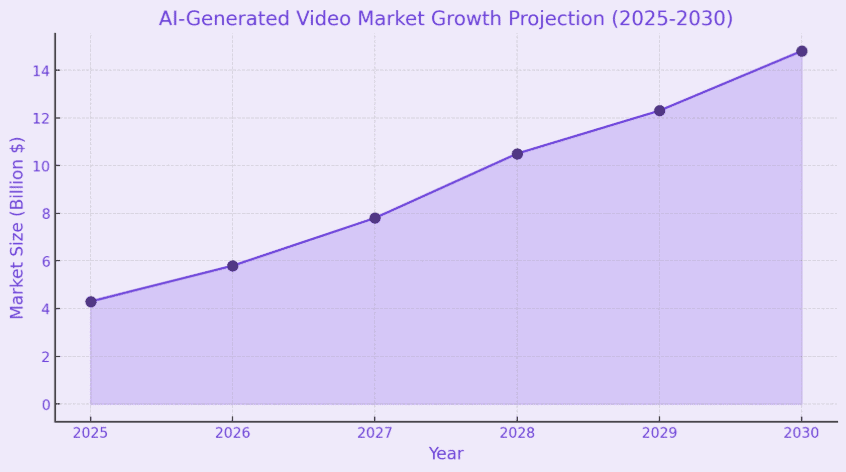
The Future of AI Voice in Social Media Content
(Image Source)
What’s next? The world of AI voice for social media is evolving fast, and you’ll want to stay ahead.
1. Real-time voice generation
Think live streams where narration or captions are matched in real-time with a natural-sounding voice, different languages, and accents. As AI latency drops and quality improves, live narration or scripts will be converted on the fly.
2. Hyper-custom voices & brand identity
Soon you’ll be able to build a custom AI voice that matches your brand or your own voice signature. This means if your brand voice is friendly yet professional, you lock in that identity across videos. Advanced voice-cloning tools with proper licensing will make this accessible for creators.
3. Deeper integration with video editing workflows
The gap between voice generation, video editing, and publishing will shrink. AI tools will suggest voice tone, visual cuts, and timing based on platform data, for example, optimal pacing for attention.
A study shows that 72% of small businesses will adopt AI video tools to cut costs and accelerate the speed to market.
4. Personalized voiceover for viewers
Beyond one voice fits all, imagine videos where the narration style or even accent adapts to viewer preference or where AI voices speak directly in a viewer’s name.
This kind of personalization is beginning to appear and will become more prominent in social media campaigns.
5. Ethical, legal, and trust considerations
As AI voice gets more realistic, questions arise about consent, voice cloning rights, and authenticity.
Creators will need to ensure transparency, respect voice rights, and maintain trust with their audience. The industry is moving to agreements for actor voice replication rights.
6. SEO & platform algorithm implications
Since AI voice enables faster video production, creators will publish more, and platforms will reward consistent content with better visibility. But you’ll still need to maintain quality, engagement, and relevance. Remember, an AI voice is a tool, not a shortcut for weak content.
What this means for you
If you adopt and embed AI voice into your monthly content workflow early, you gain a competitive edge. You achieve faster production, more frequent posts, stronger brand voice, and potentially higher engagement.
Waiting too long risks falling behind creators who are already scaling output with AI.
Case Study: How Waymark Scaled Its Video Production With AI Voices
About the Company
Waymark is a U.S.-based creative technology company that helps businesses produce marketing and social media videos at scale. The platform enables small and medium-sized brands to create professional-quality ads quickly without traditional production bottlenecks.
The Challenge
As demand for customized video ads grew, Waymark faced a major obstacle.
Recording high-quality and unique voiceovers for thousands of videos was time-consuming and costly. Coordinating with multiple voice actors, managing revisions, and maintaining consistent quality across different campaigns became an operational roadblock.
The Solution
To overcome this, Waymark integrated AI-generated voiceovers into its video creation workflow. Instead of relying on manual recordings, the team used advanced voiceover automation with AI to generate natural-sounding narrations instantly.
This enabled them to produce videos for different audiences, tones, and campaigns without hiring additional staff or scheduling studio sessions.
The Impact
- 74% reduction in overall audio production costs
- 387% increase in the number of videos produced within the same time frame
- Consistent human-like audio quality across all campaigns
- Improved creative turnaround with rapid adaptation to social media trends
This transformation highlights how brands can leverage AI content creation tools to speed up production and maintain quality and consistency at scale.
For any creator or marketer, it’s proof that adopting AI voice for social media videos can directly translate into measurable business growth.
Take the Next Step to Audio-Driven Growth
In summary:
- AI voices are now high-quality and efficient alternatives to traditional voice talent
- Creators are switching because of speed, scale, consistency, and flexibility
- You can follow a clear step-by-step workflow to integrate AI voice into your social-video production
- The future holds even deeper integration with custom brand voices, real-time generation, personalized narration, and ethical & legal clarity
Now it’s your turn. If you want to revolutionize your social media with bulk.ly’s AI-powered automation, try out how you can simplify your workflow with AI for creating, scheduling, publishing, and managing content at scale.
Sign up for a free trial today and unlock faster and smarter content creation.