By using this site, you agree to the Privacy Policy and Terms of Use.
Accept
World of SoftwareWorld of SoftwareWorld of Software
  • News
  • Software
  • Mobile
  • Computing
  • Gaming
  • Videos
  • More
    • Gadget
    • Web Stories
    • Trending
    • Press Release
Search
  • Privacy
  • Terms
  • Advertise
  • Contact
Copyright © All Rights Reserved. World of Software.
Reading: Microsoft enriches its PowerToys with tools inspired by Linux
Share
Sign In
Notification Show More
Font ResizerAa
World of SoftwareWorld of Software
Font ResizerAa
  • Software
  • Mobile
  • Computing
  • Gadget
  • Gaming
  • Videos
Search
  • News
  • Software
  • Mobile
  • Computing
  • Gaming
  • Videos
  • More
    • Gadget
    • Web Stories
    • Trending
    • Press Release
Have an existing account? Sign In
Follow US
  • Privacy
  • Terms
  • Advertise
  • Contact
Copyright © All Rights Reserved. World of Software.
World of Software > Computing > Microsoft enriches its PowerToys with tools inspired by Linux
Computing

Microsoft enriches its PowerToys with tools inspired by Linux

News Room
Last updated: 2026/04/28 at 7:26 PM
News Room Published 28 April 2026
Share
Microsoft enriches its PowerToys with tools inspired by Linux
SHARE

Microsoft’s free, open-source set of utilities, known as PowerToysonce again asserts itself as an almost essential companion for advanced users. With the deployment of the version 0.99.0the Redmond firm does not just fix bugs; it introduces features so effective that they deserve native integration into the operating system. This massive update brings in its baggage two new tools major ones as well as a host of optimizations for the modules already in place, further strengthening the value proposition of this software suite.

How is window management inspired by Linux?

The first flagship novelty is called Grab And Move (Grasp and move) and draws its inspiration directly from the Linux universe, a affiliation that Microsoft fully embraces. The principle is terribly simple but terribly effective. No more hunting for the title bar to move a window. Once the function is activated, simply hold the ALT key (configurable to the Windows key if necessary) and use the left mouse click anywhere on the window to move it freely on the screen.

Grab and Move
Credits: Microsoft

Likewise, the tool simplifies resizing. By holding the ALT key and this time using the right click, the user can adjust the size of the window on the fly, without aiming precisely at one of its edges. This intuitive approach considerably streamlines interactions with the interface and demonstrates the desire to integrate proven mechanics from other systems to enrich the PowerToys experience.

What contribution does Power Display make to screen management?

The second piece of this update is Power Display. This new module is housed discreetly in the notifications area, near the clock, and offers centralized control over the settings of your monitors. A simple click on its icon, or using the keyboard shortcut “Windows + Ctrl + Shift + P”, opens a small window allowing you to finely adjust the brightness, contrast or even the volume for each connected screen, without ever having to touch the often impractical physical buttons of the devices.

Particularly useful for multi-monitor setups, Power Display also allows you to create and save profiles personalized. You can instantly switch from a “work” configuration to a “game” or “film” configuration. The tool is also compatible with Light Switch, another PowerToys utility, to automatically adjust profiles according to the theme (light or dark) of Windows. It’s one more step Microsoft to provide granular control to its users.
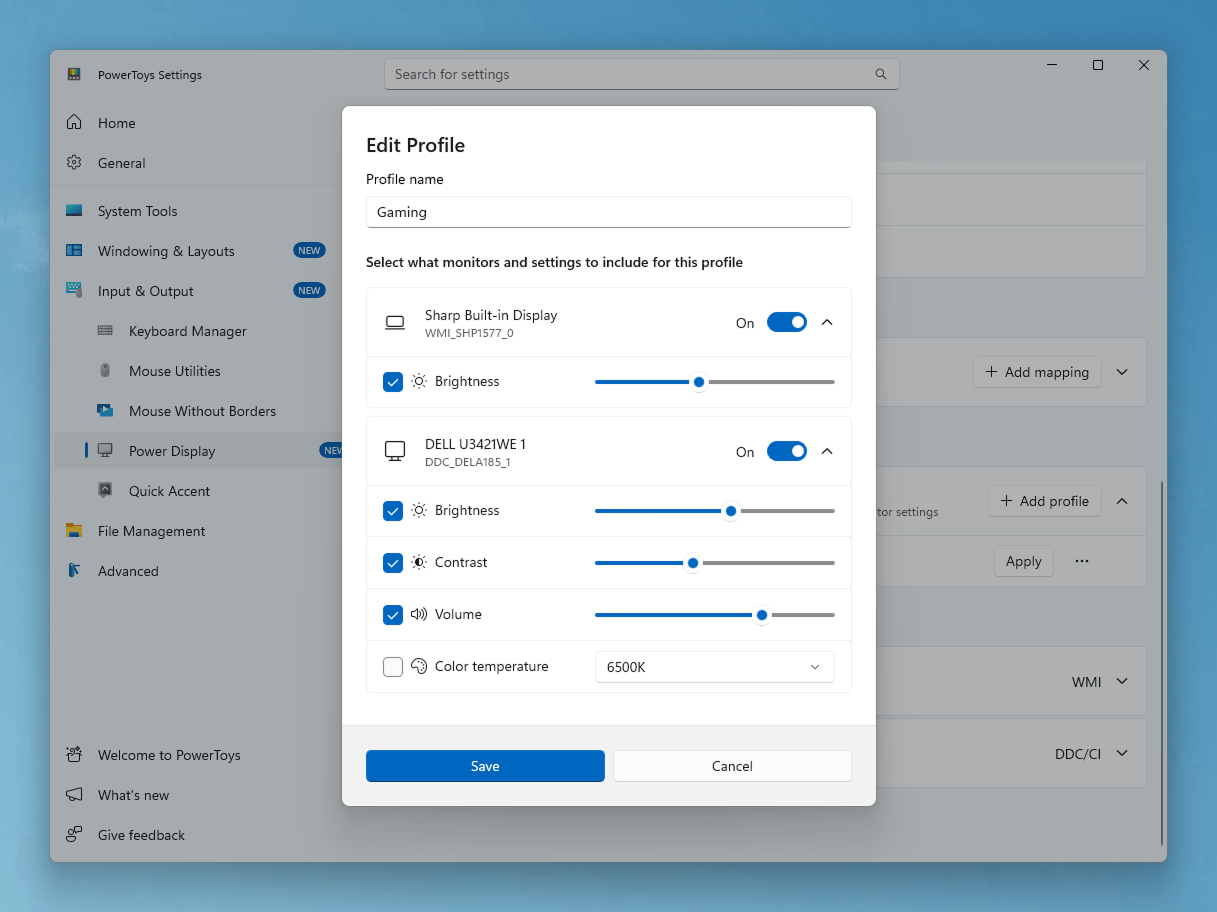
PowerToys Power Display (1)

Power Display
Credits: Microsoft

What are the other notable improvements in this version?

Beyond these two major additions, historical tools are not left out. THE Command Palette Dock benefits from significant improvements, with the appearance of a compact mode 28 pixels high and the possibility of forcing it to always stay on top of other windows. The Calculator extension, for its part, is enriched with a persistent historyallowing you to save, reuse or delete previous entries. New, more comprehensive pinning options are also appearing.

Among other improvements, we note that the utility Zoomin now includes support for scrolling screenshots and direct text extraction. The Image Resizer tool has begun its migration to WinUI 3, aligning with the design language of Windows 11 for a more consistent and modern experience. Finally, a multitude of fixes and performance optimizations solidify the entire suite.


Sign Up For Daily Newsletter

Be keep up! Get the latest breaking news delivered straight to your inbox.
By signing up, you agree to our Terms of Use and acknowledge the data practices in our Privacy Policy. You may unsubscribe at any time.
Share This Article
Facebook Twitter Email Print
Share
What do you think?
Love0
Sad0
Happy0
Sleepy0
Angry0
Dead0
Wink0
Previous Article US extends router ban | heise online US extends router ban | heise online
Next Article Meta has signed an agreement to search for it in space Meta has signed an agreement to search for it in space
Leave a comment

Leave a Reply Cancel reply

Your email address will not be published. Required fields are marked *

Stay Connected

248.1k Like
69.1k Follow
134k Pin
54.3k Follow

Latest News

OpenAI is said to have missed sales targets: Why this is now causing AI and chip stocks to falter
Gadget
Meta has signed an agreement to search for it in space
Gaming
US extends router ban | heise online
Software
which TV channel broadcasts the Champions League semi-final? 🔴
Mobile

You Might also Like

WhatsApp abandons old Android smartphones from September 2026
Computing

WhatsApp abandons old Android smartphones from September 2026

3 Min Read
It’s over for the exclusivity between OpenAI and Microsoft
Computing

It’s over for the exclusivity between OpenAI and Microsoft

2 Min Read
Your iPhone 17 no longer turns on? The wired charger could be the problem
Computing

Your iPhone 17 no longer turns on? The wired charger could be the problem

3 Min Read
has Europe become dangerously dependent on SpaceX?
Computing

has Europe become dangerously dependent on SpaceX?

5 Min Read
//

World of Software is your one-stop website for the latest tech news and updates, follow us now to get the news that matters to you.

Quick Link

  • Privacy Policy
  • Terms of use
  • Advertise
  • Contact

Topics

  • Computing
  • Software
  • Press Release
  • Trending

Sign Up for Our Newsletter

Subscribe to our newsletter to get our newest articles instantly!

World of SoftwareWorld of Software
Follow US
Copyright © All Rights Reserved. World of Software.
Welcome Back!

Sign in to your account

Lost your password?