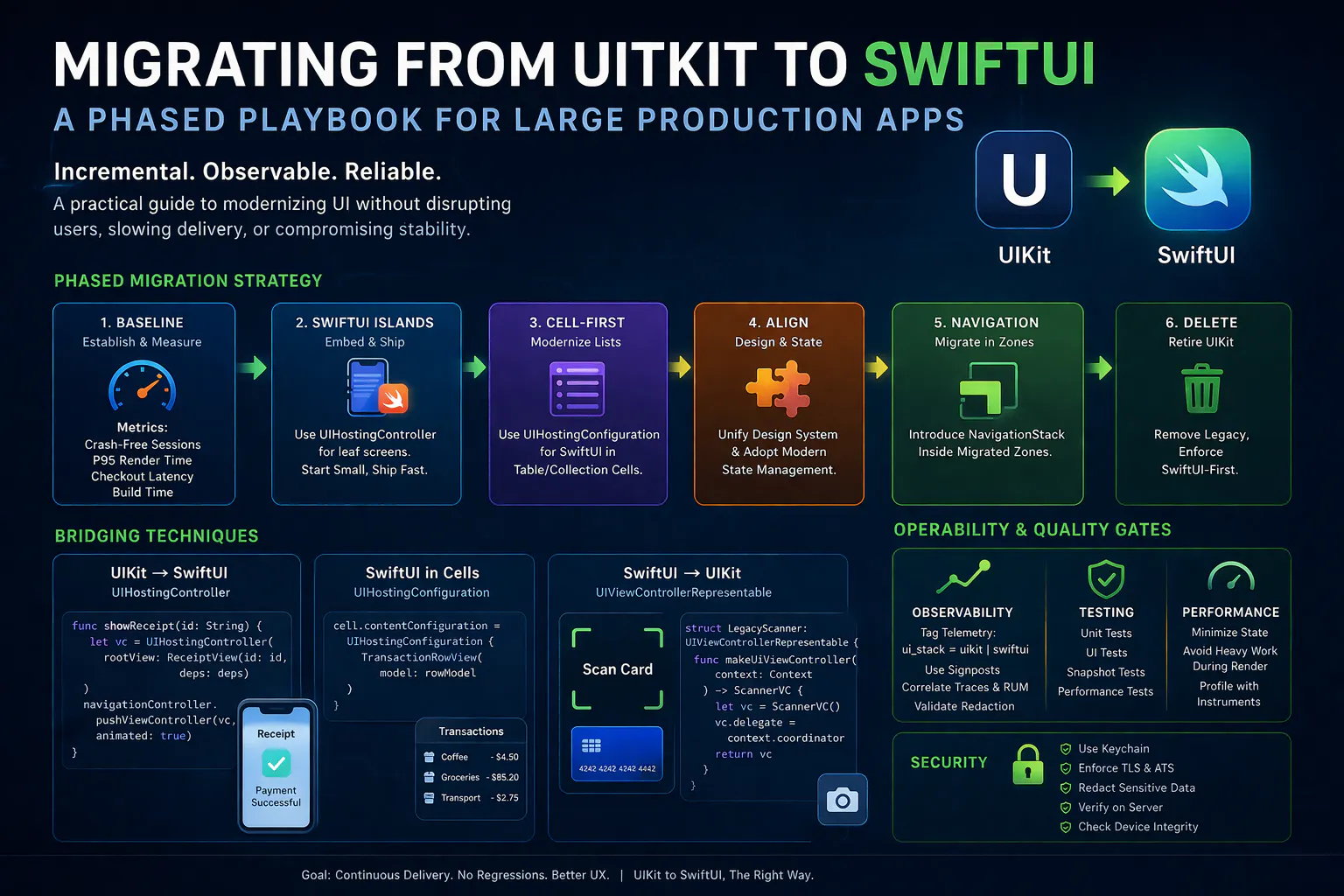
Modern iOS applications that have evolved over multiple years often accumulate complex UI layers, deeply integrated analytics, and carefully tuned performance optimizations. These applications typically rely on UIKit as the foundational framework, making any transition to SwiftUI a non-trivial architectural decision. SwiftUI introduces a declarative paradigm that improves developer productivity and maintainability, but migrating large production systems requires careful orchestration to avoid regressions in performance, reliability, and user experience. A structured migration approach becomes essential when the goal is continuous delivery without disrupting existing functionality.
A migration strategy that attempts to replace UIKit entirely in a single step tends to introduce significant risk. Large-scale rewrites often fail due to loss of operational visibility, increased defect surface area, and delays in feature delivery. Incremental adoption provides a more controlled path, allowing SwiftUI to coexist with UIKit while gradually replacing components. This coexistence is enabled by Apple-provided interoperability layers such as UIHostingController and UIHostingConfiguration, which allow SwiftUI views to be embedded within UIKit hierarchies without disrupting existing navigation or state management systems.
The initial phase of migration focuses on establishing a stable baseline. Before introducing SwiftUI components, it is necessary to capture key performance and reliability metrics such as crash-free sessions, rendering latency, and critical user flow durations. These metrics act as a reference point to ensure that subsequent changes do not degrade the application. Instrumentation techniques such as signposts can be used to measure execution intervals within performance-critical flows, allowing precise comparison between pre- and post-migration behavior.
Once baseline metrics are established, SwiftUI can be introduced in isolated areas of the application. These areas are typically low-risk screens with minimal navigation complexity but high iteration frequency, such as forms, settings pages, or confirmation screens. Embedding SwiftUI views inside UIKit using UIHostingController enables these screens to be delivered without modifying the surrounding navigation structure. The following example demonstrates how a SwiftUI view can be pushed onto an existing navigation stack while preserving UIKit-based routing.
func showReceipt(id: String) {
    let vc = UIHostingController(rootView: ReceiptView(id: id, deps: deps))
    navigationController.pushViewController(vc, animated: true)
}
This approach ensures that SwiftUI adoption does not disrupt navigation consistency, which is often tightly coupled with analytics, deep linking, and user flow tracking. By limiting SwiftUI to leaf-level screens initially, the system maintains stability while benefiting from improved UI development speed.
As migration progresses, list-based interfaces provide another opportunity for incremental adoption. SwiftUI can be embedded directly into table or collection view cells using UIHostingConfiguration, which allows UIKit to retain control over scrolling performance and data source management while SwiftUI handles the rendering of individual components. This pattern delivers immediate value by reducing UI complexity without requiring a full architectural shift.
cell.contentConfiguration = UIHostingConfiguration {
    TransactionRowView(model: rowModel)
}
The advantage of this technique lies in its minimal disruption to existing infrastructure. UIKit continues to manage lifecycle, reuse, and layout behavior, while SwiftUI introduces a more expressive and maintainable way to define UI elements. This hybrid model enables teams to modernize UI incrementally while preserving established performance characteristics.
A critical aspect of migration involves aligning design systems and state management patterns across both frameworks. Without a unified design system, the application risks diverging into two visually and behaviorally inconsistent experiences. Establishing shared design tokens, reusable components, and consistent styling rules ensures visual parity. State management requires similar discipline, with each screen having a clearly defined state owner and predictable data flow. SwiftUI encourages a unidirectional data flow model, which can coexist with existing architectures if boundaries between UIKit and SwiftUI are clearly defined.
Bridging between frameworks introduces additional considerations. Each boundary between UIKit and SwiftUI should be treated as a well-defined interface with limited responsibility. This reduces coupling and prevents leakage of implementation details across layers. In cases where legacy UIKit components must remain, representable wrappers provide a controlled mechanism to integrate them into SwiftUI-based screens. This is particularly useful for complex or hardware-dependent features such as camera capture or custom input components.
struct LegacyScanner: UIViewControllerRepresentable {
    final class Coordinator: NSObject, ScannerDelegate {
        let onResult: (ScanResult)->Void
        init(_ onResult: @escaping (ScanResult)->Void) { self.onResult = onResult }
        func scannerDidFinish(_ r: ScanResult) { onResult(r) }
    }
    let onResult: (ScanResult)->Void
    func makeCoordinator() -> Coordinator { .init(onResult) }
    func makeUIViewController(context: Context) -> ScannerVC {
        let vc = ScannerVC(); vc.delegate = context.coordinator; return vc
    }
    func updateUIViewController(_ vc: ScannerVC, context: Context) {}
}
This wrapper encapsulates UIKit-specific behavior while exposing a clean interface to SwiftUI. The use of a coordinator ensures that communication between UIKit and SwiftUI remains explicit and manageable. Such isolation prevents legacy components from introducing unintended side effects into newer parts of the application.
Navigation presents one of the most complex challenges in migration. UIKit navigation controllers often serve as the backbone of large applications, integrating deeply with routing logic, analytics tracking, and feature coordination. Replacing this structure prematurely can lead to inconsistencies and regressions. A more effective approach is to retain UIKit as the primary navigation system while introducing SwiftUI navigation within clearly defined zones. Once a sufficient portion of the application has been migrated, these zones can gradually expand until UIKit navigation is no longer required.
Operational considerations play a significant role in ensuring a successful transition. Observability must extend across both UIKit and SwiftUI components to detect regressions and attribute issues accurately. Tagging telemetry with indicators such as the active UI framework enables precise analysis of performance and error patterns. Monitoring tools can be used to correlate user interactions, backend requests, and UI rendering times, providing a comprehensive view of application behavior during migration.
Continuous integration and testing strategies must evolve alongside the migration process. Unit tests should validate state management logic and framework boundaries, while UI tests should focus on critical user flows such as authentication and transactions. Snapshot testing can help maintain visual consistency across design system components. Performance testing should include key metrics such as application launch time, scrolling smoothness, and interaction latency. These safeguards ensure that each migration step maintains or improves application quality.
Performance optimization becomes increasingly important as SwiftUI components are introduced. Declarative rendering can lead to inefficiencies if not managed carefully, particularly when state updates trigger unnecessary view recomputation. Profiling tools such as Instruments can identify performance bottlenecks, allowing targeted optimizations. Techniques such as minimizing observed state, avoiding heavy computations during rendering, and isolating expensive operations outside of the view hierarchy can significantly improve responsiveness.
Security considerations remain critical, especially for applications handling sensitive data such as financial transactions or personal information. Migration should not introduce vulnerabilities through improper data handling or logging practices. Sensitive information must be protected using secure storage mechanisms such as the Keychain, and network communication should comply with platform security requirements. Validation and redaction of telemetry data are necessary to prevent exposure of confidential information. Device integrity signals and server-side verification can further enhance security by ensuring that critical decisions are not made solely on the client.
The final phase of migration involves systematically removing UIKit components once equivalent SwiftUI implementations are stable and fully integrated. This process should be deliberate, ensuring that no residual dependencies or duplicate logic remain. Enforcing guidelines that restrict new UIKit development helps prevent regression into legacy patterns. Over time, the application transitions into a fully SwiftUI-based architecture with improved maintainability and scalability.
Migrating from UIKit to SwiftUI in large production applications requires more than adopting a new framework. It demands a disciplined approach that prioritizes stability, observability, and incremental progress. By introducing SwiftUI in controlled stages, maintaining strong operational safeguards, and aligning design and state management principles, it is possible to modernize complex applications without compromising reliability. This approach ensures that the transition delivers measurable improvements while preserving the robustness expected from production systems.